Grau Elite Brasil
Grau Elite Brasil

Grau Elite Brasil

Simulation

| Matheus Santos | Developer

Play on PC with BlueStacks or from our cloud

  • Overview
  • Game Features
  • How to Play

Page Modified On: October 30, 2026

Play Grau Elite Brasil on PC or Mac

Bring your A-game to Grau Elite Brasil, the Simulation game sensation from Matheus Santos | Developer. Give your gameplay the much-needed boost with precise game controls, high FPS graphics, and top-tier features on your PC or Mac with BlueStacks.

About the Game
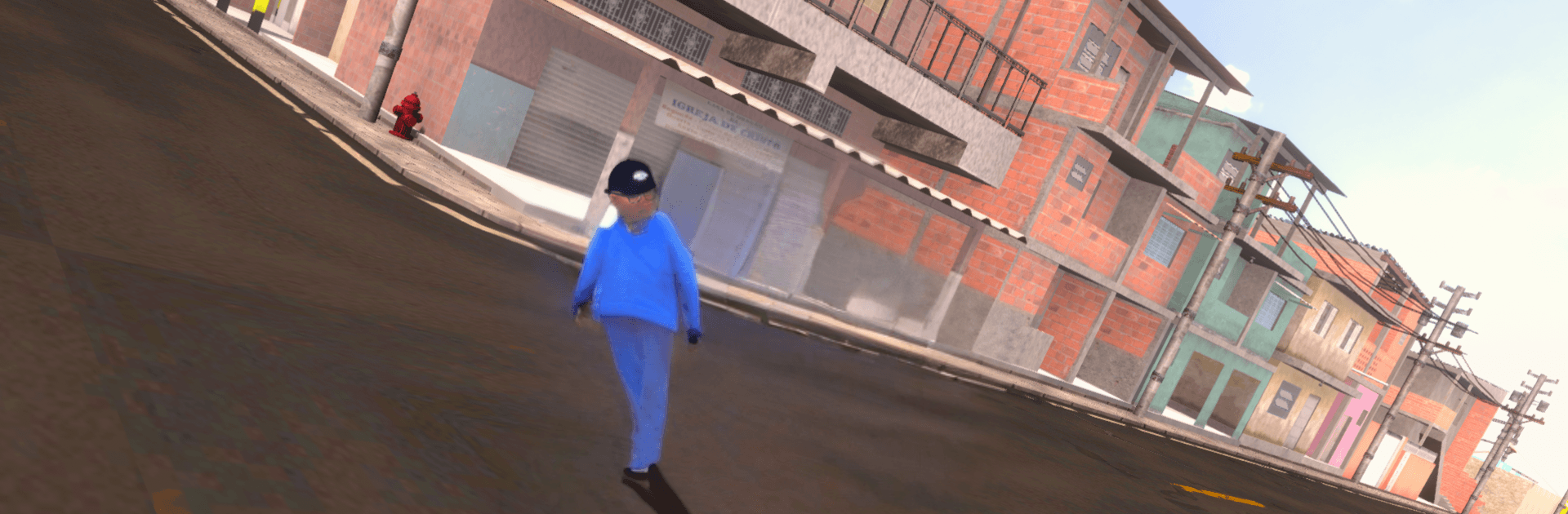
Grau Elite Brasil is a street-bike Simulation all about balance, nerve, and swagger. You’ll pull wheelies, string together stylish moves, and ride through spots that feel straight out of Brazil—from tight favela alleys to long, smooth stretches of asphalt. It handles great on a touchscreen, and if you prefer sharper control and a bigger view, it also plays nicely on BlueStacks.

Game Features
– Authentic Wheelie Control: Lean back, modulate the throttle, and hold that front wheel high—smooth physics make every second of balance feel earned.
– Brazilian-Inspired Bikes: Hop on machines modeled after local favorites, each with its own personality, power, and vibe.
– City Streets and Open Roads: Thread through dense urban areas or let it rip on wide highways; both the favela and the track have their own rhythm.
– Style-Based Scoring: Rack up points for clean balance, long grinds of throttle control, and slick transitions that show real finesse.
– Deep Customization: Tune your ride’s look and tweak your rider’s style so your setup matches the way you like to show off.
– Daily Challenges: Knock out quick objectives that sharpen your skills and give you fresh reasons to jump back in.
– Online Rankings: Compare your best runs with other players and see where your technique stands on the global boards.
– Skill Meets Attitude: It’s not just about speed—precision, flow, and confidence turn a simple wheelie into a statement.

Start your journey now. Download the game on BlueStacks, invite your friends, and march on a new adventure.


Game Features

Enhancements

  • Macros
  • Multi Instance
  • Multi Instance Sync
  • Script
  • Enhancements
Macros

Macros

Automate the predictable in Grau Elite Brasil and transform your gameplay with Macros. Get access to inventive Macros in the BlueStacks Macro Community
Multi Instance

Multi Instance

Play Grau Elite Brasil on one window. And chat with your friend on the other. Press CTRL + Shift + 8 to open the Multi-Instance Manager. And start creating fresh instances or clone an existing one.
Multi Instance Sync

Multi Instance Sync

Play Grau Elite Brasil with the power of Multi-Instance Sync. Replicate what you are doing on the main instance on all other instances. Level up faster, play more.
Script

Script

Script your way to gaming glory in Grau Elite Brasil with BlueStacks Script. Write and run a set of commands to automate repeated tasks. Trigger the command by assigning it to any key.
Read More

How to Download and Play Grau Elite Brasil on PC or Mac

  • Download and install BlueStacks on your PC or Mac

  • Complete Google sign-in to access the Play Store, or do it later

  • Look for Grau Elite Brasil in the search bar at the top right corner

  • Click to install Grau Elite Brasil from the search results

  • Complete Google sign-in (if you skipped step 2) to install Grau Elite Brasil

  • Click the Grau Elite Brasil icon on the home screen to start playing

video
Watch Video

Minimum System Requirements

With BlueStacks 5, you can get started on a PC that fulfills the following requirements.

  • Operating System

    Microsoft Windows 7 or above, macOS 11 (Big Sur) or above

  • Processor

    Intel, AMD or Apple Silicon Processor

  • RAM

    at least 4GB

  • HDD

    10GB Free Disk Space

Note:

* You must be an Administrator on your PC. Up to date graphics drivers from Microsoft or the chipset vendor.

Grau Elite Brasil - FAQs

  • How to play Grau Elite Brasil on Windows PC & Mac?

    Play Grau Elite Brasil on your PC or Mac by following these simple steps.

    • Click on 'Play Grau Elite Brasil on PC’ to download BlueStacks
    • Install it and log-in to Google Play Store
    • Launch and play the game.
  • Why is BlueStacks the fastest and safest platform to play games on PC?

    BlueStacks respects your privacy and is always safe and secure to use. It does not carry any malware, spyware, or any sort of additional software that could harm your PC.

    It is engineered to optimize speed and performance for a seamless gaming experience.

  • What are Grau Elite Brasil PC requirements?

    Minimum requirement to run Grau Elite Brasil on your PC

    • OS: Microsoft Windows 7 or above MacOS 11 (Big Sur) or above
    • Processor: Intel, AMD or Apple Silicon Processor
    • RAM: Your PC must have at least 4GB of RAM. (Note that having 4GB or more disk space is not a substitute for RAM)
    • HDD: 10GB Free Disk Space.
    • You must be an Administrator on your PC.