Horse Home
Horse Home

Horse Home

Simulation

| Talking Pet

Play on PC with BlueStacks or from our cloud

  • Overview
  • Game Features
  • How to Play

Page Modified On: January 09, 2026

Play Horse Home on PC or Mac

Explore a whole new adventure with Horse Home, a Simulation game created by Talking Pet. Experience great gameplay with BlueStacks, the most popular gaming platform to play Android games on your PC or Mac.

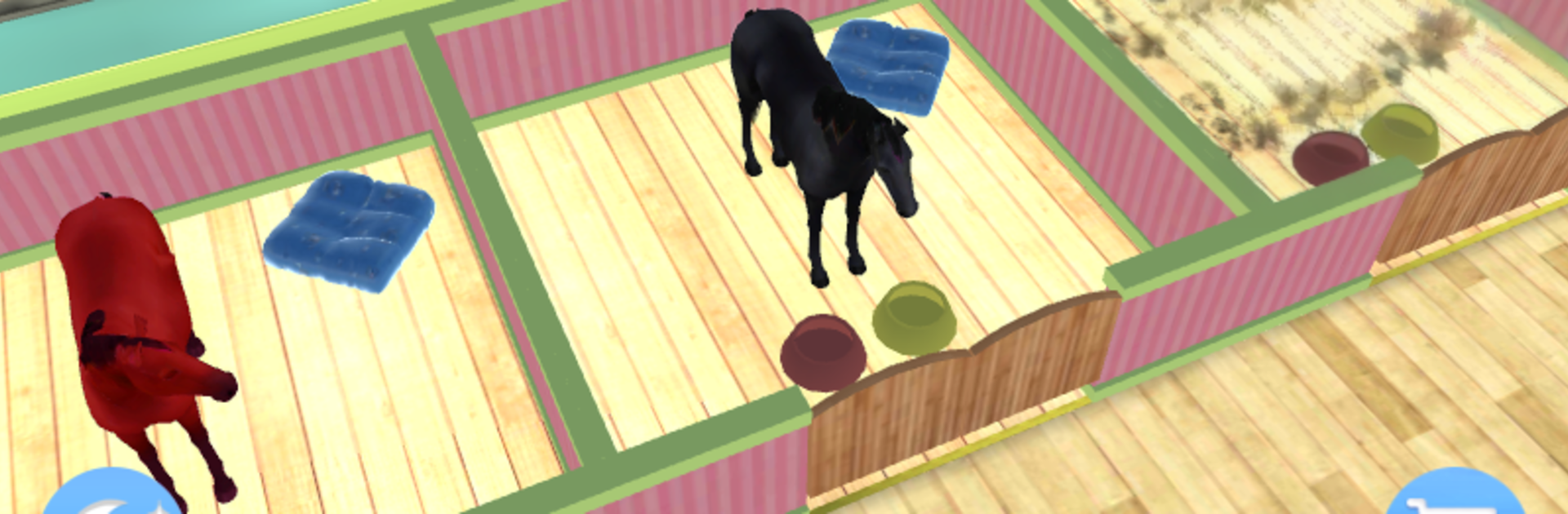
Horse Home is a chill stable sim where players act as the new manager of a small horse lodge. The loop is simple and cozy. There are up to eight horses to look after, and the day is a mix of brushing coats until they shine, giving baths when they get muddy, feeding proper food, and keeping the place clean. There is a dress up bit too, so tack and looks matter if someone enjoys that part of pet games. Controls are very straightforward, lots of quick taps and swipes. On PC with BlueStacks, the mouse makes grooming and menu clicks feel neat and tidy, and the bigger screen helps show off the horses better.

What stands out is how it breaks things into little modes. There is an indoor stable view to check on everyone, a small garden town where the horses play, a bath time scene, a running game where the horse sprints and needs steering, and a sound training section that teaches simple actions. Between chores, it drops in odd mini-games like 2048, a piano rhythm game, memory tests, one-stroke puzzles, a reaction collision test, even a tiny truck focusing game. It is more toybox than hardcore management, which makes it relaxing. Every horse has a short story with tasks attached, and the lodge can be expanded and decorated piece by piece. Expect repetition in a good way, gentle pacing, bright colors, and plenty of small wins that suit short sessions or younger players who really like horses.

Make your gaming sessions memorable with precise controls that give you an edge in close combats and visuals that pop up, bringing every character to life.


Game Features

Enhancements

  • Macros
  • Multi Instance
  • Multi Instance Sync
  • Script
  • Enhancements
Macros

Macros

Automate the predictable in Horse Home and transform your gameplay with Macros. Get access to inventive Macros in the BlueStacks Macro Community
Multi Instance

Multi Instance

Play Horse Home on one window. And chat with your friend on the other. Press CTRL + Shift + 8 to open the Multi-Instance Manager. And start creating fresh instances or clone an existing one.
Multi Instance Sync

Multi Instance Sync

Play Horse Home with the power of Multi-Instance Sync. Replicate what you are doing on the main instance on all other instances. Level up faster, play more.
Script

Script

Script your way to gaming glory in Horse Home with BlueStacks Script. Write and run a set of commands to automate repeated tasks. Trigger the command by assigning it to any key.
Read More

How to Download and Play Horse Home on PC or Mac

  • Download and install BlueStacks on your PC or Mac

  • Complete Google sign-in to access the Play Store, or do it later

  • Look for Horse Home in the search bar at the top right corner

  • Click to install Horse Home from the search results

  • Complete Google sign-in (if you skipped step 2) to install Horse Home

  • Click the Horse Home icon on the home screen to start playing

video
Watch Video

Minimum System Requirements

With BlueStacks 5, you can get started on a PC that fulfills the following requirements.

  • Operating System

    Microsoft Windows 7 or above, macOS 11 (Big Sur) or above

  • Processor

    Intel, AMD or Apple Silicon Processor

  • RAM

    at least 4GB

  • HDD

    10GB Free Disk Space

Note:

* You must be an Administrator on your PC. Up to date graphics drivers from Microsoft or the chipset vendor.

Horse Home - FAQs

  • How to play Horse Home on Windows PC & Mac?

    Play Horse Home on your PC or Mac by following these simple steps.

    • Click on 'Play Horse Home on PC’ to download BlueStacks
    • Install it and log-in to Google Play Store
    • Launch and play the game.
  • Why is BlueStacks the fastest and safest platform to play games on PC?

    BlueStacks respects your privacy and is always safe and secure to use. It does not carry any malware, spyware, or any sort of additional software that could harm your PC.

    It is engineered to optimize speed and performance for a seamless gaming experience.

  • What are Horse Home PC requirements?

    Minimum requirement to run Horse Home on your PC

    • OS: Microsoft Windows 7 or above MacOS 11 (Big Sur) or above
    • Processor: Intel, AMD or Apple Silicon Processor
    • RAM: Your PC must have at least 4GB of RAM. (Note that having 4GB or more disk space is not a substitute for RAM)
    • HDD: 10GB Free Disk Space.
    • You must be an Administrator on your PC.