Hyena Simulator
Hyena Simulator

Hyena Simulator

Simulation

| Gluten Free Games LLC

Play on PC with BlueStacks or from our cloud

  • Overview
  • Game Features
  • How to Play

Page Modified On: April 21, 2026

Play Hyena Simulator on PC or Mac

Join millions to experience Hyena Simulator, an exciting Simulation game from Gluten Free Games LLC. With BlueStacks App Player, you are always a step ahead of your opponent, ready to outplay them with faster gameplay and better control with the mouse and keyboard on your PC or Mac.

About the Game

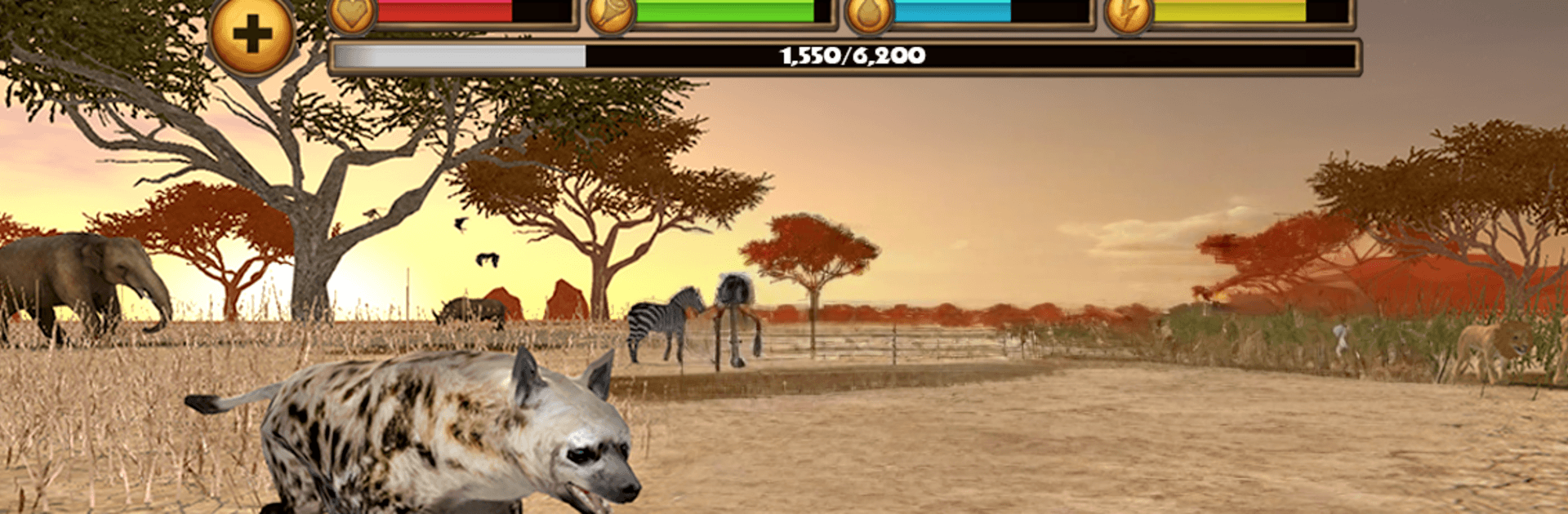
Hyena Simulator drops you in the middle of the savanna and asks a simple question: can you make it out here? As a lone hyena, you’ll scavenge, hunt, and scrap your way to survival while building a clan that actually has your back. It’s a gritty, open-world Simulation from Gluten Free Games LLC that lets you roam, fight, and raise pups across a living ecosystem. Prefer a keyboard and a big screen? You can also play through BlueStacks.

Game Features

  • Survival, not sightseeing: Keep an eye on health, hunger, thirst, and energy. Ignore them and the plains will chew you up.
  • Ferocious combat: Use that crushing bite and a mid-air pounce to finish off prey and fend off rivals like jackals, warthogs, and even lions.
  • Build a clan: Challenge other hyenas, recruit the victors, and switch between members to lead the right hunter for the job.
  • Raise pups: Find a mate, have pups, and watch them grow into reliable members of your pack.
  • Progress that matters: Earn XP by taking down threats, scavenging carcasses, and completing tasks. Push your stats higher and expand your clan, with a level cap that reaches 200.
  • Endless objectives: Tackle rotating missions and achievements, including Mark your Territory and Scavenger, for steady rewards.
  • Living savanna: Day/night shifts and dynamic weather bring thunderstorms, lightning, floods, and dusty winds that change how you play.
  • Massive open world: Roam a huge 3D map—from dry grasslands to a lush oasis—with plenty of places to scout for food.
  • Smooth controls + first-person: Intuitive touch controls feel natural, and a first-person camera lets you see through your hyena’s eyes.
  • 25 species to encounter: Cross paths with zebra, crocodile, cheetah, giraffe, leopard, elephant, vulture, honey badger, snake, jackal, and more.
  • Handy survival guide: Check wildlife info, a world map, your pack overview, and achievement progress in one place.
  • HD visuals your way: Tweak graphics quality to balance performance and detail on your device.
  • Optional blood toggle: Want a harsher look? Turn on blood effects if you’re of age or have permission.
  • No ads, no extra purchases: The Gluten-Free Promise means you get the full game experience without interruptions.

Slay your opponents with your epic moves. Play it your way on BlueStacks and dominate the battlefield.


Game Features

Enhancements

  • Macros
  • Multi Instance
  • Multi Instance Sync
  • Script
  • Enhancements
Macros

Macros

Automate the predictable in Hyena Simulator and transform your gameplay with Macros. Get access to inventive Macros in the BlueStacks Macro Community
Multi Instance

Multi Instance

Play Hyena Simulator on one window. And chat with your friend on the other. Press CTRL + Shift + 8 to open the Multi-Instance Manager. And start creating fresh instances or clone an existing one.
Multi Instance Sync

Multi Instance Sync

Play Hyena Simulator with the power of Multi-Instance Sync. Replicate what you are doing on the main instance on all other instances. Level up faster, play more.
Script

Script

Script your way to gaming glory in Hyena Simulator with BlueStacks Script. Write and run a set of commands to automate repeated tasks. Trigger the command by assigning it to any key.
Read More

How to Download and Play Hyena Simulator on PC or Mac

  • Download and install BlueStacks on your PC or Mac

  • Complete Google sign-in to access the Play Store, or do it later

  • Look for Hyena Simulator in the search bar at the top right corner

  • Click to install Hyena Simulator from the search results

  • Complete Google sign-in (if you skipped step 2) to install Hyena Simulator

  • Click the Hyena Simulator icon on the home screen to start playing

video
Watch Video

Minimum System Requirements

With BlueStacks 5, you can get started on a PC that fulfills the following requirements.

  • Operating System

    Microsoft Windows 7 or above, macOS 11 (Big Sur) or above

  • Processor

    Intel, AMD or Apple Silicon Processor

  • RAM

    at least 4GB

  • HDD

    10GB Free Disk Space

Note:

* You must be an Administrator on your PC. Up to date graphics drivers from Microsoft or the chipset vendor.

Hyena Simulator - FAQs

  • How to play Hyena Simulator on Windows PC & Mac?

    Play Hyena Simulator on your PC or Mac by following these simple steps.

    • Click on 'Play Hyena Simulator on PC’ to download BlueStacks
    • Install it and log-in to Google Play Store
    • Launch and play the game.
  • Why is BlueStacks the fastest and safest platform to play games on PC?

    BlueStacks respects your privacy and is always safe and secure to use. It does not carry any malware, spyware, or any sort of additional software that could harm your PC.

    It is engineered to optimize speed and performance for a seamless gaming experience.

  • What are Hyena Simulator PC requirements?

    Minimum requirement to run Hyena Simulator on your PC

    • OS: Microsoft Windows 7 or above MacOS 11 (Big Sur) or above
    • Processor: Intel, AMD or Apple Silicon Processor
    • RAM: Your PC must have at least 4GB of RAM. (Note that having 4GB or more disk space is not a substitute for RAM)
    • HDD: 10GB Free Disk Space.
    • You must be an Administrator on your PC.