
Idle Space Mining
Idle Space Mining

Idle Space Mining

Simulation

| Dolphin Ridge Games Limited

Play on PC with BlueStacks or from our cloud

  • Overview
  • Game Features
  • How to Play

Page Modified On: November 20, 2025

Play Idle Space Mining on PC or Mac

Idle Space Mining brings the Simulation genre to life, and throws up exciting challenges for gamers. Developed by Dolphin Ridge Games Limited, this Android game is best experienced on BlueStacks, the World’s #1 app player for PC and Mac users.

About the Game

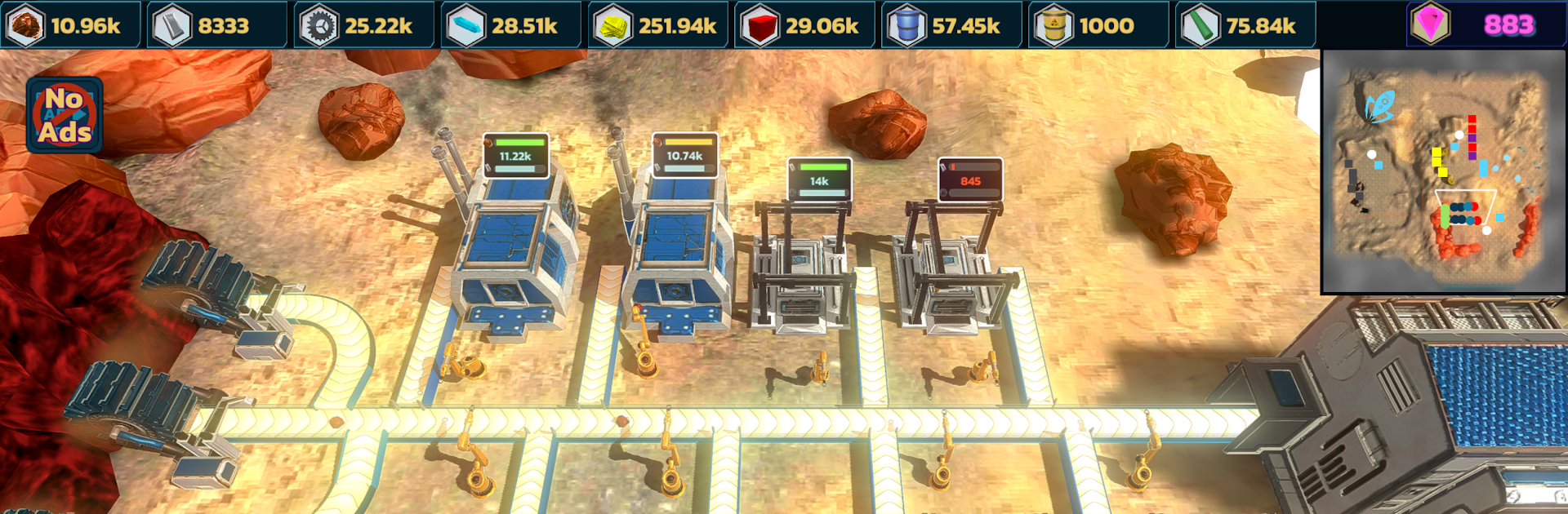
Idle Space Mining is a chill, satisfying Simulation game about turning a lonely alien planet into a humming, automated outpost. You wake from cryosleep, meet your helpful bot buddy George, and start wiring up machines that mine, craft, and assemble while you plan the next leap through space. Prefer a bigger screen while you tinker? You can play it on PC with BlueStacks, too.

Game Features

  • Smart Automation: Set up miners, smelters, and assemblers, then connect everything with belts so production keeps rolling even when you’re not playing.
  • Factory Building That Feels Good: Lay out tidy lines, split resources, and optimize flow without the stress—it’s all about making systems that click.
  • Explore and Reveal: Build radar arrays to uncover new zones and send drones to gather resources you can’t reach on foot.
  • Salvage Alien Wrecks: Scavenge crashed ships for rare parts and tech that supercharge your progress.
  • Quick Burst Power: Kick in short boosts to speed up mining, crafting, or assembly when you want a little extra momentum.
  • Build, Fuel, Launch: Craft fuel, assemble new spacecraft, and hop to fresh planets packed with different materials and challenges.
  • George, Your Robotic Sidekick: This quirky companion offers tips and a little personality while you expand your operation.
  • Play at Your Pace: Revisit earlier worlds with a new strategy or keep pushing forward. Grab optional reward videos for bonuses—or ignore them and go fully ad-free.
  • Strategy That Scales: Experiment with layouts, balance power and throughput, and grow from a scrappy starter base to a sprawling interplanetary network.

Slay your opponents with your epic moves. Play it your way on BlueStacks and dominate the battlefield.


Game Features

Enhancements

  • Macros
  • Multi Instance
  • Multi Instance Sync
  • Script
  • Enhancements
Macros

Macros

Automate the predictable in Idle Space Mining and transform your gameplay with Macros. Get access to inventive Macros in the BlueStacks Macro Community
Multi Instance

Multi Instance

Play Idle Space Mining on one window. And chat with your friend on the other. Press CTRL + Shift + 8 to open the Multi-Instance Manager. And start creating fresh instances or clone an existing one.
Multi Instance Sync

Multi Instance Sync

Play Idle Space Mining with the power of Multi-Instance Sync. Replicate what you are doing on the main instance on all other instances. Level up faster, play more.
Script

Script

Script your way to gaming glory in Idle Space Mining with BlueStacks Script. Write and run a set of commands to automate repeated tasks. Trigger the command by assigning it to any key.
Read More

How to Download and Play Idle Space Mining on PC or Mac

  • Download and install BlueStacks on your PC or Mac

  • Complete Google sign-in to access the Play Store, or do it later

  • Look for Idle Space Mining in the search bar at the top right corner

  • Click to install Idle Space Mining from the search results

  • Complete Google sign-in (if you skipped step 2) to install Idle Space Mining

  • Click the Idle Space Mining icon on the home screen to start playing

video
Watch Video

Minimum System Requirements

With BlueStacks 5, you can get started on a PC that fulfills the following requirements.

  • Operating System

    Microsoft Windows 7 or above, macOS 11 (Big Sur) or above

  • Processor

    Intel, AMD or Apple Silicon Processor

  • RAM

    at least 4GB

  • HDD

    10GB Free Disk Space

Note:

* You must be an Administrator on your PC. Up to date graphics drivers from Microsoft or the chipset vendor.

Idle Space Mining - FAQs

  • How to play Idle Space Mining on Windows PC & Mac?

    Play Idle Space Mining on your PC or Mac by following these simple steps.

    • Click on 'Play Idle Space Mining on PC’ to download BlueStacks
    • Install it and log-in to Google Play Store
    • Launch and play the game.
  • Why is BlueStacks the fastest and safest platform to play games on PC?

    BlueStacks respects your privacy and is always safe and secure to use. It does not carry any malware, spyware, or any sort of additional software that could harm your PC.

    It is engineered to optimize speed and performance for a seamless gaming experience.

  • What are Idle Space Mining PC requirements?

    Minimum requirement to run Idle Space Mining on your PC

    • OS: Microsoft Windows 7 or above MacOS 11 (Big Sur) or above
    • Processor: Intel, AMD or Apple Silicon Processor
    • RAM: Your PC must have at least 4GB of RAM. (Note that having 4GB or more disk space is not a substitute for RAM)
    • HDD: 10GB Free Disk Space.
    • You must be an Administrator on your PC.







