Jurassic Fight Dinosaur Battle

Jurassic Fight Dinosaur Battle

Simulation

| Verx Labs

Play on PC with BlueStacks or from our cloud

  • Overview
  • Game Features
  • How to Play

Page Modified On: October 23, 2026

Play Jurassic Fight Dinosaur Battle on PC or Mac

Jurassic Fight Dinosaur Battle by Verx Labs has plenty to keep you busy. BlueStacks lets you play it on PC or Mac with more screen space, better control, and fewer mobile limits.

About the Game

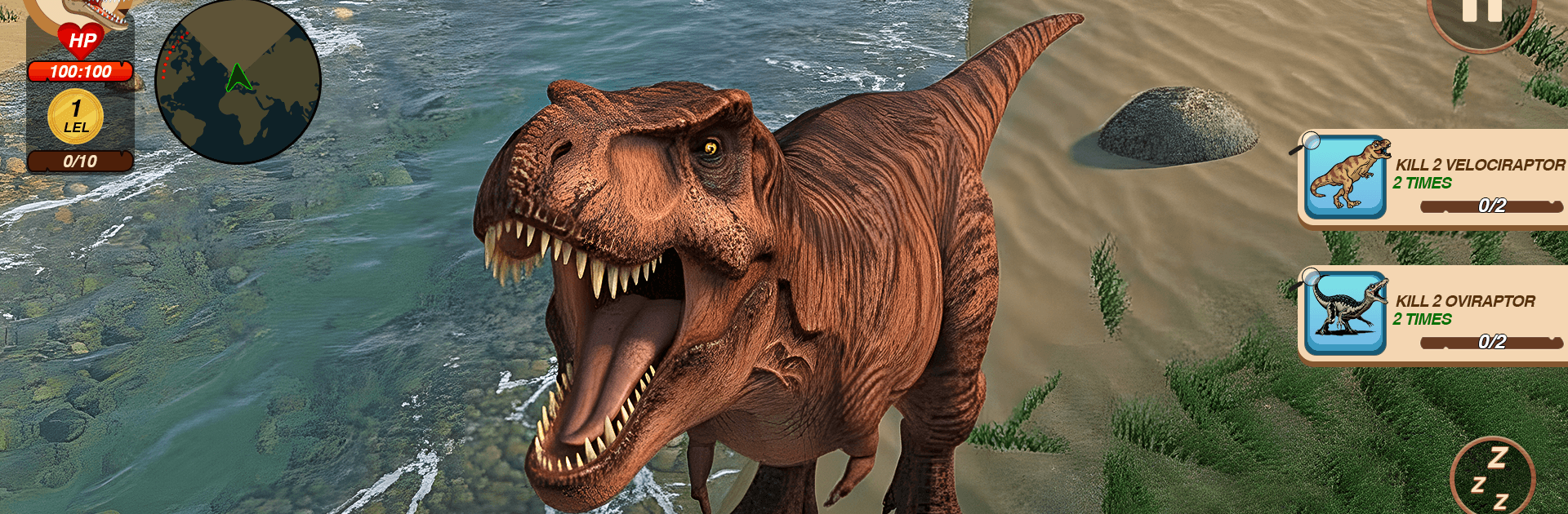
Jurassic Fight Dinosaur Battle drops you straight into brutal, head-to-head clashes between prehistoric titans. As a Simulation, it’s all about mastering each dinosaur’s rhythm, picking your moments, and fine-tuning builds that actually change how you win. Expect quick, high-stakes arena fights where timing a dodge or landing the perfect hit can turn the whole match. Prefer a bigger screen and steady controls? You can also play on PC with BlueStacks.

Game Features

  • Signature dinos, distinct styles: Pick from heavy hitters and lightning-fast hunters, then learn their ranges, tempos, and best matchups.
  • Skill-based duels: Outthink rivals with clean dodges, feints, and well-timed abilities that punish greedy swings.
  • Varied battlegrounds: Fight across lava-lit rims, dense jungle clearings, and rocky pits that shape movement, cover, and angles.
  • Upgrades that matter: Boost strength, speed, and health, or tailor builds to counter specific threats.
  • Crisp, responsive controls: Simple inputs with depth, so precision footwork and clean combos actually pay off.
  • Unlock and expand: Earn new dinosaurs and tougher variants as your streak grows.
  • Rising difficulty curve: Enemies hit harder and read better, rewarding patience, spacing, and smart aggression.
  • Impact you can feel: Thundering charges, tail smashes, and roar-fueled finishers make every hit land with weight.
  • Fast bouts, real stakes: Short, intense matches ideal for quick runs—until you chase a longer win streak.
  • Challenge on your terms: Experiment, tweak your loadout, learn from a loss, and come back sharper in the next arena.

Start your journey now. Download the game on BlueStacks, invite your friends, and march on a new adventure.


Game Features

Enhancements

  • Macros
  • Multi Instance
  • Multi Instance Sync
  • Script
  • Enhancements
Macros

Macros

Automate the predictable in Jurassic Fight Dinosaur Battle and transform your gameplay with Macros. Get access to inventive Macros in the BlueStacks Macro Community
Multi Instance

Multi Instance

Play Jurassic Fight Dinosaur Battle on one window. And chat with your friend on the other. Press CTRL + Shift + 8 to open the Multi-Instance Manager. And start creating fresh instances or clone an existing one.
Multi Instance Sync

Multi Instance Sync

Play Jurassic Fight Dinosaur Battle with the power of Multi-Instance Sync. Replicate what you are doing on the main instance on all other instances. Level up faster, play more.
Script

Script

Script your way to gaming glory in Jurassic Fight Dinosaur Battle with BlueStacks Script. Write and run a set of commands to automate repeated tasks. Trigger the command by assigning it to any key.
Read More

How to Download and Play Jurassic Fight Dinosaur Battle on PC or Mac

  • Download and install BlueStacks on your PC or Mac

  • Complete Google sign-in to access the Play Store, or do it later

  • Look for Jurassic Fight Dinosaur Battle in the search bar at the top right corner

  • Click to install Jurassic Fight Dinosaur Battle from the search results

  • Complete Google sign-in (if you skipped step 2) to install Jurassic Fight Dinosaur Battle

  • Click the Jurassic Fight Dinosaur Battle icon on the home screen to start playing

video
Watch Video

Minimum System Requirements

With BlueStacks 5, you can get started on a PC that fulfills the following requirements.

  • Operating System

    Microsoft Windows 7 or above, macOS 11 (Big Sur) or above

  • Processor

    Intel, AMD or Apple Silicon Processor

  • RAM

    at least 4GB

  • HDD

    10GB Free Disk Space

Note:

* You must be an Administrator on your PC. Up to date graphics drivers from Microsoft or the chipset vendor.

Jurassic Fight Dinosaur Battle - FAQs

  • How to play Jurassic Fight Dinosaur Battle on Windows PC & Mac?

    Play Jurassic Fight Dinosaur Battle on your PC or Mac by following these simple steps.

    • Click on 'Play Jurassic Fight Dinosaur Battle on PC’ to download BlueStacks
    • Install it and log-in to Google Play Store
    • Launch and play the game.
  • Why is BlueStacks the fastest and safest platform to play games on PC?

    BlueStacks respects your privacy and is always safe and secure to use. It does not carry any malware, spyware, or any sort of additional software that could harm your PC.

    It is engineered to optimize speed and performance for a seamless gaming experience.

  • What are Jurassic Fight Dinosaur Battle PC requirements?

    Minimum requirement to run Jurassic Fight Dinosaur Battle on your PC

    • OS: Microsoft Windows 7 or above MacOS 11 (Big Sur) or above
    • Processor: Intel, AMD or Apple Silicon Processor
    • RAM: Your PC must have at least 4GB of RAM. (Note that having 4GB or more disk space is not a substitute for RAM)
    • HDD: 10GB Free Disk Space.
    • You must be an Administrator on your PC.