Kawaii Block Craft
Kawaii Block Craft

Kawaii Block Craft

Simulation

| Minecraft Addons & Block Craft

Play on PC with BlueStacks or from our cloud

  • Overview
  • Game Features
  • How to Play

Page Modified On: August 31, 2026

Play Kawaii Block Craft on PC or Mac

Kawaii Block Craft by Minecraft Addons & Block Craft has plenty to keep you busy. BlueStacks lets you play it on PC or Mac with more screen space, better control, and fewer mobile limits.

About the Game

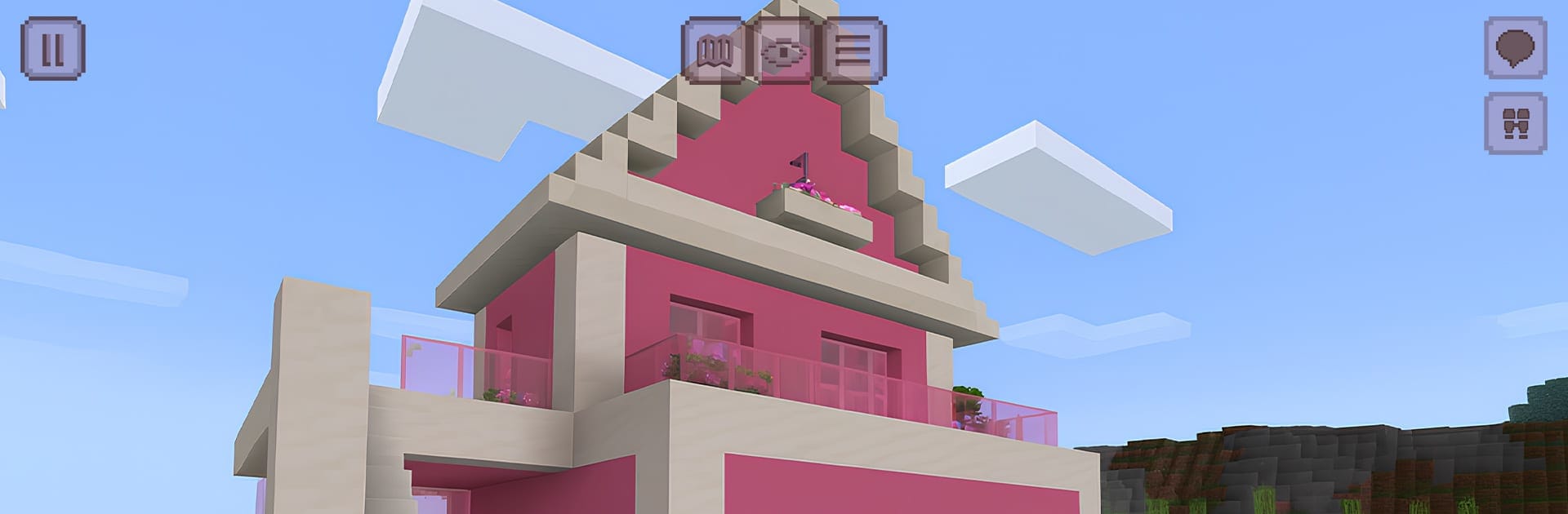
Kawaii Block Craft is a Simulation sandbox where everything feels cozy, colorful, and a little bit dreamy. Build a snug cottage, a glittery castle, or a whole pastel town while you explore wide-open maps and gather what you need to make your ideas real. Prefer a bigger screen and steady controls for long building sessions? It plays comfortably on BlueStacks too.

Game Features

  • Creative or Survival: Pick your playstyle—create freely with unlimited resources or go Survival to gather food, manage supplies, and face cute-but-real challenges.
  • Endless Worlds to Explore: Start new worlds whenever you want and wander as far as your curiosity takes you, with fresh sights around every ridge.
  • Flight and Sailing: Take off to scout your next build site from above or glide across lakes and rivers to reach hidden corners fast.
  • Charming Biomes: Stroll through pastel forests, sparkling hills, snowy ridges, and flower-filled meadows, each with its own mood and look.
  • Day and Weather: Build by sunrise, roam under the stars, and work around shifting weather that keeps your routine interesting.
  • Adorable Wildlife: Spot ponies, deer, bunnies, and other friendly critters as they roam; they make screenshots and quiet walks way cuter.
  • Crafting That Pops: Use hundreds of blocks and decorations to shape gardens, rooms, and busy little streets with personality.
  • Harvest, Fish, and Cook: Grow what you need, catch dinner, and cook simple meals to keep your Survival runs going strong.
  • Rare Finds and Gadgets: Track down special materials to craft cute contraptions and eye-catching ornaments for your builds.
  • Play Solo or Together: Build privately or invite friends, chat in-game, and collaborate on big projects without the hassle.
  • Handy Tools and Controls: Check your minimap, sprint when needed, and adjust camera zoom for clean angles and better screenshots.
  • Smooth Performance: Enjoy steady FPS and responsive controls that keep the focus on your ideas, not on loading screens.

BlueStacks gives you more room to focus on the game and less time adjusting around mobile limitations.


Game Features

Enhancements

  • Macros
  • Multi Instance
  • Multi Instance Sync
  • Script
  • Enhancements
Macros

Macros

Automate the predictable in Kawaii Block Craft and transform your gameplay with Macros. Get access to inventive Macros in the BlueStacks Macro Community
Multi Instance

Multi Instance

Play Kawaii Block Craft on one window. And chat with your friend on the other. Press CTRL + Shift + 8 to open the Multi-Instance Manager. And start creating fresh instances or clone an existing one.
Multi Instance Sync

Multi Instance Sync

Play Kawaii Block Craft with the power of Multi-Instance Sync. Replicate what you are doing on the main instance on all other instances. Level up faster, play more.
Script

Script

Script your way to gaming glory in Kawaii Block Craft with BlueStacks Script. Write and run a set of commands to automate repeated tasks. Trigger the command by assigning it to any key.
Read More

How to Download and Play Kawaii Block Craft on PC or Mac

  • Download and install BlueStacks on your PC or Mac

  • Complete Google sign-in to access the Play Store, or do it later

  • Look for Kawaii Block Craft in the search bar at the top right corner

  • Click to install Kawaii Block Craft from the search results

  • Complete Google sign-in (if you skipped step 2) to install Kawaii Block Craft

  • Click the Kawaii Block Craft icon on the home screen to start playing

video
Watch Video

Minimum System Requirements

With BlueStacks 5, you can get started on a PC that fulfills the following requirements.

  • Operating System

    Microsoft Windows 7 or above, macOS 11 (Big Sur) or above

  • Processor

    Intel, AMD or Apple Silicon Processor

  • RAM

    at least 4GB

  • HDD

    10GB Free Disk Space

Note:

* You must be an Administrator on your PC. Up to date graphics drivers from Microsoft or the chipset vendor.

Kawaii Block Craft - FAQs

  • How to play Kawaii Block Craft on Windows PC & Mac?

    Play Kawaii Block Craft on your PC or Mac by following these simple steps.

    • Click on 'Play Kawaii Block Craft on PC’ to download BlueStacks
    • Install it and log-in to Google Play Store
    • Launch and play the game.
  • Why is BlueStacks the fastest and safest platform to play games on PC?

    BlueStacks respects your privacy and is always safe and secure to use. It does not carry any malware, spyware, or any sort of additional software that could harm your PC.

    It is engineered to optimize speed and performance for a seamless gaming experience.

  • What are Kawaii Block Craft PC requirements?

    Minimum requirement to run Kawaii Block Craft on your PC

    • OS: Microsoft Windows 7 or above MacOS 11 (Big Sur) or above
    • Processor: Intel, AMD or Apple Silicon Processor
    • RAM: Your PC must have at least 4GB of RAM. (Note that having 4GB or more disk space is not a substitute for RAM)
    • HDD: 10GB Free Disk Space.
    • You must be an Administrator on your PC.