Keyboard Escape: Speed Up

Keyboard Escape: Speed Up

Simulation

| KeTu Playhouse

Play on PC with BlueStacks or from our cloud

  • Overview
  • Game Features
  • How to Play

Page Modified On: October 21, 2026

Play Keyboard Escape: Speed Up on PC or Mac

Step into the World of Keyboard Escape: Speed Up, a thrilling Simulation game from the house of KeTu Playhouse. Play this Android game on BlueStacks App Player and experience immersive gaming on PC or Mac.

About the Game
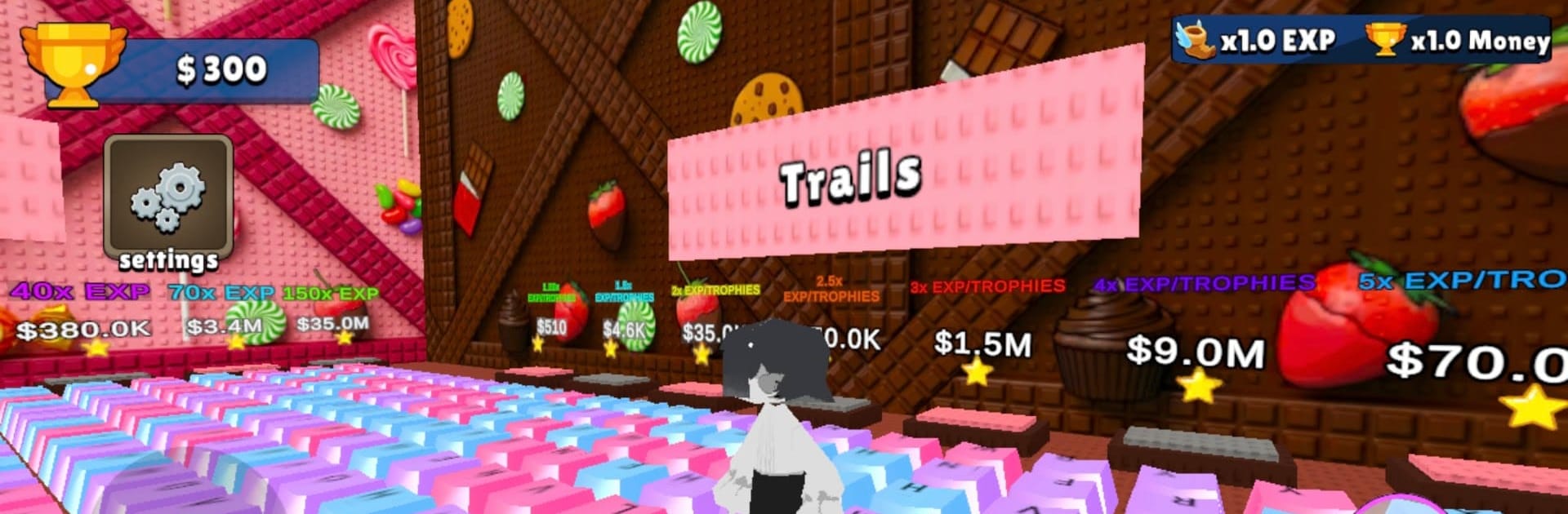
Keyboard Escape: Speed Up is all about turning tiny steps into ridiculous velocity. This fast-paced Simulation throws you onto quirky, keyboard-inspired tracks where every movement charges you up, letting you blow past obstacles and shoot for the finish. Prefer a wider view? It feels extra smooth on PC with BlueStacks.

Game Features
– Snowballing Momentum: Keep moving to stack experience and watch your speed climb from a jog to a near blur.
– Keyboard Worlds, Candy Vibes: Sprint across giant keycaps and playful, candy-coated hazards in bright, toy-like 3D.
– Smart Upgrades at the Gate: Spend your hard-earned coins right at the start line to boost base speed, multipliers, and more.
– Bite-Sized, High-Intensity Tracks: Short stages designed to test pure pace, tight timing, and clean lines.
– Permanent Speed Boosts: Unlock lasting enhancements that make future runs faster and your top speed even scarier.
– Clean, Pick-Up-and-Play Controls: Simple inputs make it easy to start; threading through traps at full tilt is where the skill kicks in.
– Obstacles Built for Velocity: Breakable barriers, sharp turns, and risky gaps that only make sense when you’re absolutely flying.
– Rewarding Finishes: Hit the end of a course to cash in coins—push farther and your payout grows, fueling your next upgrade.

Get ready for a buttery smooth, high-performance gaming action only on BlueStacks.

Game Features

Enhancements

  • Macros
  • Multi Instance
  • Multi Instance Sync
  • Script
  • Enhancements
Macros

Macros

Automate the predictable in Keyboard Escape: Speed Up and transform your gameplay with Macros. Get access to inventive Macros in the BlueStacks Macro Community
Multi Instance

Multi Instance

Play Keyboard Escape: Speed Up on one window. And chat with your friend on the other. Press CTRL + Shift + 8 to open the Multi-Instance Manager. And start creating fresh instances or clone an existing one.
Multi Instance Sync

Multi Instance Sync

Play Keyboard Escape: Speed Up with the power of Multi-Instance Sync. Replicate what you are doing on the main instance on all other instances. Level up faster, play more.
Script

Script

Script your way to gaming glory in Keyboard Escape: Speed Up with BlueStacks Script. Write and run a set of commands to automate repeated tasks. Trigger the command by assigning it to any key.
Read More

How to Download and Play Keyboard Escape: Speed Up on PC or Mac

  • Download and install BlueStacks on your PC or Mac

  • Complete Google sign-in to access the Play Store, or do it later

  • Look for Keyboard Escape: Speed Up in the search bar at the top right corner

  • Click to install Keyboard Escape: Speed Up from the search results

  • Complete Google sign-in (if you skipped step 2) to install Keyboard Escape: Speed Up

  • Click the Keyboard Escape: Speed Up icon on the home screen to start playing

video
Watch Video

Minimum System Requirements

With BlueStacks 5, you can get started on a PC that fulfills the following requirements.

  • Operating System

    Microsoft Windows 7 or above, macOS 11 (Big Sur) or above

  • Processor

    Intel, AMD or Apple Silicon Processor

  • RAM

    at least 4GB

  • HDD

    10GB Free Disk Space

Note:

* You must be an Administrator on your PC. Up to date graphics drivers from Microsoft or the chipset vendor.

Keyboard Escape: Speed Up - FAQs

  • How to play Keyboard Escape: Speed Up on Windows PC & Mac?

    Play Keyboard Escape: Speed Up on your PC or Mac by following these simple steps.

    • Click on 'Play Keyboard Escape: Speed Up on PC’ to download BlueStacks
    • Install it and log-in to Google Play Store
    • Launch and play the game.
  • Why is BlueStacks the fastest and safest platform to play games on PC?

    BlueStacks respects your privacy and is always safe and secure to use. It does not carry any malware, spyware, or any sort of additional software that could harm your PC.

    It is engineered to optimize speed and performance for a seamless gaming experience.

  • What are Keyboard Escape: Speed Up PC requirements?

    Minimum requirement to run Keyboard Escape: Speed Up on your PC

    • OS: Microsoft Windows 7 or above MacOS 11 (Big Sur) or above
    • Processor: Intel, AMD or Apple Silicon Processor
    • RAM: Your PC must have at least 4GB of RAM. (Note that having 4GB or more disk space is not a substitute for RAM)
    • HDD: 10GB Free Disk Space.
    • You must be an Administrator on your PC.