Симулятор Lada 2115 Пятнашка

Симулятор Lada 2115 Пятнашка

Simulation

| SBlazer

Play on PC with BlueStacks or from our cloud

  • Overview
  • Game Features
  • How to Play

Page Modified On: September 25, 2026

Play Симулятор Lada 2115 Пятнашка on PC or Mac

Симулятор Lada 2115 Пятнашка brings the Simulation genre to life, and throws up exciting challenges for gamers. Developed by SBlazer, this Android game is best experienced on BlueStacks, the World’s #1 app player for PC and Mac users.

About the Game

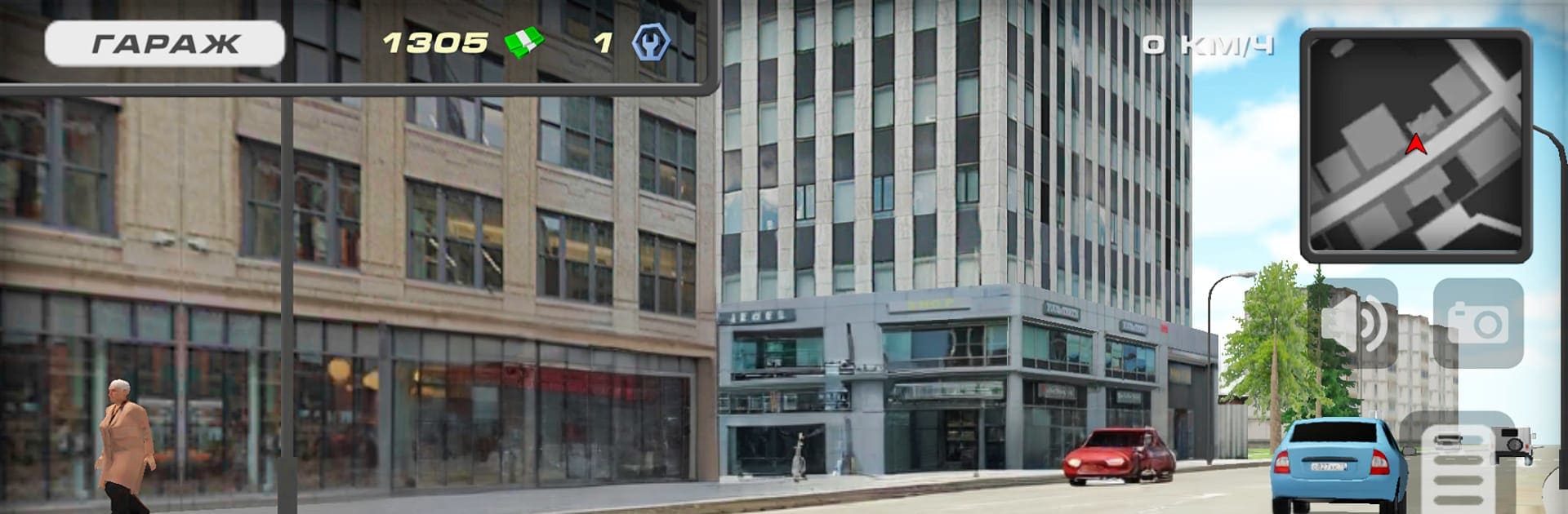
Симулятор Lada 2115 Пятнашка is a Simulation game that hands you the keys to a scrappy Lada and drops you into a big Russian city with a 90s vibe. Drive, hop out to explore, hunt for cash and rare parts, and slowly turn your ride into something mean and personal. If you like playing on a bigger screen, it also runs smoothly on BlueStacks.

Game Features

  • Open-world playground: Roam a large, seamless city with side streets, wide avenues, and hidden corners waiting to be found.
  • Drive it your way: Switch camera views—including a true first-person cockpit—and feel every bump thanks to grounded physics.
  • On-foot freedom: Step out of the car anytime to explore neighborhoods, scout for collectibles, or line up your next upgrade.
  • Authentic Lada 2115 details: Open every door, pop the hood and trunk, and take a properly modeled Samara for a spin.
  • Money, parts, and secrets: Collect cash, track down rare components for builds, and uncover hidden spots that can even unlock nitro.
  • Lively traffic and pedestrians: Share the streets with Gazelle vans, Volga sedans, PAZ buses, Lada classics like the Seven and Granta, and folks going about their day.
  • Tuning that matters: Boost the engine, dial in the suspension, repaint the body, and tweak until the car feels uniquely yours.
  • Modern look, gritty mood: Clean visuals meet a rough, street-level atmosphere that nails the era’s tone.
  • BlueStacks-friendly setup: Enjoy precise key mapping and steady performance if you prefer driving from your PC.

Ready to top the leaderboard? We bet you do. Let precise controls and sharp visuals optimized on BlueStacks lead you to victory.


Game Features

Enhancements

  • Macros
  • Multi Instance
  • Multi Instance Sync
  • Script
  • Enhancements
Macros

Macros

Automate the predictable in Симулятор Lada 2115 Пятнашка and transform your gameplay with Macros. Get access to inventive Macros in the BlueStacks Macro Community
Multi Instance

Multi Instance

Play Симулятор Lada 2115 Пятнашка on one window. And chat with your friend on the other. Press CTRL + Shift + 8 to open the Multi-Instance Manager. And start creating fresh instances or clone an existing one.
Multi Instance Sync

Multi Instance Sync

Play Симулятор Lada 2115 Пятнашка with the power of Multi-Instance Sync. Replicate what you are doing on the main instance on all other instances. Level up faster, play more.
Script

Script

Script your way to gaming glory in Симулятор Lada 2115 Пятнашка with BlueStacks Script. Write and run a set of commands to automate repeated tasks. Trigger the command by assigning it to any key.
Read More

How to Download and Play Симулятор Lada 2115 Пятнашка on PC or Mac

  • Download and install BlueStacks on your PC or Mac

  • Complete Google sign-in to access the Play Store, or do it later

  • Look for Симулятор Lada 2115 Пятнашка in the search bar at the top right corner

  • Click to install Симулятор Lada 2115 Пятнашка from the search results

  • Complete Google sign-in (if you skipped step 2) to install Симулятор Lada 2115 Пятнашка

  • Click the Симулятор Lada 2115 Пятнашка icon on the home screen to start playing

video
Watch Video

Minimum System Requirements

With BlueStacks 5, you can get started on a PC that fulfills the following requirements.

  • Operating System

    Microsoft Windows 7 or above, macOS 11 (Big Sur) or above

  • Processor

    Intel, AMD or Apple Silicon Processor

  • RAM

    at least 4GB

  • HDD

    10GB Free Disk Space

Note:

* You must be an Administrator on your PC. Up to date graphics drivers from Microsoft or the chipset vendor.

Симулятор Lada 2115 Пятнашка - FAQs

  • How to play Симулятор Lada 2115 Пятнашка on Windows PC & Mac?

    Play Симулятор Lada 2115 Пятнашка on your PC or Mac by following these simple steps.

    • Click on 'Play Симулятор Lada 2115 Пятнашка on PC’ to download BlueStacks
    • Install it and log-in to Google Play Store
    • Launch and play the game.
  • Why is BlueStacks the fastest and safest platform to play games on PC?

    BlueStacks respects your privacy and is always safe and secure to use. It does not carry any malware, spyware, or any sort of additional software that could harm your PC.

    It is engineered to optimize speed and performance for a seamless gaming experience.

  • What are Симулятор Lada 2115 Пятнашка PC requirements?

    Minimum requirement to run Симулятор Lada 2115 Пятнашка on your PC

    • OS: Microsoft Windows 7 or above MacOS 11 (Big Sur) or above
    • Processor: Intel, AMD or Apple Silicon Processor
    • RAM: Your PC must have at least 4GB of RAM. (Note that having 4GB or more disk space is not a substitute for RAM)
    • HDD: 10GB Free Disk Space.
    • You must be an Administrator on your PC.