Bakso Simulator 2
Bakso Simulator 2

Bakso Simulator 2

Simulation

| Akhir Pekan Studio

Play on PC with BlueStacks or from our cloud

  • Overview
  • Game Features
  • How to Play

Page Modified On: June 29, 2026

Play Bakso Simulator 2 on PC or Mac

Step into the World of Bakso Simulator 2, a thrilling Simulation game from the house of Akhir Pekan Studio. Play this Android game on BlueStacks App Player and experience immersive gaming on PC or Mac.

About the Game

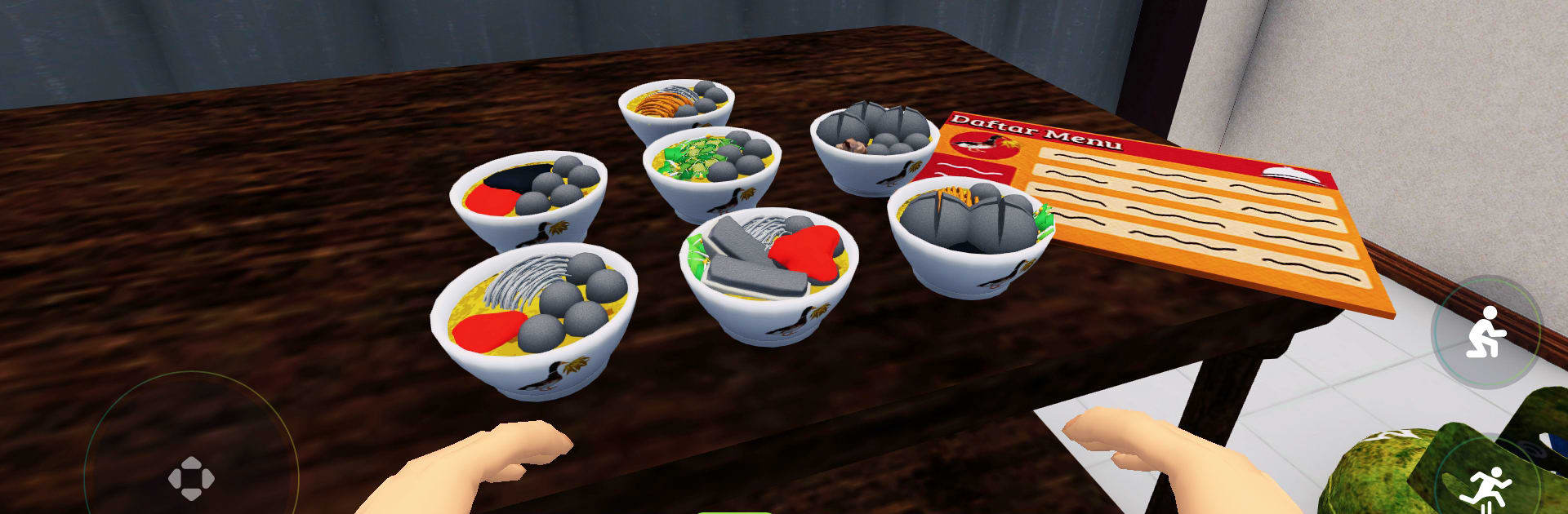
Bakso Simulator 2 is a hands-on Simulation about turning a humble bakso cart into a thriving food business. You’ll chop, simmer, and serve while juggling picky customers, rowdy troublemakers, and a town that always has something going on. Want to chill and build or chase a story that gets a little weird in the best way? Both fit—and it’s just as comfy on your phone as it is on PC with BlueStacks.

Game Features

  • Cook and Serve: Prep ingredients, manage the stove, and keep orders moving. There’s a growing menu with more than eight tasty recipes to unlock and master.
  • Make It Yours: Redo the whole place—floors, ceilings, roofs, decor, carts, even your crew’s outfits. Go sleek, cozy, chaotic…whatever feels right.
  • Handle the Chaos: Thieves, dine-and-dashers, bratty kids, and even the mischievous Tuyul show up. Use your tools and a bit of grit to shoo them away.
  • Explore a Lively Town: Wander a larger map packed with quirky NPCs, tucked-away spots, and odd side activities if you need a break from the kitchen heat.
  • Build Your Dream Team: Hire staff with their own backstories, then train them to get faster, sharper, and way more dependable during rush hour.
  • Story With a Twist: Follow a main plot that swings from funny to a little supernatural, plus side quests that reward you with neat perks and useful items.
  • Quick Mini-Games: Step away from the broth for a minute with short, playful challenges scattered around town.
  • Indonesian Flavor: From street chatter to night markets, the atmosphere leans authentic—warm, noisy, and full of character.

Ready to top the leaderboard? We bet you do. Let precise controls and sharp visuals optimized on BlueStacks lead you to victory.


Game Features

Enhancements

  • Macros
  • Multi Instance
  • Multi Instance Sync
  • Script
  • Enhancements
Macros

Macros

Automate the predictable in Bakso Simulator 2 and transform your gameplay with Macros. Get access to inventive Macros in the BlueStacks Macro Community
Multi Instance

Multi Instance

Play Bakso Simulator 2 on one window. And chat with your friend on the other. Press CTRL + Shift + 8 to open the Multi-Instance Manager. And start creating fresh instances or clone an existing one.
Multi Instance Sync

Multi Instance Sync

Play Bakso Simulator 2 with the power of Multi-Instance Sync. Replicate what you are doing on the main instance on all other instances. Level up faster, play more.
Script

Script

Script your way to gaming glory in Bakso Simulator 2 with BlueStacks Script. Write and run a set of commands to automate repeated tasks. Trigger the command by assigning it to any key.
Read More

How to Download and Play Bakso Simulator 2 on PC or Mac

  • Download and install BlueStacks on your PC or Mac

  • Complete Google sign-in to access the Play Store, or do it later

  • Look for Bakso Simulator 2 in the search bar at the top right corner

  • Click to install Bakso Simulator 2 from the search results

  • Complete Google sign-in (if you skipped step 2) to install Bakso Simulator 2

  • Click the Bakso Simulator 2 icon on the home screen to start playing

video
Watch Video

Minimum System Requirements

With BlueStacks 5, you can get started on a PC that fulfills the following requirements.

  • Operating System

    Microsoft Windows 7 or above, macOS 11 (Big Sur) or above

  • Processor

    Intel, AMD or Apple Silicon Processor

  • RAM

    at least 4GB

  • HDD

    10GB Free Disk Space

Note:

* You must be an Administrator on your PC. Up to date graphics drivers from Microsoft or the chipset vendor.

Bakso Simulator 2 - FAQs

  • How to play Bakso Simulator 2 on Windows PC & Mac?

    Play Bakso Simulator 2 on your PC or Mac by following these simple steps.

    • Click on 'Play Bakso Simulator 2 on PC’ to download BlueStacks
    • Install it and log-in to Google Play Store
    • Launch and play the game.
  • Why is BlueStacks the fastest and safest platform to play games on PC?

    BlueStacks respects your privacy and is always safe and secure to use. It does not carry any malware, spyware, or any sort of additional software that could harm your PC.

    It is engineered to optimize speed and performance for a seamless gaming experience.

  • What are Bakso Simulator 2 PC requirements?

    Minimum requirement to run Bakso Simulator 2 on your PC

    • OS: Microsoft Windows 7 or above MacOS 11 (Big Sur) or above
    • Processor: Intel, AMD or Apple Silicon Processor
    • RAM: Your PC must have at least 4GB of RAM. (Note that having 4GB or more disk space is not a substitute for RAM)
    • HDD: 10GB Free Disk Space.
    • You must be an Administrator on your PC.