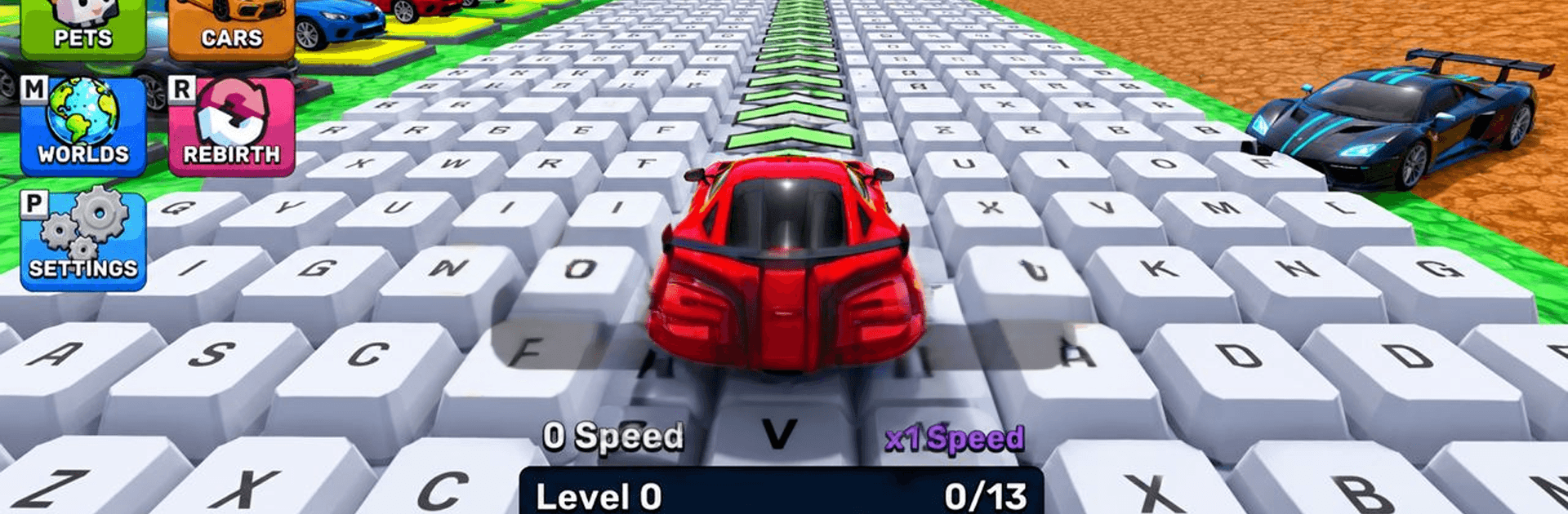
Obby Supercar Race Keyboard

Obby Supercar Race Keyboard

Simulation

| Doublentil

Play on PC with BlueStacks or from our cloud

  • Overview
  • Game Features
  • How to Play

Page Modified On: September 11, 2026

Play Obby Supercar Race Keyboard on PC or Mac

Play Obby Supercar Race Keyboard by Doublentil on PC or Mac with BlueStacks. Use a bigger screen, mouse and keyboard controls, and smoother performance while you play.

About the Game

Obby Supercar Race Keyboard takes the obstacle-course craze and straps it to a garage of roaring supercars. This stunt-happy Simulation lets you rip through colorful tracks, thread narrow platforms, and stick every landing with crisp keyboard control. Prefer a bigger screen and steady frames? It pairs nicely with BlueStacks while keeping those snappy inputs intact.

Game Features

  • Pure keyboard handling: Steer, brake, and line up jumps with tight, responsive controls that reward timing, precision, and a cool head under pressure.
  • Wild obby tracks: Tackle ramps, moving walls, spinning hammers, tilting beams, and other mischievous contraptions that change how you approach each run.
  • Stunts with purpose: Use speed, angle, and momentum to clear gaps, ride edges, or drift a skinny platform—flashy moves actually help you finish cleaner.
  • Learn-as-you-go difficulty: Start with forgiving routes, then work up to trickier layouts that test patience, rhythm, and quick reactions.
  • Garage of supercars: Swap between sleek rockets and grippy bruisers, each with a distinct feel on corners, jumps, and sketchy landings.
  • Colorful 3D worlds: Race through bright, playful environments where hazards pop visually, so you can read the track at a glance.
  • Short runs, big payoffs: Bite-size stages make retries painless; every attempt is a fresh shot at a smarter line and a better time.
  • Progress that sticks: Clearing stages opens new challenges and tougher routes, inviting you to refine splits and chase your personal bests.

BlueStacks gives you more room to focus on the game and less time adjusting around mobile limitations.


Game Features

Enhancements

  • Macros
  • Multi Instance
  • Multi Instance Sync
  • Script
  • Enhancements
Macros

Macros

Automate the predictable in Obby Supercar Race Keyboard and transform your gameplay with Macros. Get access to inventive Macros in the BlueStacks Macro Community
Multi Instance

Multi Instance

Play Obby Supercar Race Keyboard on one window. And chat with your friend on the other. Press CTRL + Shift + 8 to open the Multi-Instance Manager. And start creating fresh instances or clone an existing one.
Multi Instance Sync

Multi Instance Sync

Play Obby Supercar Race Keyboard with the power of Multi-Instance Sync. Replicate what you are doing on the main instance on all other instances. Level up faster, play more.
Script

Script

Script your way to gaming glory in Obby Supercar Race Keyboard with BlueStacks Script. Write and run a set of commands to automate repeated tasks. Trigger the command by assigning it to any key.
Read More

How to Download and Play Obby Supercar Race Keyboard on PC or Mac

  • Download and install BlueStacks on your PC or Mac

  • Complete Google sign-in to access the Play Store, or do it later

  • Look for Obby Supercar Race Keyboard in the search bar at the top right corner

  • Click to install Obby Supercar Race Keyboard from the search results

  • Complete Google sign-in (if you skipped step 2) to install Obby Supercar Race Keyboard

  • Click the Obby Supercar Race Keyboard icon on the home screen to start playing

video
Watch Video

Minimum System Requirements

With BlueStacks 5, you can get started on a PC that fulfills the following requirements.

  • Operating System

    Microsoft Windows 7 or above, macOS 11 (Big Sur) or above

  • Processor

    Intel, AMD or Apple Silicon Processor

  • RAM

    at least 4GB

  • HDD

    10GB Free Disk Space

Note:

* You must be an Administrator on your PC. Up to date graphics drivers from Microsoft or the chipset vendor.

Obby Supercar Race Keyboard - FAQs

  • How to play Obby Supercar Race Keyboard on Windows PC & Mac?

    Play Obby Supercar Race Keyboard on your PC or Mac by following these simple steps.

    • Click on 'Play Obby Supercar Race Keyboard on PC’ to download BlueStacks
    • Install it and log-in to Google Play Store
    • Launch and play the game.
  • Why is BlueStacks the fastest and safest platform to play games on PC?

    BlueStacks respects your privacy and is always safe and secure to use. It does not carry any malware, spyware, or any sort of additional software that could harm your PC.

    It is engineered to optimize speed and performance for a seamless gaming experience.

  • What are Obby Supercar Race Keyboard PC requirements?

    Minimum requirement to run Obby Supercar Race Keyboard on your PC

    • OS: Microsoft Windows 7 or above MacOS 11 (Big Sur) or above
    • Processor: Intel, AMD or Apple Silicon Processor
    • RAM: Your PC must have at least 4GB of RAM. (Note that having 4GB or more disk space is not a substitute for RAM)
    • HDD: 10GB Free Disk Space.
    • You must be an Administrator on your PC.