Penny Corner Store: Tycoon

Penny Corner Store: Tycoon

Simulation

| 4th May Games

Play on PC with BlueStacks or from our cloud

  • Overview
  • Game Features
  • How to Play

Page Modified On: October 12, 2026

Play Penny Corner Store: Tycoon on PC or Mac

Explore a whole new adventure with Penny Corner Store: Tycoon, a Simulation game created by 4th May Games. Experience great gameplay with BlueStacks, the most popular gaming platform to play Android games on your PC or Mac.

About the Game

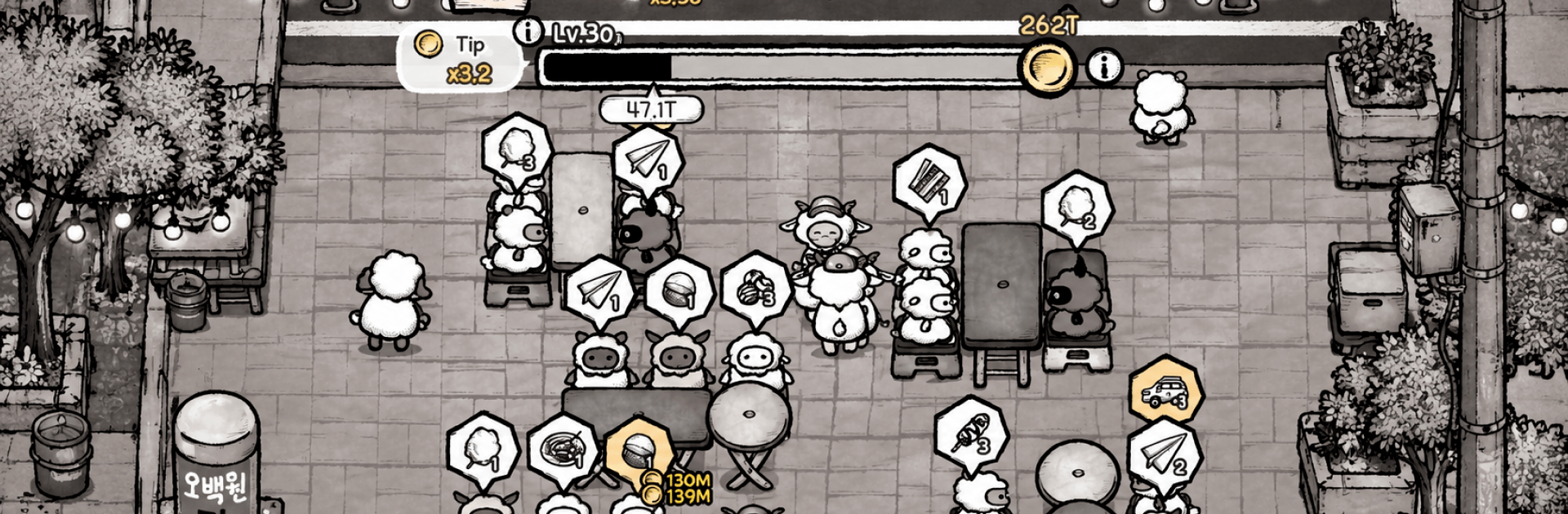
Penny Corner Store: Tycoon is a cozy Simulation about bringing a tiny shop across from Owol Elementary School back to life with the ever-charming Grandma Sheep. You’ll prep comfort snacks, sell quirky toys, and turn a humble counter into a bustling neighborhood hangout—at a calm, idle-friendly pace. Prefer a bigger view? It runs nicely on PC with BlueStacks.

Game Features

  • Warm shopkeeping with woolly neighbors: Take orders, prep treats, and keep the counter humming as flocks of adorable sheep drop by all day.
  • Nostalgia-packed menu and trinkets: Cook dalgona, cotton candy, and tteokbokki, then stock capsule toys, bubble wands, slap cards, ocarinas, diaries, slushies, and more.
  • Smooth upgrades that snowball: Earn gold from every sale, unlock fresh products, and tune up your machines to serve faster and keep lines short.
  • Pick-your-perks progression: Choose useful card skills and tidy up special ledgers to squeeze extra efficiency out of every corner of the shop.
  • Managers, pets, and dress-up fun: Recruit helpful managers, bring along cute pets, and style Grandma Sheep with hats and outfits to make the place feel like yours.
  • Stage-by-stage growth: Clear stages to add new recipes and toys, slowly evolving your quiet stall into a lively neighborhood staple.
  • Sketchbook-black-and-white vibe: Soft, hand-drawn monochrome art sets a gentle mood, with tiny details that make the store feel warm and lived-in.
  • Relaxing idle rhythm: Play at your own pace—great for quick sessions or longer stretches when you want to tinker and watch the shop thrive.

Get ready for a buttery smooth, high-performance gaming action only on BlueStacks.

Game Features

Enhancements

  • Macros
  • Multi Instance
  • Multi Instance Sync
  • Script
  • Enhancements
Macros

Macros

Automate the predictable in Penny Corner Store: Tycoon and transform your gameplay with Macros. Get access to inventive Macros in the BlueStacks Macro Community
Multi Instance

Multi Instance

Play Penny Corner Store: Tycoon on one window. And chat with your friend on the other. Press CTRL + Shift + 8 to open the Multi-Instance Manager. And start creating fresh instances or clone an existing one.
Multi Instance Sync

Multi Instance Sync

Play Penny Corner Store: Tycoon with the power of Multi-Instance Sync. Replicate what you are doing on the main instance on all other instances. Level up faster, play more.
Script

Script

Script your way to gaming glory in Penny Corner Store: Tycoon with BlueStacks Script. Write and run a set of commands to automate repeated tasks. Trigger the command by assigning it to any key.
Read More

How to Download and Play Penny Corner Store: Tycoon on PC or Mac

  • Download and install BlueStacks on your PC or Mac

  • Complete Google sign-in to access the Play Store, or do it later

  • Look for Penny Corner Store: Tycoon in the search bar at the top right corner

  • Click to install Penny Corner Store: Tycoon from the search results

  • Complete Google sign-in (if you skipped step 2) to install Penny Corner Store: Tycoon

  • Click the Penny Corner Store: Tycoon icon on the home screen to start playing

video
Watch Video

Minimum System Requirements

With BlueStacks 5, you can get started on a PC that fulfills the following requirements.

  • Operating System

    Microsoft Windows 7 or above, macOS 11 (Big Sur) or above

  • Processor

    Intel, AMD or Apple Silicon Processor

  • RAM

    at least 4GB

  • HDD

    10GB Free Disk Space

Note:

* You must be an Administrator on your PC. Up to date graphics drivers from Microsoft or the chipset vendor.

Penny Corner Store: Tycoon - FAQs

  • How to play Penny Corner Store: Tycoon on Windows PC & Mac?

    Play Penny Corner Store: Tycoon on your PC or Mac by following these simple steps.

    • Click on 'Play Penny Corner Store: Tycoon on PC’ to download BlueStacks
    • Install it and log-in to Google Play Store
    • Launch and play the game.
  • Why is BlueStacks the fastest and safest platform to play games on PC?

    BlueStacks respects your privacy and is always safe and secure to use. It does not carry any malware, spyware, or any sort of additional software that could harm your PC.

    It is engineered to optimize speed and performance for a seamless gaming experience.

  • What are Penny Corner Store: Tycoon PC requirements?

    Minimum requirement to run Penny Corner Store: Tycoon on your PC

    • OS: Microsoft Windows 7 or above MacOS 11 (Big Sur) or above
    • Processor: Intel, AMD or Apple Silicon Processor
    • RAM: Your PC must have at least 4GB of RAM. (Note that having 4GB or more disk space is not a substitute for RAM)
    • HDD: 10GB Free Disk Space.
    • You must be an Administrator on your PC.