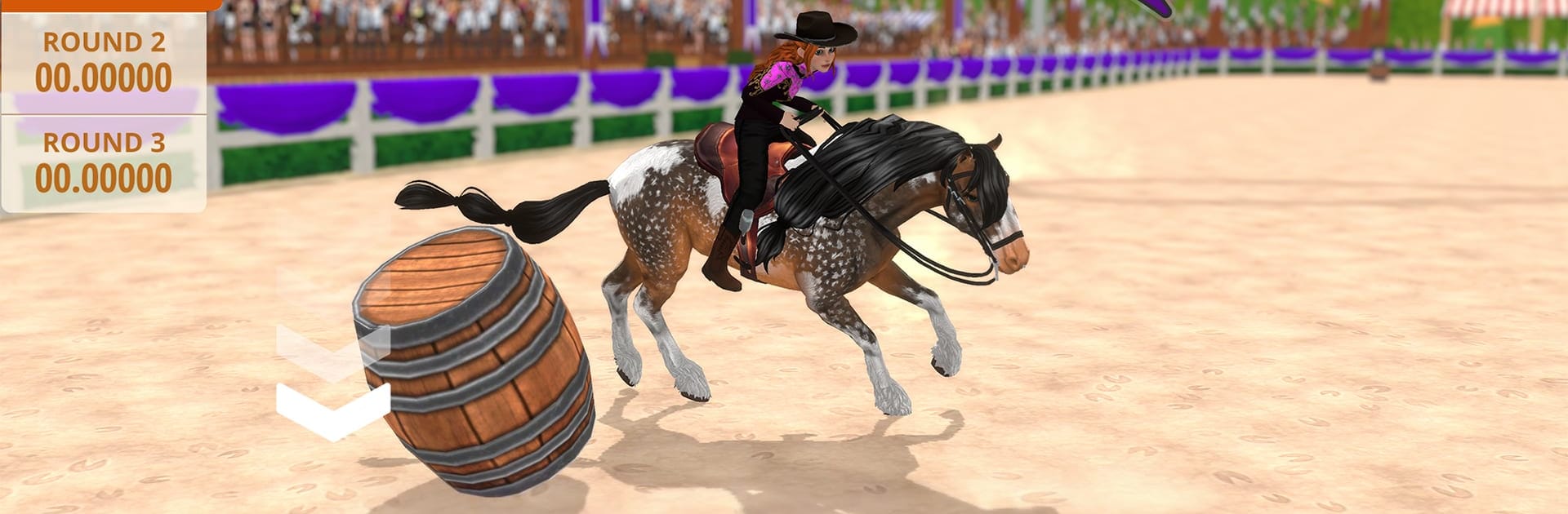
Pocket Horse: Racing Champions

Pocket Horse: Racing Champions

Simulation

| Foxie Ventures

Play on PC with BlueStacks or from our cloud

Click here to Pre-Register for Pocket Horse: Racing Champions
  • Overview
  • Features
  • How to Play

Page Modified On: June 04, 2026

Play Pocket Horse: Racing Champions on PC or Mac

Pocket Horse: Racing Champions by Foxie Ventures has plenty to keep you busy. BlueStacks lets you play it on PC or Mac with more screen space, better control, and fewer mobile limits.

About the Game

Pocket Horse: Racing Champions is a cozy-yet-deep Simulation all about raising, training, and racing the horses you’ve always wanted. You’re rebuilding the reputation of Oakmeer, a once-legendary riding region, by caring for your own herd and guiding them toward the winner’s circle. Expect hands-on horse care, meaningful choices, and competitions where your prep work really shows.

Game Features

  • Create your dream horse: Mix and match coat patterns, face markings, mane and tail styles, and even different socks on each leg to craft a look that’s totally yours.
  • Care that truly matters: Feed smart, prep longer-lasting mixes, groom, wash, and play. Horses have their own moods and traits, and a loved, well-kept partner runs better—simple as that.
  • Four riding disciplines: Test skill and timing across Barrel Racing, Dressage, Flat Racing, and Show Jumping. Each event favors different strengths, so pick the right horse for the job.
  • Breeding with real depth: Raise foals and watch inherited looks, stats, and personalities emerge. Plan pairings to pass down helpful advantages and grow your stable’s potential.
  • Build a lasting legacy: Horses can learn traits over time that influence future generations, letting you develop rarer, more specialized bloodlines.
  • Expand your ranch: Add stalls, collect new horses, and see how your herd interacts. Unlock more championships, trophies, and traits as your stable grows.
  • Story with stakes: Oakmeer fell from glory after a harsh betrayal; now it’s on you and your first horse to bring the region back to championship form.
  • Play your way: Prefer a bigger screen and comfy controls? Pocket Horse: Racing Champions also runs smoothly on PC with BlueStacks.

Ready to top the leaderboard? We bet you do. Let precise controls and sharp visuals optimized on BlueStacks lead you to victory.


Features

  • Macros

    Automate the predictable in Pocket Horse: Racing Champions and transform your gameplay with Macros. Get access to inventive Macros in the BlueStacks Macro Community

  • Multi Instance

    Play Pocket Horse: Racing Champions on one window. And chat with your friend on the other. Press CTRL + Shift + 8 to open the Multi-Instance Manager. And start creating fresh instances or clone an existing one.

  • Multi Instance Sync

    Play Pocket Horse: Racing Champions with the power of Multi-Instance Sync. Replicate what you are doing on the main instance on all other instances. Level up faster, play more.

  • Script

    Script your way to gaming glory in Pocket Horse: Racing Champions with BlueStacks Script. Write and run a set of commands to automate repeated tasks. Trigger the command by assigning it to any key.

How to Download and Play Pocket Horse: Racing Champions on PC or Mac

  • Download and install BlueStacks on your PC or Mac

  • Complete Google sign-in to access the Play Store, or do it later

  • Look for Pocket Horse: Racing Champions in the search bar at the top right corner

  • Click to install Pocket Horse: Racing Champions from the search results

  • Complete Google sign-in (if you skipped step 2) to install Pocket Horse: Racing Champions

  • Click the Pocket Horse: Racing Champions icon on the home screen to start playing

video
Watch Video

Minimum System Requirements

With BlueStacks 5, you can get started on a PC that fulfills the following requirements.

  • Operating System

    Microsoft Windows 7 or above, macOS 11 (Big Sur) or above

  • Processor

    Intel, AMD or Apple Silicon Processor

  • RAM

    at least 4GB

  • HDD

    10GB Free Disk Space

Note:

* You must be an Administrator on your PC. Up to date graphics drivers from Microsoft or the chipset vendor.

Exclusive Gaming Content. And More.

Get the latest updates on the BlueStacks Blog.

See More
Pocket Horse: Racing Champions

Be among the first to play Pocket Horse: Racing Champions on PC

Get notified when the Game launches

Pocket Horse: Racing Champions - FAQs

  • How to play Pocket Horse: Racing Champions on Windows PC & Mac?

    Play Pocket Horse: Racing Champions on your PC or Mac by following these simple steps.

    • Click on 'Play Pocket Horse: Racing Champions on PC’ to download BlueStacks
    • Install it and log-in to Google Play Store
    • Launch and play the game.
  • Why is BlueStacks the fastest and safest platform to play games on PC?

    BlueStacks respects your privacy and is always safe and secure to use. It does not carry any malware, spyware, or any sort of additional software that could harm your PC.

    It is engineered to optimize speed and performance for a seamless gaming experience.

  • What are Pocket Horse: Racing Champions PC requirements?

    Minimum requirement to run Pocket Horse: Racing Champions on your PC

    • OS: Microsoft Windows 7 or above MacOS 11 (Big Sur) or above
    • Processor: Intel, AMD or Apple Silicon Processor
    • RAM: Your PC must have at least 4GB of RAM. (Note that having 4GB or more disk space is not a substitute for RAM)
    • HDD: 10GB Free Disk Space.
    • You must be an Administrator on your PC.