Police Motorbike Driving

Police Motorbike Driving

Simulation

| Game Pickle

Play on PC with BlueStacks or from our cloud

  • Overview
  • Game Features
  • How to Play

Page Modified On: September 11, 2026

Play Police Motorbike Driving on PC or Mac

Police Motorbike Driving by Game Pickle has plenty to keep you busy. BlueStacks lets you play it on PC or Mac with more screen space, better control, and fewer mobile limits.

About the Game

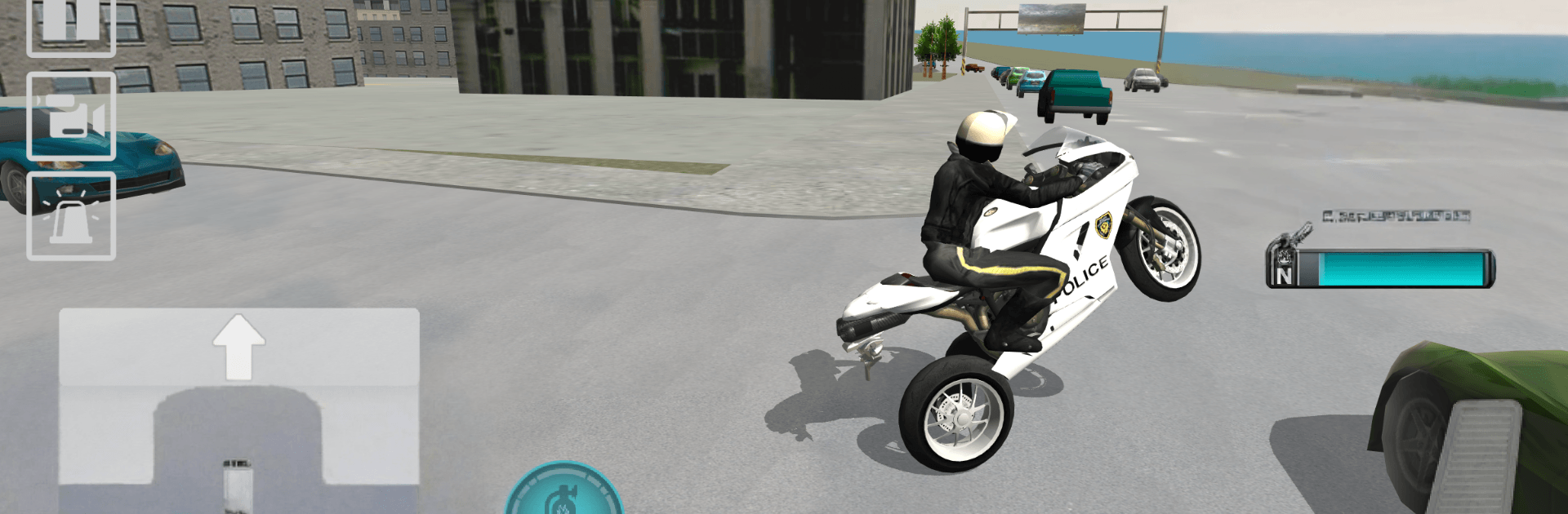
Police Motorbike Driving is a Simulation that puts you on the saddle of a fast patrol bike and sets you loose in a bustling city. Rip through traffic, test your skills on stunt ramps, and see how far you can push your ride with nitro-fueled speed. Want it on a bigger screen? It also runs smoothly on BlueStacks.

Game Features

  • Open-World City: Explore a huge urban map with miles of roads, side streets, and shortcuts to discover at your own pace.
  • Busy Traffic System: Weave through believable A.I. vehicles—from taxis and ambulances to delivery vans and more—each behaving like they own the road.
  • Stunt Ramps & Jumps: Hit ramps, clear gaps, and try wild landings when you’re feeling brave (or a little reckless).
  • Nitro Boosts: Kick in powerful nitro to rocket to top speed when a straightaway opens up or you need a quick getaway from gridlock.
  • Ragdoll Crashes: Botch a landing or clip a bumper and watch the rider tumble with over-the-top ragdoll physics.
  • Realistic Bike Handling: Feel the weight shift, braking, and acceleration with responsive controls that make every turn count.
  • Easy Control Options: Choose what suits you—intuitive touch or tilt—so you can ride comfortably from the first minute.
  • Multiple Camera Views: Swap between cinematic and close-up angles to capture clean lines, big jumps, and messy wipeouts.
  • Patrol-Ready Rides: Pick from a lineup of authentic-looking police motorbikes, complete with flashing lights and punchy sirens.
  • BlueStacks Friendly: Prefer a larger display and steady performance? The game plays great on BlueStacks without getting in your way.

BlueStacks gives you more room to focus on the game and less time adjusting around mobile limitations.


Game Features

Enhancements

  • Macros
  • Multi Instance
  • Multi Instance Sync
  • Script
  • Enhancements
Macros

Macros

Automate the predictable in Police Motorbike Driving and transform your gameplay with Macros. Get access to inventive Macros in the BlueStacks Macro Community
Multi Instance

Multi Instance

Play Police Motorbike Driving on one window. And chat with your friend on the other. Press CTRL + Shift + 8 to open the Multi-Instance Manager. And start creating fresh instances or clone an existing one.
Multi Instance Sync

Multi Instance Sync

Play Police Motorbike Driving with the power of Multi-Instance Sync. Replicate what you are doing on the main instance on all other instances. Level up faster, play more.
Script

Script

Script your way to gaming glory in Police Motorbike Driving with BlueStacks Script. Write and run a set of commands to automate repeated tasks. Trigger the command by assigning it to any key.
Read More

How to Download and Play Police Motorbike Driving on PC or Mac

  • Download and install BlueStacks on your PC or Mac

  • Complete Google sign-in to access the Play Store, or do it later

  • Look for Police Motorbike Driving in the search bar at the top right corner

  • Click to install Police Motorbike Driving from the search results

  • Complete Google sign-in (if you skipped step 2) to install Police Motorbike Driving

  • Click the Police Motorbike Driving icon on the home screen to start playing

video
Watch Video

Minimum System Requirements

With BlueStacks 5, you can get started on a PC that fulfills the following requirements.

  • Operating System

    Microsoft Windows 7 or above, macOS 11 (Big Sur) or above

  • Processor

    Intel, AMD or Apple Silicon Processor

  • RAM

    at least 4GB

  • HDD

    10GB Free Disk Space

Note:

* You must be an Administrator on your PC. Up to date graphics drivers from Microsoft or the chipset vendor.

Police Motorbike Driving - FAQs

  • How to play Police Motorbike Driving on Windows PC & Mac?

    Play Police Motorbike Driving on your PC or Mac by following these simple steps.

    • Click on 'Play Police Motorbike Driving on PC’ to download BlueStacks
    • Install it and log-in to Google Play Store
    • Launch and play the game.
  • Why is BlueStacks the fastest and safest platform to play games on PC?

    BlueStacks respects your privacy and is always safe and secure to use. It does not carry any malware, spyware, or any sort of additional software that could harm your PC.

    It is engineered to optimize speed and performance for a seamless gaming experience.

  • What are Police Motorbike Driving PC requirements?

    Minimum requirement to run Police Motorbike Driving on your PC

    • OS: Microsoft Windows 7 or above MacOS 11 (Big Sur) or above
    • Processor: Intel, AMD or Apple Silicon Processor
    • RAM: Your PC must have at least 4GB of RAM. (Note that having 4GB or more disk space is not a substitute for RAM)
    • HDD: 10GB Free Disk Space.
    • You must be an Administrator on your PC.