Pregnant Mother Baby Care Sim

Pregnant Mother Baby Care Sim

Simulation

| Darwin Games

Play on PC with BlueStacks or from our cloud

  • Overview
  • Game Features
  • How to Play

Page Modified On: July 27, 2026

Play Pregnant Mother Baby Care Sim on PC or Mac

Step into the World of Pregnant Mother Baby Care Sim, a thrilling Simulation game from the house of Darwin Games. Play this Android game on BlueStacks App Player and experience immersive gaming on PC or Mac.

About the Game

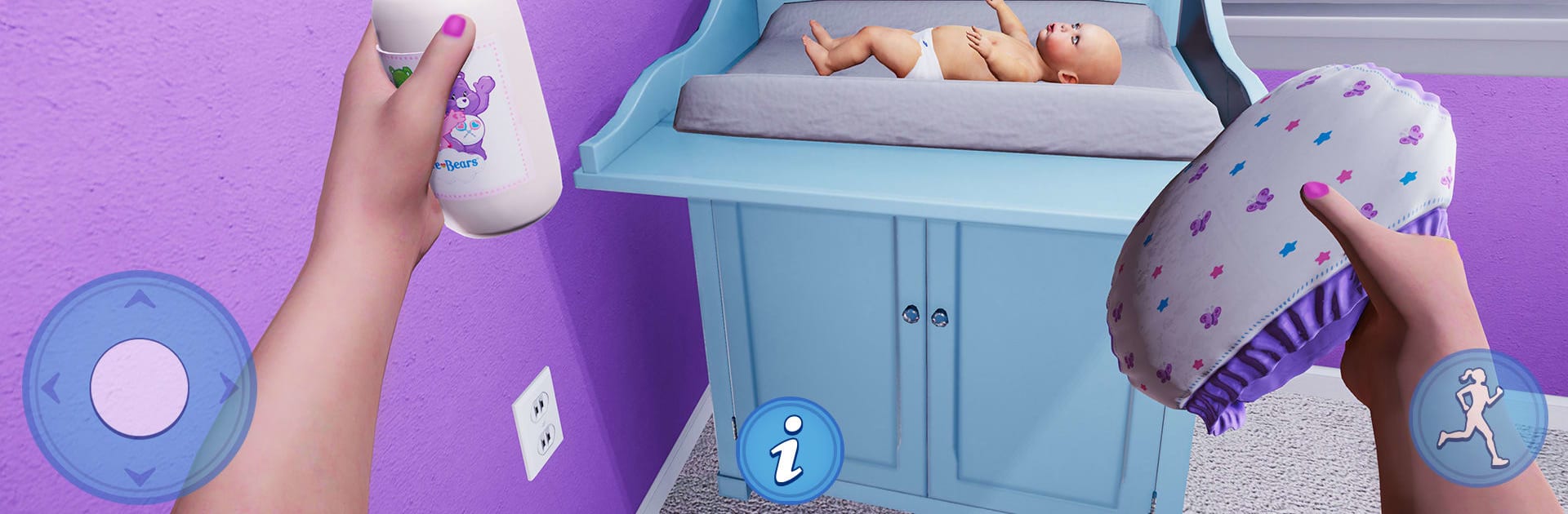
Pregnant Mother Baby Care Sim is a warm, slice-of-life Simulation that follows an expecting mom from prenatal checkups to late-night newborn snuggles. You’ll juggle self-care, baby care, and the everyday bustle of home life—breakfasts, backpacks, and all the tiny to-dos that make a family tick. Prefer a bigger screen? It plays nicely on BlueStacks, too.

Game Features

  • Real pregnancy journey: Visit the hospital for checkups, follow healthy routines, and get everything ready for the big day.
  • Day-in-the-life tasks: Wake up early, prep breakfast, pack school bags, and make sure everyone’s out the door on time.
  • Newborn care essentials: Feed, bathe, dress, and change diapers while staying calm through those adorable little cries.
  • Family management: Check in on your partner and loved ones, keep the home running, and maintain a happy, cozy vibe.
  • Build a cozy nursery: Decorate the baby’s room with cute items and make it feel just right for your little one.
  • Dress-up moments: Pick outfits and comfortable looks for mom, from morning yoga to hospital visits.
  • Smooth, simple controls: Tap and swipe through tasks—easy to learn, relaxing to play.
  • Polished visuals: Bright rooms, soft animations, and a welcoming home that’s fun to explore.
  • Goals for each day: Short, focused levels introduce new responsibilities and keep the routine fresh.
  • Balance and well-being: Keep an eye on mom’s health while handling chores—small choices add up to a happier home.

Ready to top the leaderboard? We bet you do. Let precise controls and sharp visuals optimized on BlueStacks lead you to victory.


Game Features

Enhancements

  • Macros
  • Multi Instance
  • Multi Instance Sync
  • Script
  • Enhancements
Macros

Macros

Automate the predictable in Pregnant Mother Baby Care Sim and transform your gameplay with Macros. Get access to inventive Macros in the BlueStacks Macro Community
Multi Instance

Multi Instance

Play Pregnant Mother Baby Care Sim on one window. And chat with your friend on the other. Press CTRL + Shift + 8 to open the Multi-Instance Manager. And start creating fresh instances or clone an existing one.
Multi Instance Sync

Multi Instance Sync

Play Pregnant Mother Baby Care Sim with the power of Multi-Instance Sync. Replicate what you are doing on the main instance on all other instances. Level up faster, play more.
Script

Script

Script your way to gaming glory in Pregnant Mother Baby Care Sim with BlueStacks Script. Write and run a set of commands to automate repeated tasks. Trigger the command by assigning it to any key.
Read More

How to Download and Play Pregnant Mother Baby Care Sim on PC or Mac

  • Download and install BlueStacks on your PC or Mac

  • Complete Google sign-in to access the Play Store, or do it later

  • Look for Pregnant Mother Baby Care Sim in the search bar at the top right corner

  • Click to install Pregnant Mother Baby Care Sim from the search results

  • Complete Google sign-in (if you skipped step 2) to install Pregnant Mother Baby Care Sim

  • Click the Pregnant Mother Baby Care Sim icon on the home screen to start playing

video
Watch Video

Minimum System Requirements

With BlueStacks 5, you can get started on a PC that fulfills the following requirements.

  • Operating System

    Microsoft Windows 7 or above, macOS 11 (Big Sur) or above

  • Processor

    Intel, AMD or Apple Silicon Processor

  • RAM

    at least 4GB

  • HDD

    10GB Free Disk Space

Note:

* You must be an Administrator on your PC. Up to date graphics drivers from Microsoft or the chipset vendor.

Pregnant Mother Baby Care Sim - FAQs

  • How to play Pregnant Mother Baby Care Sim on Windows PC & Mac?

    Play Pregnant Mother Baby Care Sim on your PC or Mac by following these simple steps.

    • Click on 'Play Pregnant Mother Baby Care Sim on PC’ to download BlueStacks
    • Install it and log-in to Google Play Store
    • Launch and play the game.
  • Why is BlueStacks the fastest and safest platform to play games on PC?

    BlueStacks respects your privacy and is always safe and secure to use. It does not carry any malware, spyware, or any sort of additional software that could harm your PC.

    It is engineered to optimize speed and performance for a seamless gaming experience.

  • What are Pregnant Mother Baby Care Sim PC requirements?

    Minimum requirement to run Pregnant Mother Baby Care Sim on your PC

    • OS: Microsoft Windows 7 or above MacOS 11 (Big Sur) or above
    • Processor: Intel, AMD or Apple Silicon Processor
    • RAM: Your PC must have at least 4GB of RAM. (Note that having 4GB or more disk space is not a substitute for RAM)
    • HDD: 10GB Free Disk Space.
    • You must be an Administrator on your PC.