Авто-ретро: СМЗ С-3Д

Авто-ретро: СМЗ С-3Д

Simulation

| Сопротивление Бесполезно

Play on PC with BlueStacks or from our cloud

  • Overview
  • Game Features
  • How to Play

Page Modified On: August 20, 2026

Play Авто-ретро: СМЗ С-3Д on PC or Mac

Авто-ретро: СМЗ С-3Д by Сопротивление Бесполезно has plenty to keep you busy. BlueStacks lets you play it on PC or Mac with more screen space, better control, and fewer mobile limits.

About the Game

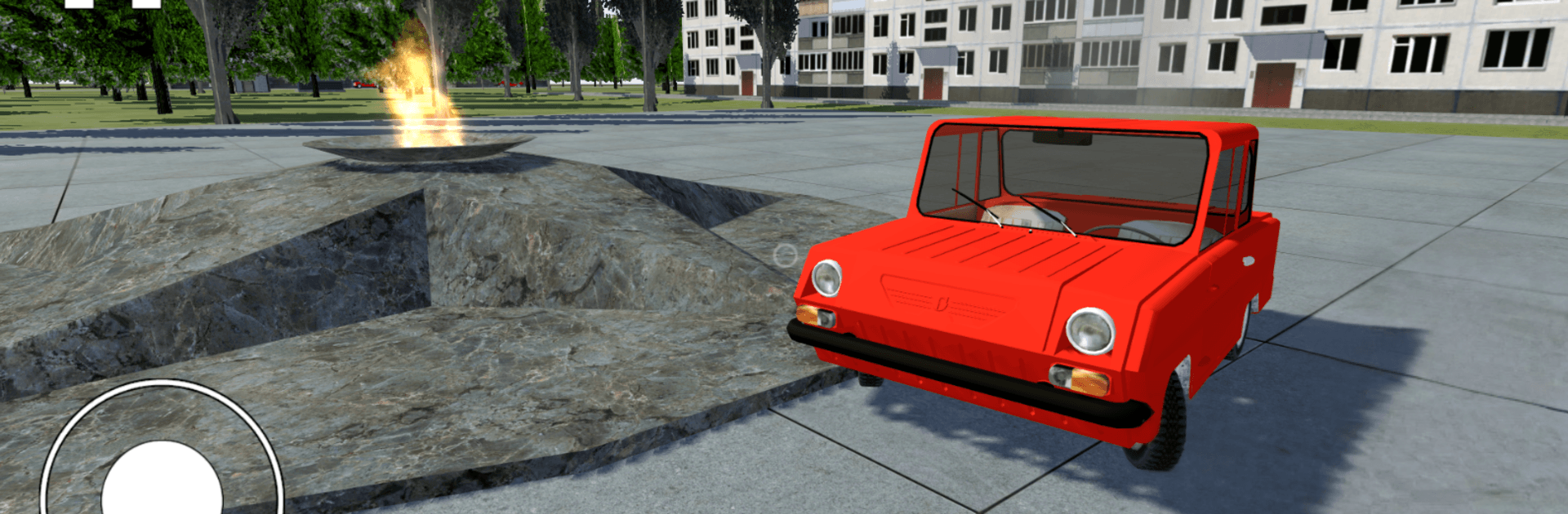
Авто-ретро: СМЗ С-3Д is a Simulation that celebrates a very specific kind of nostalgia: cruising a classic Soviet microcar through places that feel pulled straight from old photo albums. It’s all about soaking in the details—peeking under hoods, repainting panels, and rolling through cities, forests, and quiet villages at your own pace. Prefer sitting back and watching the world go by? You can even ride a trolleybus as a passenger. If you like playing on a bigger screen, it runs comfortably on PC with BlueStacks and straightforward keyboard-and-mouse controls.

Game Features

  • A world of vintage places: Wander through a garage cooperative, city streets, a working factory, an autodrome, forest roads, a sleepy village, and a collective farm—each space crafted with a lived-in, old-school feel.
  • Soviet-era flavor: Drive a classic S-3D and cross paths with period machines from the era’s auto scene, from humble cars to sturdy workhorses.
  • Ride the trolleybus: Hop in as a passenger and watch the city unfold from a seat by the window—no driving, just people-watching and street scenery.
  • Hands-on with your car: Open every door and hood, poke around compartments, and get a close look at the bits most games barely show.
  • Paint it your way: Refinish the body with new colors to match your mood—subtle touch-up or bold overhaul, your call.
  • Flexible controls: Choose on-screen buttons or go with keyboard-and-mouse; it feels natural, especially when playing on BlueStacks.
  • Slow-lane exploration: No rush, no pressure—take your time, learn the car’s quirks, and let the old-world atmosphere sink in.

Ready to top the leaderboard? We bet you do. Let precise controls and sharp visuals optimized on BlueStacks lead you to victory.


Game Features

Enhancements

  • Macros
  • Multi Instance
  • Multi Instance Sync
  • Script
  • Enhancements
Macros

Macros

Automate the predictable in Авто-ретро: СМЗ С-3Д and transform your gameplay with Macros. Get access to inventive Macros in the BlueStacks Macro Community
Multi Instance

Multi Instance

Play Авто-ретро: СМЗ С-3Д on one window. And chat with your friend on the other. Press CTRL + Shift + 8 to open the Multi-Instance Manager. And start creating fresh instances or clone an existing one.
Multi Instance Sync

Multi Instance Sync

Play Авто-ретро: СМЗ С-3Д with the power of Multi-Instance Sync. Replicate what you are doing on the main instance on all other instances. Level up faster, play more.
Script

Script

Script your way to gaming glory in Авто-ретро: СМЗ С-3Д with BlueStacks Script. Write and run a set of commands to automate repeated tasks. Trigger the command by assigning it to any key.
Read More

How to Download and Play Авто-ретро: СМЗ С-3Д on PC or Mac

  • Download and install BlueStacks on your PC or Mac

  • Complete Google sign-in to access the Play Store, or do it later

  • Look for Авто-ретро: СМЗ С-3Д in the search bar at the top right corner

  • Click to install Авто-ретро: СМЗ С-3Д from the search results

  • Complete Google sign-in (if you skipped step 2) to install Авто-ретро: СМЗ С-3Д

  • Click the Авто-ретро: СМЗ С-3Д icon on the home screen to start playing

video
Watch Video

Minimum System Requirements

With BlueStacks 5, you can get started on a PC that fulfills the following requirements.

  • Operating System

    Microsoft Windows 7 or above, macOS 11 (Big Sur) or above

  • Processor

    Intel, AMD or Apple Silicon Processor

  • RAM

    at least 4GB

  • HDD

    10GB Free Disk Space

Note:

* You must be an Administrator on your PC. Up to date graphics drivers from Microsoft or the chipset vendor.

Авто-ретро: СМЗ С-3Д - FAQs

  • How to play Авто-ретро: СМЗ С-3Д on Windows PC & Mac?

    Play Авто-ретро: СМЗ С-3Д on your PC or Mac by following these simple steps.

    • Click on 'Play Авто-ретро: СМЗ С-3Д on PC’ to download BlueStacks
    • Install it and log-in to Google Play Store
    • Launch and play the game.
  • Why is BlueStacks the fastest and safest platform to play games on PC?

    BlueStacks respects your privacy and is always safe and secure to use. It does not carry any malware, spyware, or any sort of additional software that could harm your PC.

    It is engineered to optimize speed and performance for a seamless gaming experience.

  • What are Авто-ретро: СМЗ С-3Д PC requirements?

    Minimum requirement to run Авто-ретро: СМЗ С-3Д on your PC

    • OS: Microsoft Windows 7 or above MacOS 11 (Big Sur) or above
    • Processor: Intel, AMD or Apple Silicon Processor
    • RAM: Your PC must have at least 4GB of RAM. (Note that having 4GB or more disk space is not a substitute for RAM)
    • HDD: 10GB Free Disk Space.
    • You must be an Administrator on your PC.