Spooky Beat: Find the Monsters

Spooky Beat: Find the Monsters

Simulation

| Doublentil

Play on PC with BlueStacks or from our cloud

  • Overview
  • Game Features
  • How to Play

Page Modified On: September 21, 2026

Play Spooky Beat: Find the Monsters on PC or Mac

Bring your A-game to Spooky Beat: Find the Monsters, the Simulation game sensation from Doublentil. Give your gameplay the much-needed boost with precise game controls, high FPS graphics, and top-tier features on your PC or Mac with BlueStacks.

About the Game

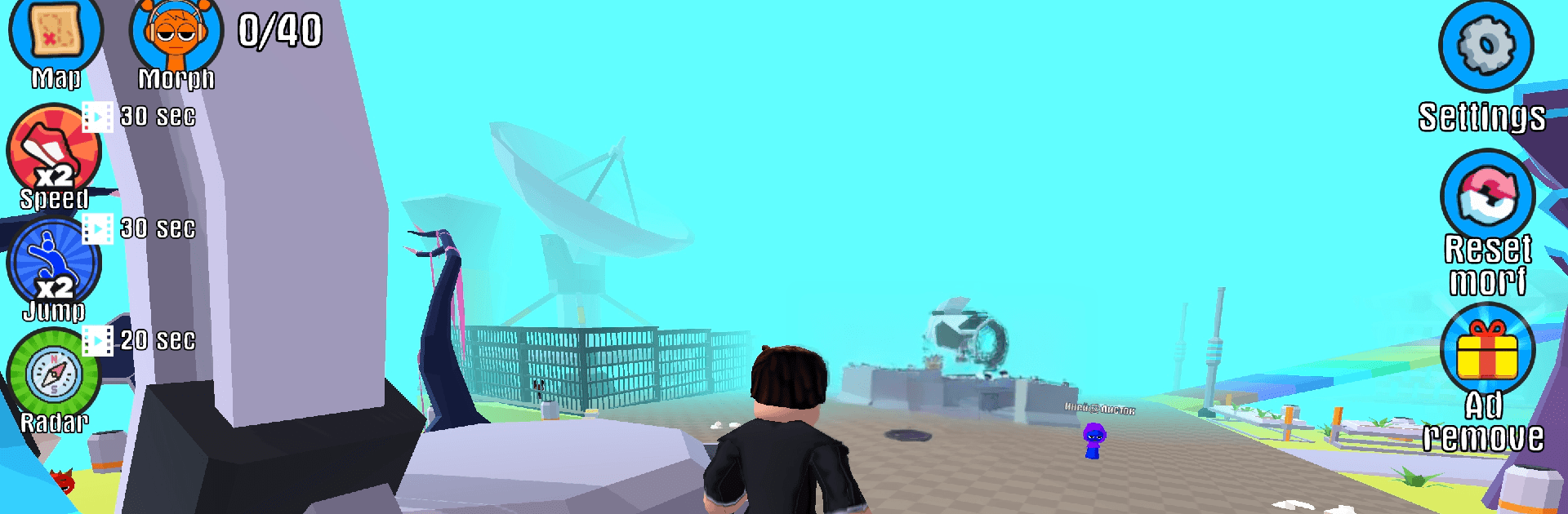
Spooky Beat: Find the Monsters is a playful mashup of hide-and-seek and rhythm, where you poke around eerie locations and follow musical cues to uncover cheeky creatures. This Simulation adventure keeps things light and clever, serving up quick hunts, quirky surprises, and missions that reward a sharp eye. Prefer a bigger screen and comfy controls? It runs smoothly on BlueStacks as well.

Game Features

  • Beat-guided searching: Follow subtle audio and visual cues that groove along with the soundtrack to zero in on sneaky monsters.
  • Haunted locales: Wander through creaky mansions, foggy forests, and other themed spots packed with personality and secrets.
  • Pick-up-and-play controls: Jump in fast with simple interactions that feel natural, whether you’re exploring or chasing clues.
  • Fresh goals each level: Tackle varied objectives—spot lists, timed hunts, and multi-step tasks that keep every run feeling new.
  • Unlockable maps: Progress to open new areas, each with its own twist, hazards, and hidden nooks to comb through.
  • Collectible critter album: Find, catalog, and admire a gallery of oddball monsters with charming animations and weird little quirks.
  • Rewards and achievements: Complete missions to earn goodies, tick off milestones, and track your monster-hunting mastery.
  • Replay-friendly surprises: Hidden spots shuffle and clues change, so returning to a favorite map still feels unexpected.
  • Gentle spooky vibes: Enjoy cartoon-styled chills—moody lighting, playful jump-scares, and zero gore—great for a cozy scare.
  • Play your way: Sneak in a quick round or settle in for a longer session; the pacing stays relaxed without losing challenge.

Get ready for a buttery smooth, high-performance gaming action only on BlueStacks.

Game Features

Enhancements

  • Macros
  • Multi Instance
  • Multi Instance Sync
  • Script
  • Enhancements
Macros

Macros

Automate the predictable in Spooky Beat: Find the Monsters and transform your gameplay with Macros. Get access to inventive Macros in the BlueStacks Macro Community
Multi Instance

Multi Instance

Play Spooky Beat: Find the Monsters on one window. And chat with your friend on the other. Press CTRL + Shift + 8 to open the Multi-Instance Manager. And start creating fresh instances or clone an existing one.
Multi Instance Sync

Multi Instance Sync

Play Spooky Beat: Find the Monsters with the power of Multi-Instance Sync. Replicate what you are doing on the main instance on all other instances. Level up faster, play more.
Script

Script

Script your way to gaming glory in Spooky Beat: Find the Monsters with BlueStacks Script. Write and run a set of commands to automate repeated tasks. Trigger the command by assigning it to any key.
Read More

How to Download and Play Spooky Beat: Find the Monsters on PC or Mac

  • Download and install BlueStacks on your PC or Mac

  • Complete Google sign-in to access the Play Store, or do it later

  • Look for Spooky Beat: Find the Monsters in the search bar at the top right corner

  • Click to install Spooky Beat: Find the Monsters from the search results

  • Complete Google sign-in (if you skipped step 2) to install Spooky Beat: Find the Monsters

  • Click the Spooky Beat: Find the Monsters icon on the home screen to start playing

video
Watch Video

Minimum System Requirements

With BlueStacks 5, you can get started on a PC that fulfills the following requirements.

  • Operating System

    Microsoft Windows 7 or above, macOS 11 (Big Sur) or above

  • Processor

    Intel, AMD or Apple Silicon Processor

  • RAM

    at least 4GB

  • HDD

    10GB Free Disk Space

Note:

* You must be an Administrator on your PC. Up to date graphics drivers from Microsoft or the chipset vendor.

Spooky Beat: Find the Monsters - FAQs

  • How to play Spooky Beat: Find the Monsters on Windows PC & Mac?

    Play Spooky Beat: Find the Monsters on your PC or Mac by following these simple steps.

    • Click on 'Play Spooky Beat: Find the Monsters on PC’ to download BlueStacks
    • Install it and log-in to Google Play Store
    • Launch and play the game.
  • Why is BlueStacks the fastest and safest platform to play games on PC?

    BlueStacks respects your privacy and is always safe and secure to use. It does not carry any malware, spyware, or any sort of additional software that could harm your PC.

    It is engineered to optimize speed and performance for a seamless gaming experience.

  • What are Spooky Beat: Find the Monsters PC requirements?

    Minimum requirement to run Spooky Beat: Find the Monsters on your PC

    • OS: Microsoft Windows 7 or above MacOS 11 (Big Sur) or above
    • Processor: Intel, AMD or Apple Silicon Processor
    • RAM: Your PC must have at least 4GB of RAM. (Note that having 4GB or more disk space is not a substitute for RAM)
    • HDD: 10GB Free Disk Space.
    • You must be an Administrator on your PC.