Sunmori Simulator Indonesia 3D

Sunmori Simulator Indonesia 3D

Simulation

| VerlyGameDev

Play on PC with BlueStacks or from our cloud

  • Overview
  • Game Features
  • How to Play

Page Modified On: August 14, 2026

Play Sunmori Simulator Indonesia 3D on PC or Mac

Explore a whole new adventure with Sunmori Simulator Indonesia 3D, a Simulation game created by VerlyGameDev. Experience great gameplay with BlueStacks, the most popular gaming platform to play Android games on your PC or Mac.

About the Game

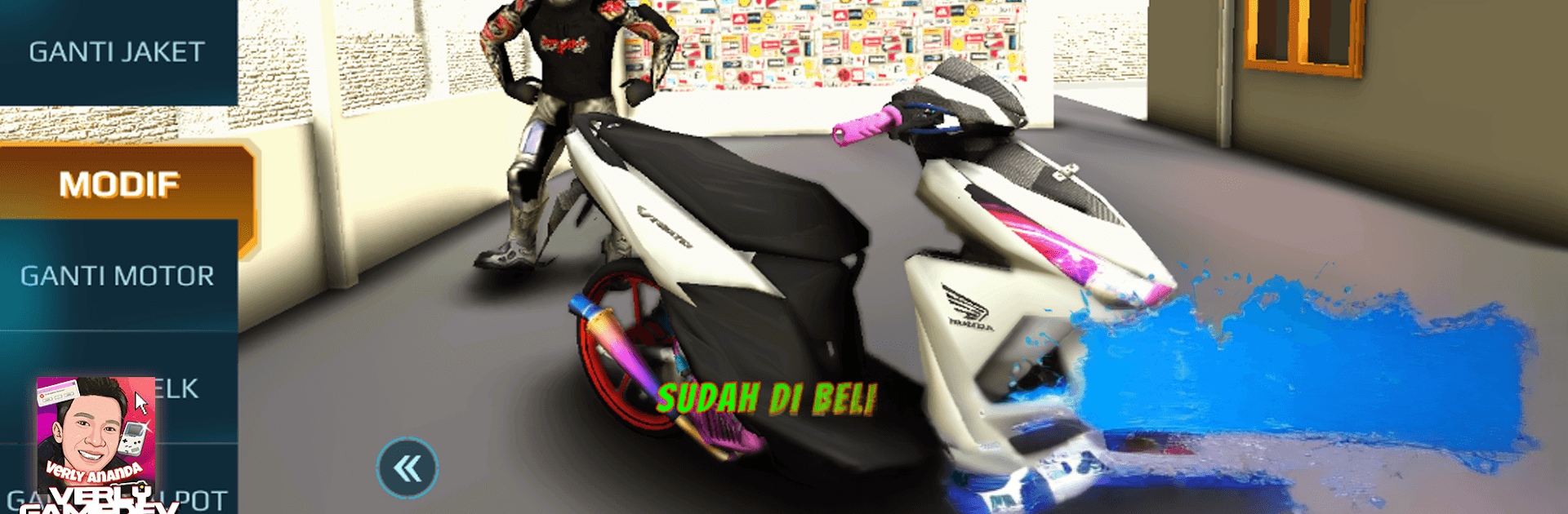
Sunmori Simulator Indonesia 3D is a laid-back-meets-adrenaline Simulation ride through scenic Indonesian roads. Cruise at your own pace across a map inspired by Bandung and the hills of Lembang, or jump into wild street races to test your build and stack some cash. Prefer a bigger view and tighter input? It feels great on BlueStacks too.

Game Features

  • Open-World Sunmori: Kick back in Free Ride mode and wander wherever the road takes you. Roll past rest areas, gas stations, tourist spots, and cozy hillside stretches that capture everyday Indonesian vibes.

  • Wild Racing Mode: When it’s time to go full throttle, line up for gritty races and prove your tuning works under pressure. Win money, unlock new rides, and push for that “king of the road” feeling.

  • Bikes You Actually Want: Build a garage that spans nimble city scooters, punchy 250s, and full-fat superbikes. From everyday favorites to track-ready monsters, there’s something for every style.

  • Tune, Mod, Repeat: Upgrade performance to squeeze out extra speed, then add visual touches to give your bike personality. Small tweaks matter—feel the difference on straights and in tight corners.

  • On-Foot + Cinematic Camera: Hop off the bike to soak in the scenery, then switch to cinematic angles for slick, movie-like shots of your ride and the road ahead.

  • Indonesian Atmosphere: Landmarks, street layouts, and short getaways feel familiar if you know West Java—think winding routes, hillside rest stops, and city-to-suburb transitions.

  • Clean 3D Visuals: Crisp HD graphics and a smooth sense of speed make every sprint, cruise, and photo op pop without getting in your way.

BlueStacks gives you more room to focus on the game and less time adjusting around mobile limitations.


Game Features

Enhancements

  • Macros
  • Multi Instance
  • Multi Instance Sync
  • Script
  • Enhancements
Macros

Macros

Automate the predictable in Sunmori Simulator Indonesia 3D and transform your gameplay with Macros. Get access to inventive Macros in the BlueStacks Macro Community
Multi Instance

Multi Instance

Play Sunmori Simulator Indonesia 3D on one window. And chat with your friend on the other. Press CTRL + Shift + 8 to open the Multi-Instance Manager. And start creating fresh instances or clone an existing one.
Multi Instance Sync

Multi Instance Sync

Play Sunmori Simulator Indonesia 3D with the power of Multi-Instance Sync. Replicate what you are doing on the main instance on all other instances. Level up faster, play more.
Script

Script

Script your way to gaming glory in Sunmori Simulator Indonesia 3D with BlueStacks Script. Write and run a set of commands to automate repeated tasks. Trigger the command by assigning it to any key.
Read More

How to Download and Play Sunmori Simulator Indonesia 3D on PC or Mac

  • Download and install BlueStacks on your PC or Mac

  • Complete Google sign-in to access the Play Store, or do it later

  • Look for Sunmori Simulator Indonesia 3D in the search bar at the top right corner

  • Click to install Sunmori Simulator Indonesia 3D from the search results

  • Complete Google sign-in (if you skipped step 2) to install Sunmori Simulator Indonesia 3D

  • Click the Sunmori Simulator Indonesia 3D icon on the home screen to start playing

video
Watch Video

Minimum System Requirements

With BlueStacks 5, you can get started on a PC that fulfills the following requirements.

  • Operating System

    Microsoft Windows 7 or above, macOS 11 (Big Sur) or above

  • Processor

    Intel, AMD or Apple Silicon Processor

  • RAM

    at least 4GB

  • HDD

    10GB Free Disk Space

Note:

* You must be an Administrator on your PC. Up to date graphics drivers from Microsoft or the chipset vendor.

Sunmori Simulator Indonesia 3D - FAQs

  • How to play Sunmori Simulator Indonesia 3D on Windows PC & Mac?

    Play Sunmori Simulator Indonesia 3D on your PC or Mac by following these simple steps.

    • Click on 'Play Sunmori Simulator Indonesia 3D on PC’ to download BlueStacks
    • Install it and log-in to Google Play Store
    • Launch and play the game.
  • Why is BlueStacks the fastest and safest platform to play games on PC?

    BlueStacks respects your privacy and is always safe and secure to use. It does not carry any malware, spyware, or any sort of additional software that could harm your PC.

    It is engineered to optimize speed and performance for a seamless gaming experience.

  • What are Sunmori Simulator Indonesia 3D PC requirements?

    Minimum requirement to run Sunmori Simulator Indonesia 3D on your PC

    • OS: Microsoft Windows 7 or above MacOS 11 (Big Sur) or above
    • Processor: Intel, AMD or Apple Silicon Processor
    • RAM: Your PC must have at least 4GB of RAM. (Note that having 4GB or more disk space is not a substitute for RAM)
    • HDD: 10GB Free Disk Space.
    • You must be an Administrator on your PC.