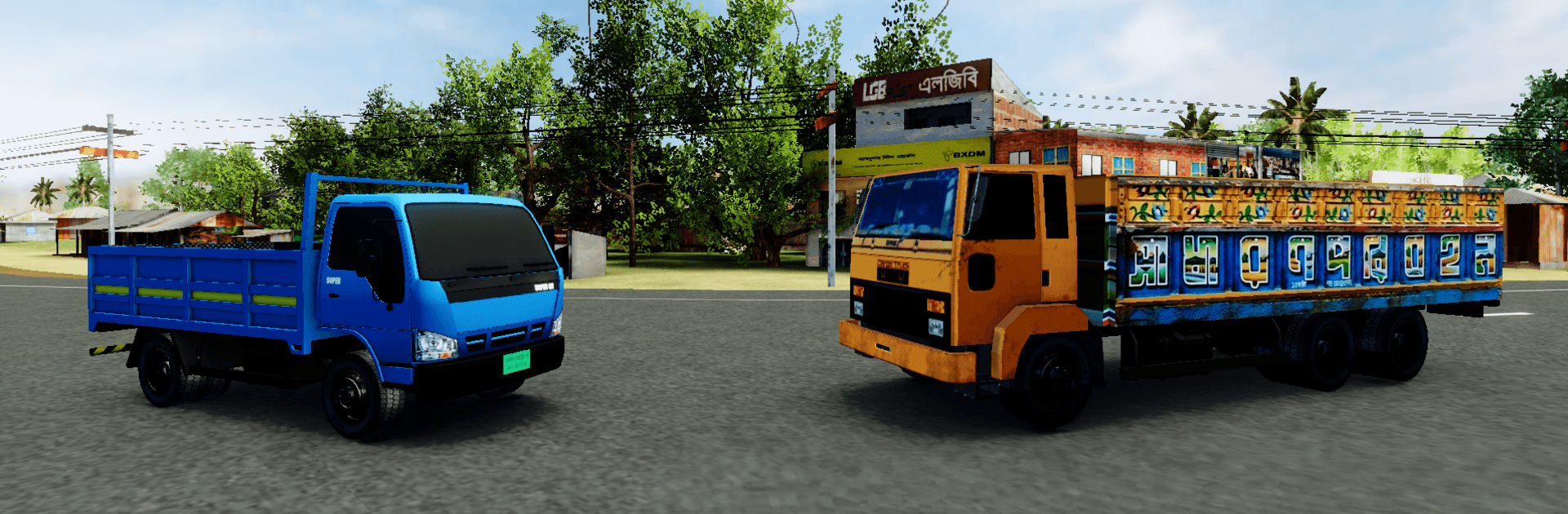
Truck Simulator Bangladesh

Truck Simulator Bangladesh

Simulation

| Ghost Interactive

Play on PC with BlueStacks or from our cloud

  • Overview
  • Game Features
  • How to Play

Page Modified On: October 30, 2026

Play Truck Simulator Bangladesh on PC or Mac

Bring your A-game to Truck Simulator Bangladesh, the Simulation game sensation from Ghost Interactive. Give your gameplay the much-needed boost with precise game controls, high FPS graphics, and top-tier features on your PC or Mac with BlueStacks.

About the Game

Truck Simulator Bangladesh puts you in the driver’s seat for a grounded, no-nonsense trucking journey across Bangladesh. This Simulation game focuses on believable driving, local flavor, and the small decisions that make big rigs feel alive. Haul cargo through buzzing cities and quiet village roads, handle tight turns, and keep your schedule in check—prefer a bigger view? It plays great on BlueStacks, too.

Game Features

  • Local trucks that feel heavy: Drive rigs inspired by the ones you actually see across Bangladesh, with weighty handling, believable suspension, and engine notes that growl when you push the load.
  • Bangladesh on the map: Roll through familiar city streets, highways, and rural lanes packed with landmarks, tight corners, and everyday traffic patterns you’ll recognize.
  • Cargo jobs that count: Pick up goods, plan the route, watch your timing, and deliver safely to earn money you can put back into your fleet.
  • Weather and time that change the road: Sunny afternoons, monsoon downpours, misty nights—you’ll adjust braking, visibility, and speed as conditions shift.
  • A garage that’s truly yours: Add local-inspired paint, decals, and rims, then upgrade power, brakes, and steering to handle hills, heavy loads, and tricky pavement.
  • Controls that match your style: Go with tilt, a virtual wheel, or buttons, and switch between manual and automatic gearboxes depending on how hands-on you want to be.
  • Free drive without a connection: Explore at your own pace in offline mode, practice routes, and get comfortable with each rig before you take on tougher contracts.
  • Traffic and route challenges: Navigate narrow streets, crowded junctions, and sudden slowdowns that demand clean lines and patient driving.

Ready to top the leaderboard? We bet you do. Let precise controls and sharp visuals optimized on BlueStacks lead you to victory.


Game Features

Enhancements

  • Macros
  • Multi Instance
  • Multi Instance Sync
  • Script
  • Enhancements
Macros

Macros

Automate the predictable in Truck Simulator Bangladesh and transform your gameplay with Macros. Get access to inventive Macros in the BlueStacks Macro Community
Multi Instance

Multi Instance

Play Truck Simulator Bangladesh on one window. And chat with your friend on the other. Press CTRL + Shift + 8 to open the Multi-Instance Manager. And start creating fresh instances or clone an existing one.
Multi Instance Sync

Multi Instance Sync

Play Truck Simulator Bangladesh with the power of Multi-Instance Sync. Replicate what you are doing on the main instance on all other instances. Level up faster, play more.
Script

Script

Script your way to gaming glory in Truck Simulator Bangladesh with BlueStacks Script. Write and run a set of commands to automate repeated tasks. Trigger the command by assigning it to any key.
Read More

How to Download and Play Truck Simulator Bangladesh on PC or Mac

  • Download and install BlueStacks on your PC or Mac

  • Complete Google sign-in to access the Play Store, or do it later

  • Look for Truck Simulator Bangladesh in the search bar at the top right corner

  • Click to install Truck Simulator Bangladesh from the search results

  • Complete Google sign-in (if you skipped step 2) to install Truck Simulator Bangladesh

  • Click the Truck Simulator Bangladesh icon on the home screen to start playing

video
Watch Video

Minimum System Requirements

With BlueStacks 5, you can get started on a PC that fulfills the following requirements.

  • Operating System

    Microsoft Windows 7 or above, macOS 11 (Big Sur) or above

  • Processor

    Intel, AMD or Apple Silicon Processor

  • RAM

    at least 4GB

  • HDD

    10GB Free Disk Space

Note:

* You must be an Administrator on your PC. Up to date graphics drivers from Microsoft or the chipset vendor.

Truck Simulator Bangladesh - FAQs

  • How to play Truck Simulator Bangladesh on Windows PC & Mac?

    Play Truck Simulator Bangladesh on your PC or Mac by following these simple steps.

    • Click on 'Play Truck Simulator Bangladesh on PC’ to download BlueStacks
    • Install it and log-in to Google Play Store
    • Launch and play the game.
  • Why is BlueStacks the fastest and safest platform to play games on PC?

    BlueStacks respects your privacy and is always safe and secure to use. It does not carry any malware, spyware, or any sort of additional software that could harm your PC.

    It is engineered to optimize speed and performance for a seamless gaming experience.

  • What are Truck Simulator Bangladesh PC requirements?

    Minimum requirement to run Truck Simulator Bangladesh on your PC

    • OS: Microsoft Windows 7 or above MacOS 11 (Big Sur) or above
    • Processor: Intel, AMD or Apple Silicon Processor
    • RAM: Your PC must have at least 4GB of RAM. (Note that having 4GB or more disk space is not a substitute for RAM)
    • HDD: 10GB Free Disk Space.
    • You must be an Administrator on your PC.