Ultimate Rider:Traffic Bike 3D

Ultimate Rider:Traffic Bike 3D

Simulation

| Happy Run

Play on PC with BlueStacks or from our cloud

  • Overview
  • Game Features
  • How to Play

Page Modified On: September 18, 2026

Play Ultimate Rider:Traffic Bike 3D on PC or Mac

Ultimate Rider:Traffic Bike 3D brings the Simulation genre to life, and throws up exciting challenges for gamers. Developed by Happy Run, this Android game is best experienced on BlueStacks, the World’s #1 app player for PC and Mac users.

About the Game

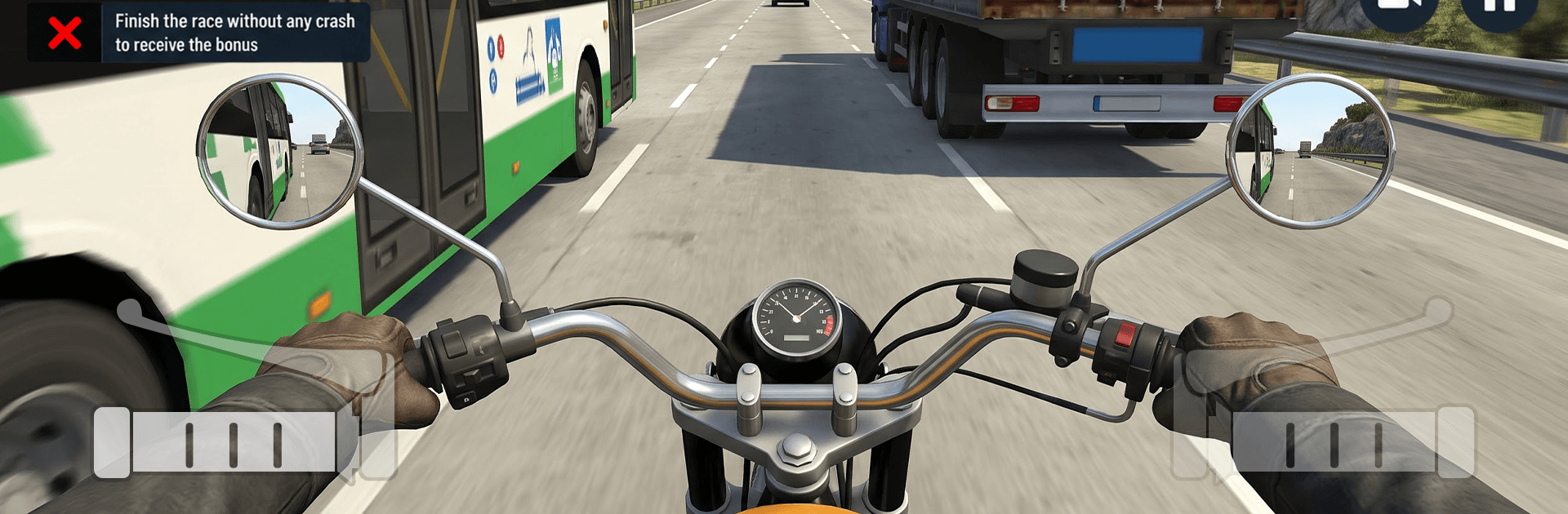
Ultimate Rider:Traffic Bike 3D puts you right in the rider’s seat with smooth handling, tight control, and the kind of speed that makes your stomach flutter. It’s a Simulation that’s all about believable bike behavior and the pure joy of carving through traffic or cruising wide-open roads at your own pace. Prefer a bigger screen and steady frames? It plays great on PC with BlueStacks.

Game Features

  • True-to-road physics: Feel the weight shift in corners, the bite of the brakes, and the surge when you roll on the throttle—every move translates cleanly to the asphalt.
  • A garage for every style: From nimble scooters and classic commuters to sleek superbikes, pick what fits your vibe and swap whenever the mood changes.
  • Crisp 3D visuals: Ride through detailed cities, highways, and countryside routes with sharp bike models, dynamic lighting, and clean effects that keep the world feeling alive.
  • Modes for any mood: Take it easy in Free Ride, sharpen your reflexes with tight Challenges, or push for faster laps in Races and see where you land on the leaderboards.
  • Customization that counts: Upgrade engines, tires, and brakes for real performance gains, then personalize your look with skins, decals, and other cosmetic tweaks.
  • Your view, your call: Switch between first-person for maximum focus or third-person to see more of the road, with camera angles that keep you locked in.
  • Lively traffic flow: Navigate believable traffic patterns, time your passes, and thread gaps safely—or bravely—depending on how bold you’re feeling.
  • Easy to pick up, tough to master: Intuitive controls make it simple to start, while precise braking points and clean racing lines keep skilled riders coming back.
  • Offline anytime: No connection needed for solo rides and practice sessions, so you can play wherever, whenever.

Start playing Ultimate Rider:Traffic Bike 3D on BlueStacks and get a smoother, more comfortable PC or Mac setup.


Game Features

Enhancements

  • Macros
  • Multi Instance
  • Multi Instance Sync
  • Script
  • Enhancements
Macros

Macros

Automate the predictable in Ultimate Rider:Traffic Bike 3D and transform your gameplay with Macros. Get access to inventive Macros in the BlueStacks Macro Community
Multi Instance

Multi Instance

Play Ultimate Rider:Traffic Bike 3D on one window. And chat with your friend on the other. Press CTRL + Shift + 8 to open the Multi-Instance Manager. And start creating fresh instances or clone an existing one.
Multi Instance Sync

Multi Instance Sync

Play Ultimate Rider:Traffic Bike 3D with the power of Multi-Instance Sync. Replicate what you are doing on the main instance on all other instances. Level up faster, play more.
Script

Script

Script your way to gaming glory in Ultimate Rider:Traffic Bike 3D with BlueStacks Script. Write and run a set of commands to automate repeated tasks. Trigger the command by assigning it to any key.
Read More

How to Download and Play Ultimate Rider:Traffic Bike 3D on PC or Mac

  • Download and install BlueStacks on your PC or Mac

  • Complete Google sign-in to access the Play Store, or do it later

  • Look for Ultimate Rider:Traffic Bike 3D in the search bar at the top right corner

  • Click to install Ultimate Rider:Traffic Bike 3D from the search results

  • Complete Google sign-in (if you skipped step 2) to install Ultimate Rider:Traffic Bike 3D

  • Click the Ultimate Rider:Traffic Bike 3D icon on the home screen to start playing

video
Watch Video

Minimum System Requirements

With BlueStacks 5, you can get started on a PC that fulfills the following requirements.

  • Operating System

    Microsoft Windows 7 or above, macOS 11 (Big Sur) or above

  • Processor

    Intel, AMD or Apple Silicon Processor

  • RAM

    at least 4GB

  • HDD

    10GB Free Disk Space

Note:

* You must be an Administrator on your PC. Up to date graphics drivers from Microsoft or the chipset vendor.

Ultimate Rider:Traffic Bike 3D - FAQs

  • How to play Ultimate Rider:Traffic Bike 3D on Windows PC & Mac?

    Play Ultimate Rider:Traffic Bike 3D on your PC or Mac by following these simple steps.

    • Click on 'Play Ultimate Rider:Traffic Bike 3D on PC’ to download BlueStacks
    • Install it and log-in to Google Play Store
    • Launch and play the game.
  • Why is BlueStacks the fastest and safest platform to play games on PC?

    BlueStacks respects your privacy and is always safe and secure to use. It does not carry any malware, spyware, or any sort of additional software that could harm your PC.

    It is engineered to optimize speed and performance for a seamless gaming experience.

  • What are Ultimate Rider:Traffic Bike 3D PC requirements?

    Minimum requirement to run Ultimate Rider:Traffic Bike 3D on your PC

    • OS: Microsoft Windows 7 or above MacOS 11 (Big Sur) or above
    • Processor: Intel, AMD or Apple Silicon Processor
    • RAM: Your PC must have at least 4GB of RAM. (Note that having 4GB or more disk space is not a substitute for RAM)
    • HDD: 10GB Free Disk Space.
    • You must be an Administrator on your PC.