Fishing Times
Fishing Times

Fishing Times

Sports

| Fishingreminder

Play on PC with BlueStacks or from our cloud

  • Overview
  • Game Features
  • How to Play

Page Modified On: November 28, 2025

Play Fishing Times on PC or Mac

From the innovators and creators at Fishingreminder, Fishing Times is another fun addition to the World of Sports games. Go beyond your mobile screen and play it bigger and better on your PC or Mac. An immersive experience awaits you.

About the Game

Fishing Times by Fishingreminder is a Sports title that turns planning your next cast into a satisfying, data-driven routine. It’s all about picking the moment: reading the water, checking the moon, and heading out when the odds look great. It won’t hook fish for you, but it gives you the timing tools to make every trip feel smarter—and more fun. You can even check your planning screen comfortably on PC with BlueStacks.

Game Features

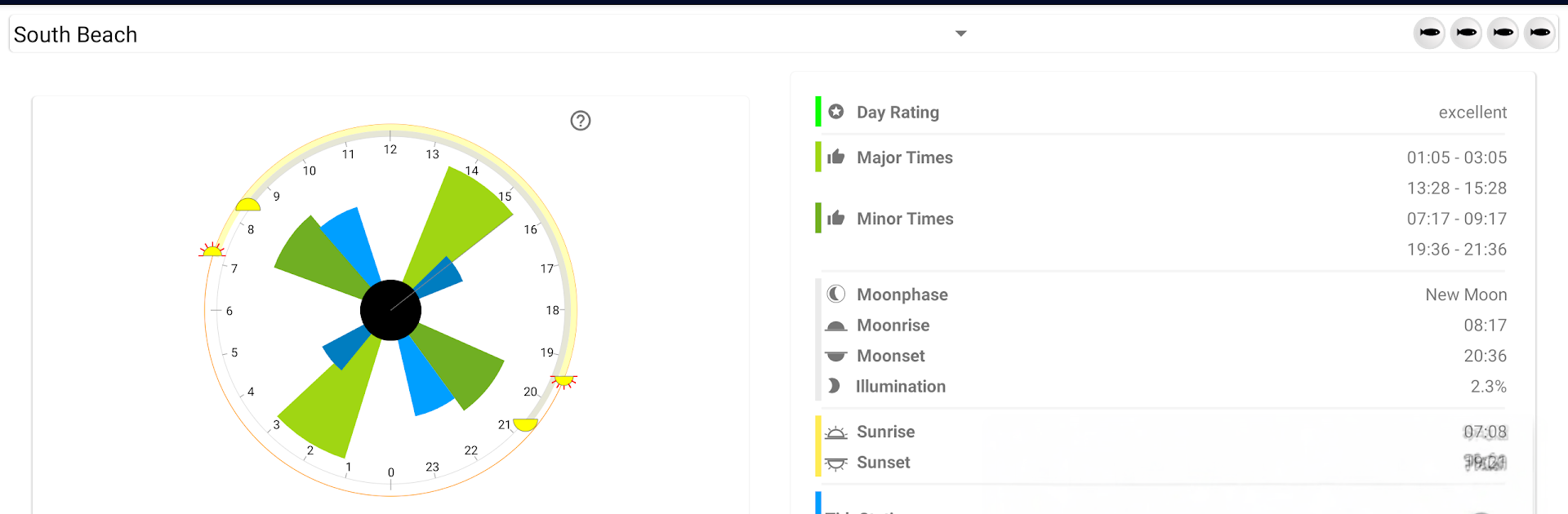
  • Smart Bite Windows: See major and minor feeding periods at a glance so you know when the action is most likely to pick up.
  • Tide Snapshot: Track upcoming highs and lows with clear visual bars—super handy for coastal spots and moving water.
  • Moon & Sun Cues: Get moon phase details front and center, plus quick icons for sunrise and sunset to match your plan to the light.
  • Live Timeline: A simple time marker shows where you are in the day’s cycle, helping you decide whether to stay, move, or switch tactics.
  • Day Quality Rating: A clean 1–4 fish score hints at overall potential, from “eh, maybe” to “get your gear ready.”
  • Easy Browsing: Swipe through dates fast to compare upcoming days and pick your next outing without digging through menus.
  • Real-Angler Focus: Built as a companion to your skills—location, presentation, and a bit of luck still matter. If one spot’s quiet, use the timing info and try a new location or lure.
  • Free Forecast Window: The free version shows a 7‑day lookahead and includes ads, giving you a solid planning base without a paywall.

Get ready for a buttery smooth, high-performance gaming action only on BlueStacks.

Game Features

Enhancements

  • Macros
  • Multi Instance
  • Multi Instance Sync
  • Script
  • Enhancements
Macros

Macros

Automate the predictable in Fishing Times and transform your gameplay with Macros. Get access to inventive Macros in the BlueStacks Macro Community
Multi Instance

Multi Instance

Play Fishing Times on one window. And chat with your friend on the other. Press CTRL + Shift + 8 to open the Multi-Instance Manager. And start creating fresh instances or clone an existing one.
Multi Instance Sync

Multi Instance Sync

Play Fishing Times with the power of Multi-Instance Sync. Replicate what you are doing on the main instance on all other instances. Level up faster, play more.
Script

Script

Script your way to gaming glory in Fishing Times with BlueStacks Script. Write and run a set of commands to automate repeated tasks. Trigger the command by assigning it to any key.
Read More

How to Download and Play Fishing Times on PC or Mac

  • Download and install BlueStacks on your PC or Mac

  • Complete Google sign-in to access the Play Store, or do it later

  • Look for Fishing Times in the search bar at the top right corner

  • Click to install Fishing Times from the search results

  • Complete Google sign-in (if you skipped step 2) to install Fishing Times

  • Click the Fishing Times icon on the home screen to start playing

video
Watch Video

Minimum System Requirements

With BlueStacks 5, you can get started on a PC that fulfills the following requirements.

  • Operating System

    Microsoft Windows 7 or above, macOS 11 (Big Sur) or above

  • Processor

    Intel, AMD or Apple Silicon Processor

  • RAM

    at least 4GB

  • HDD

    10GB Free Disk Space

Note:

* You must be an Administrator on your PC. Up to date graphics drivers from Microsoft or the chipset vendor.

Fishing Times - FAQs

  • How to play Fishing Times on Windows PC & Mac?

    Play Fishing Times on your PC or Mac by following these simple steps.

    • Click on 'Play Fishing Times on PC’ to download BlueStacks
    • Install it and log-in to Google Play Store
    • Launch and play the game.
  • Why is BlueStacks the fastest and safest platform to play games on PC?

    BlueStacks respects your privacy and is always safe and secure to use. It does not carry any malware, spyware, or any sort of additional software that could harm your PC.

    It is engineered to optimize speed and performance for a seamless gaming experience.

  • What are Fishing Times PC requirements?

    Minimum requirement to run Fishing Times on your PC

    • OS: Microsoft Windows 7 or above MacOS 11 (Big Sur) or above
    • Processor: Intel, AMD or Apple Silicon Processor
    • RAM: Your PC must have at least 4GB of RAM. (Note that having 4GB or more disk space is not a substitute for RAM)
    • HDD: 10GB Free Disk Space.
    • You must be an Administrator on your PC.