SIR Tv Kora Live
SIR Tv Kora Live

SIR Tv Kora Live

Sports

| Morozane Tapis

Play on PC with BlueStacks or from our cloud

  • Overview
  • How to Download

Page Modified On: October 21, 2026

Run SIR Tv Kora Live on PC or Mac

Let BlueStacks turn your PC, Mac, or laptop into the perfect home for SIR Tv Kora Live, a fun Sports app from Morozane Tapis.

About the App

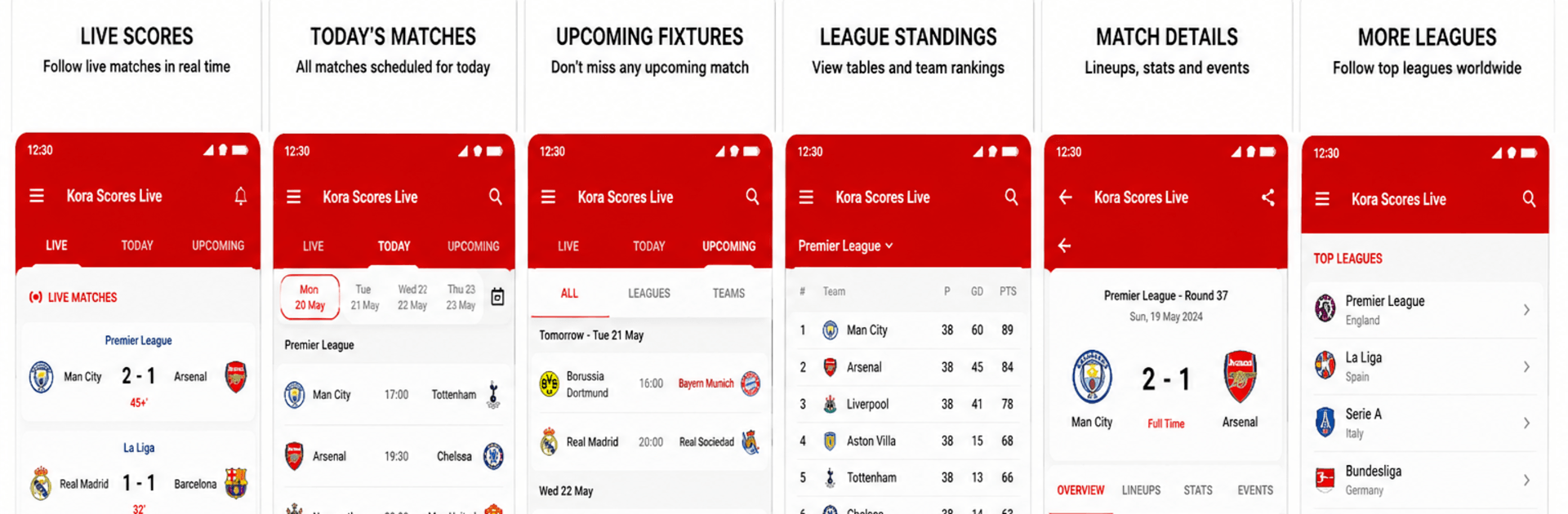
SIR Tv Kora Live is a Sports app built for fans who want the essentials, fast. It puts live scores, today’s fixtures, upcoming games, and standings in one clean place so you can check what matters at a glance. Want a bigger view while you’re following multiple matches? It also runs smoothly on BlueStacks.

App Features

  • Fast score updates: Keep up with matches in real time with clear, reliable scoring that refreshes quickly as the action unfolds.
  • Simple tabs that make sense: Jump between Live, Today, Upcoming, and Standings to see exactly what’s happening now and what’s on the horizon.
  • League browser & quick search: Browse popular leagues or type a league name to get straight to the competition you care about.
  • Detailed match view: Open any game to see a timeline of key moments and stats when they’re available, so you know who’s creating chances and when momentum shifts.
  • Clean, readable design: A straightforward red-and-white layout keeps info easy to scan, even when you’re checking multiple matches in a hurry.
  • Scores and info only: This app focuses on data—no video playback, live TV, or third‑party channel listings.
  • Honest coverage notes: Match data comes from the app’s configured service; stats or events may vary by competition or source.
  • Ads with control: You may see Google AdMob ads; manage related choices through your Google account and device settings.
  • Built to improve: See something off—like a wrong score or a missing fixture? Use the store listing’s contact details to share feedback so it can be fixed.

Eager to take your app experience to the next level? Start right away by downloading BlueStacks on your PC or Mac.


How to Download and Run SIR Tv Kora Live on PC or Mac

  • Download and install BlueStacks on your PC or Mac

  • Complete Google sign-in to access the Play Store, or do it later

  • Look for SIR Tv Kora Live in the search bar at the top right corner

  • Click to install SIR Tv Kora Live from the search results

  • Complete Google sign-in (if you skipped step 2) to install SIR Tv Kora Live

  • Click the SIR Tv Kora Live icon on the home screen to start playing

video
Watch Video

Minimum System Requirements

With BlueStacks 5, you can get started on a PC that fulfills the following requirements.

  • Operating System

    Microsoft Windows 7 or above, macOS 11 (Big Sur) or above

  • Processor

    Intel, AMD or Apple Silicon Processor

  • RAM

    at least 4GB

  • HDD

    10GB Free Disk Space

Note:

* You must be an Administrator on your PC. Up to date graphics drivers from Microsoft or the chipset vendor.

SIR Tv Kora Live - FAQs

  • How to Run SIR Tv Kora Live on Windows PC & Mac?

    Run SIR Tv Kora Live on your PC or Mac by following these simple steps.

    • Click on ‘Download SIR Tv Kora Live on PC’ to download BlueStacks
    • Install it and log-in to Google Play Store
    • Launch and run the app.
  • Why is BlueStacks the fastest and safest platform to play games on PC?

    BlueStacks respects your privacy and is always safe and secure to use. It does not carry any malware, spyware, or any sort of additional software that could harm your PC.

    It is engineered to optimize speed and performance for a seamless gaming experience.

  • What are SIR Tv Kora Live PC requirements?

    Minimum requirement to run SIR Tv Kora Live on your PC

    • OS: Microsoft Windows 7 and above:
    • Processor: Intel or AMD Processor:
    • RAM: Your PC must have at least 2GB of RAM. (Note that having 2GB or more disk space is not a substitute for RAM):
    • HDD: 5GB Free Disk Space.
    • You must be an Administrator on your PC.