
Soccer Battle - Arcade 1v1

Soccer Battle - Arcade 1v1

Sports

| Nova Tech LTDA

Play on PC with BlueStacks or from our cloud

  • Overview
  • Game Features
  • How to Play

Page Modified On: August 14, 2026

Play Soccer Battle - Arcade 1v1 on PC or Mac

Play Soccer Battle – Arcade 1v1 by Nova Tech LTDA on PC or Mac with BlueStacks. Use a bigger screen, mouse and keyboard controls, and smoother performance while you play.

About the Game

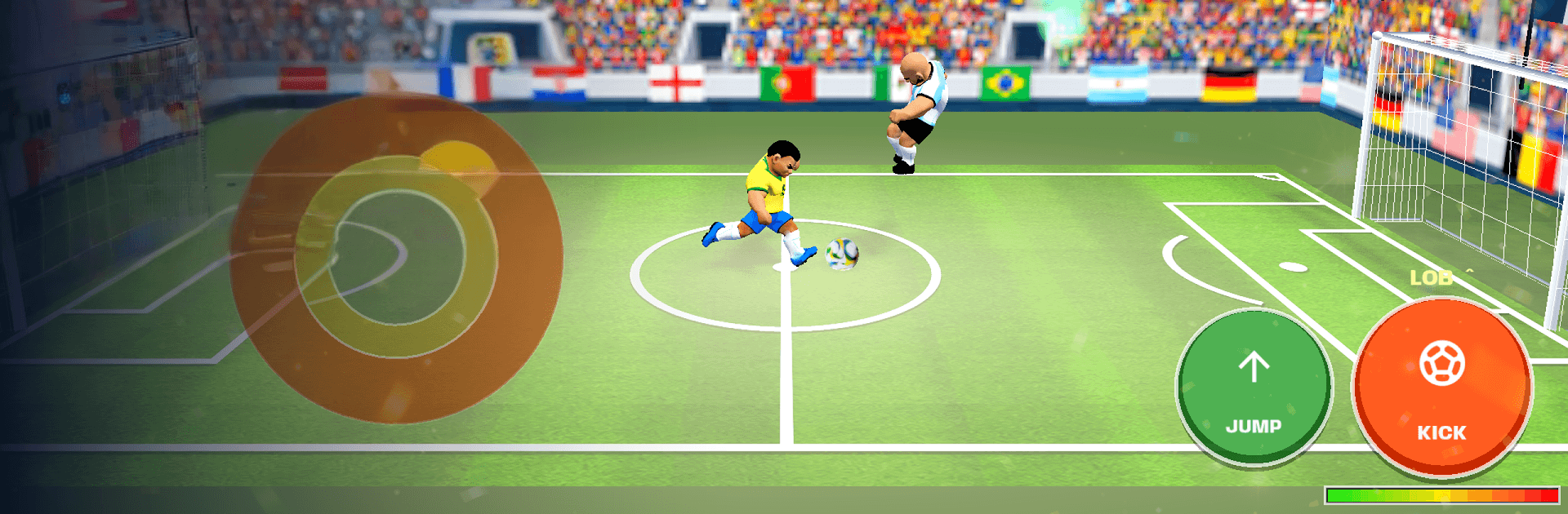
Soccer Battle – Arcade 1v1 drops you into quick, high-stakes duels where it’s just you, your rival, and a net to defend. It’s built for short bursts with real-feeling physics—charge a rocket, time a clean header, or smash a volley before the buzzer. This Sports title is easy to pick up and surprisingly deep once you start reading bounces and fakes. Prefer a bigger display? It also runs great on BlueStacks.

Game Features

  • Tight 1v1 Showdowns: One attacker, one defender, and matches that wrap up fast—every touch, save, and rebound matters.
  • Lifelike Ball Physics: Curving shots, spin, and satisfying ricochets keep plays fresh so no two goals look the same.
  • Simple, Skill-Based Controls: A D-pad plus jump and kick—learn it in seconds, then spend hours mastering angles and timing.
  • Career Mode with Bosses: Tackle 42 handcrafted levels across five regions, each capped with a tricky boss matchup.
  • Eight Distinct Arenas & Day/Night: Kick around on beaches, street courts, school gyms, and more—with lighting that shifts from morning to midnight.
  • Smooth Online Matchmaking: Head-to-head matches run on dedicated servers for steady, responsive play.
  • Local Versus on the Same Wi‑Fi: Sitting next to a friend? Settle the score over your local network.
  • Collect Players, Stadiums & Balls: Unlock a global roster and themed gear, then show off your style.
  • Reactive Play-by-Play: A lively announcer calls out goals, near-misses, and big saves in the language you choose.
  • Play Your Way: Go offline for the full career or hop online to chase wins, climb divisions, and rack up achievements.

BlueStacks gives you more room to focus on the game and less time adjusting around mobile limitations.


Game Features

Enhancements

  • Macros
  • Multi Instance
  • Multi Instance Sync
  • Script
  • Enhancements
Macros

Macros

Automate the predictable in Soccer Battle - Arcade 1v1 and transform your gameplay with Macros. Get access to inventive Macros in the BlueStacks Macro Community
Multi Instance

Multi Instance

Play Soccer Battle - Arcade 1v1 on one window. And chat with your friend on the other. Press CTRL + Shift + 8 to open the Multi-Instance Manager. And start creating fresh instances or clone an existing one.
Multi Instance Sync

Multi Instance Sync

Play Soccer Battle - Arcade 1v1 with the power of Multi-Instance Sync. Replicate what you are doing on the main instance on all other instances. Level up faster, play more.
Script

Script

Script your way to gaming glory in Soccer Battle - Arcade 1v1 with BlueStacks Script. Write and run a set of commands to automate repeated tasks. Trigger the command by assigning it to any key.
Read More

How to Download and Play Soccer Battle - Arcade 1v1 on PC or Mac

  • Download and install BlueStacks on your PC or Mac

  • Complete Google sign-in to access the Play Store, or do it later

  • Look for Soccer Battle - Arcade 1v1 in the search bar at the top right corner

  • Click to install Soccer Battle - Arcade 1v1 from the search results

  • Complete Google sign-in (if you skipped step 2) to install Soccer Battle - Arcade 1v1

  • Click the Soccer Battle - Arcade 1v1 icon on the home screen to start playing

video
Watch Video

Minimum System Requirements

With BlueStacks 5, you can get started on a PC that fulfills the following requirements.

  • Operating System

    Microsoft Windows 7 or above, macOS 11 (Big Sur) or above

  • Processor

    Intel, AMD or Apple Silicon Processor

  • RAM

    at least 4GB

  • HDD

    10GB Free Disk Space

Note:

* You must be an Administrator on your PC. Up to date graphics drivers from Microsoft or the chipset vendor.

Soccer Battle - Arcade 1v1 - FAQs

  • How to play Soccer Battle - Arcade 1v1 on Windows PC & Mac?

    Play Soccer Battle - Arcade 1v1 on your PC or Mac by following these simple steps.

    • Click on 'Play Soccer Battle - Arcade 1v1 on PC’ to download BlueStacks
    • Install it and log-in to Google Play Store
    • Launch and play the game.
  • Why is BlueStacks the fastest and safest platform to play games on PC?

    BlueStacks respects your privacy and is always safe and secure to use. It does not carry any malware, spyware, or any sort of additional software that could harm your PC.

    It is engineered to optimize speed and performance for a seamless gaming experience.

  • What are Soccer Battle - Arcade 1v1 PC requirements?

    Minimum requirement to run Soccer Battle - Arcade 1v1 on your PC

    • OS: Microsoft Windows 7 or above MacOS 11 (Big Sur) or above
    • Processor: Intel, AMD or Apple Silicon Processor
    • RAM: Your PC must have at least 4GB of RAM. (Note that having 4GB or more disk space is not a substitute for RAM)
    • HDD: 10GB Free Disk Space.
    • You must be an Administrator on your PC.







