City Driving Sim Bus Game 3d

City Driving Sim Bus Game 3d

Strategy

| Mega Driving Games

Play on PC with BlueStacks or from our cloud

  • Overview
  • Game Features
  • How to Play

Page Modified On: November 19, 2026

Play City Driving Sim Bus Game 3d on PC or Mac

Play City Driving Sim Bus Game 3d by Mega Driving Games on PC or Mac with BlueStacks. Use a bigger screen, mouse and keyboard controls, and smoother performance while you play.

About the Game

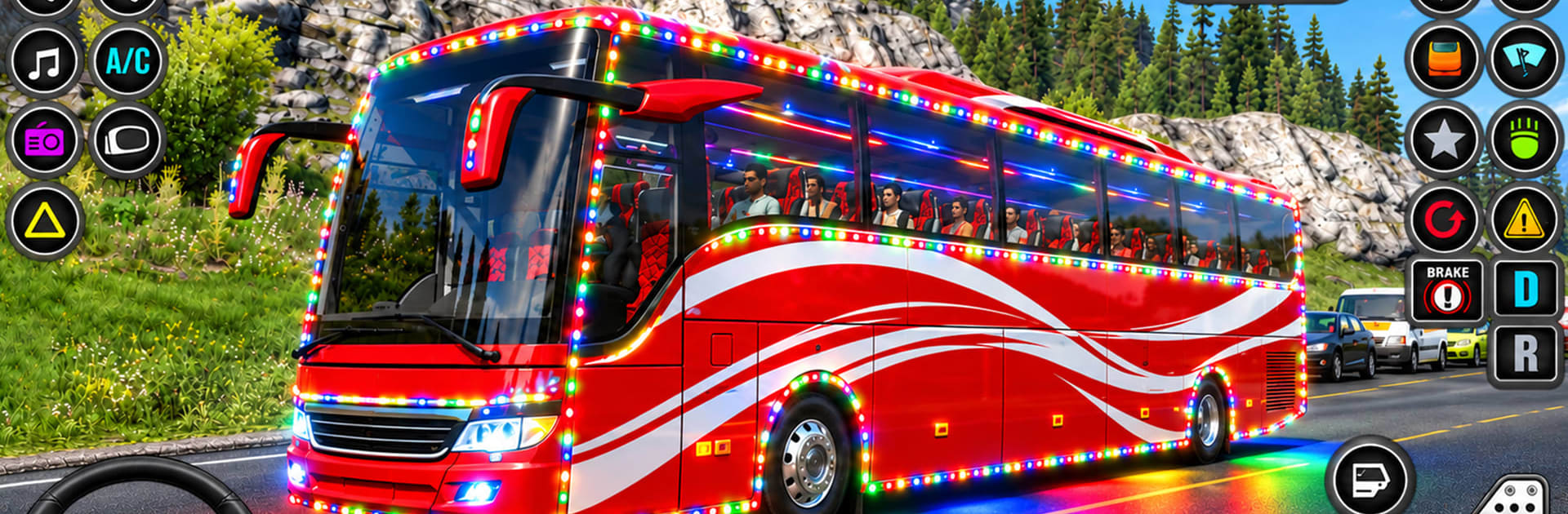
City Driving Sim Bus Game 3d blends hands-on bus driving with thoughtful planning, making every route feel like a small puzzle you can actually sit behind the wheel for. As a Strategy experience, it’s all about timing your stops, reading the traffic, and keeping passengers happy while you guide big vehicles through a busy city. Expect realistic controls, grounded physics, and missions that steadily raise the stakes; it all feels extra smooth when played on BlueStacks.

Game Features

  • Career Progression: Start as a rookie driver and work through a series of missions with tougher routes, trickier intersections, and tighter schedules.
  • Real-World City Driving: Follow traffic rules, watch your mirrors, and handle close quarters while keeping the ride calm and comfortable.
  • Authentic Ticketing: Coordinate with an onboard attendant who checks fares at the start of each run, boarding valid riders and turning away the rest.
  • Luxury Bus Fleet: Choose from six distinct buses—each with detailed interiors, responsive steering, and weighty, believable physics.
  • Urban 3D Visuals: Crisp lighting, roomy views, and smooth camera work make the city feel alive from the depot to the last stop.
  • Smart Traffic AI: Lanes fill up, gaps open and close, and other vehicles behave like they mean it, so every merge actually matters.
  • Intuitive Controls: Pick your steering style, feel natural braking and acceleration, and swap camera angles to master tight turns with big bodies.
  • Optimized Performance: Enjoy steady frame rates and fluid play even during rush hour, with busy streets and lots of on-screen activity.

BlueStacks gives you more room to focus on the game and less time adjusting around mobile limitations.


Game Features

Enhancements

  • Macros
  • Multi Instance
  • Multi Instance Sync
  • Eco Mode
  • Enhancements
Macros

Macros

Skip the boring parts of a game. Play City Driving Sim Bus Game 3d with Macros and get the edge. Simply record a sequence of commands and execute them at any moment.
Multi Instance

Multi Instance

Why limit to one game on your phone when you can play many on your PC? Open multiple instances of City Driving Sim Bus Game 3d at once with Multi-Instance. Leverage the power of different accounts by doing more.
Multi Instance Sync

Multi Instance Sync

Get the best out of City Driving Sim Bus Game 3d with Multi-Instance Sync. Play the game from different accounts and build your own empire. Use Multi-instance sync to repeat the action in the main BlueStacks instance on all other instances.
Eco Mode

Eco Mode

Find the rarest heroes by making multiple summons in City Driving Sim Bus Game 3d. And while you are at it, reduce your PC’s resource consumption with the Eco Mode. Farm efficiently. Get the best results.
Read More

How to Download and Play City Driving Sim Bus Game 3d on PC or Mac

  • Download and install BlueStacks on your PC or Mac

  • Complete Google sign-in to access the Play Store, or do it later

  • Look for City Driving Sim Bus Game 3d in the search bar at the top right corner

  • Click to install City Driving Sim Bus Game 3d from the search results

  • Complete Google sign-in (if you skipped step 2) to install City Driving Sim Bus Game 3d

  • Click the City Driving Sim Bus Game 3d icon on the home screen to start playing

video
Watch Video

Minimum System Requirements

With BlueStacks 5, you can get started on a PC that fulfills the following requirements.

  • Operating System

    Microsoft Windows 7 or above, macOS 11 (Big Sur) or above

  • Processor

    Intel, AMD or Apple Silicon Processor

  • RAM

    at least 4GB

  • HDD

    10GB Free Disk Space

Note:

* You must be an Administrator on your PC. Up to date graphics drivers from Microsoft or the chipset vendor.

City Driving Sim Bus Game 3d - FAQs

  • How to play City Driving Sim Bus Game 3d on Windows PC & Mac?

    Play City Driving Sim Bus Game 3d on your PC or Mac by following these simple steps.

    • Click on 'Play City Driving Sim Bus Game 3d on PC’ to download BlueStacks
    • Install it and log-in to Google Play Store
    • Launch and play the game.
  • Why is BlueStacks the fastest and safest platform to play games on PC?

    BlueStacks respects your privacy and is always safe and secure to use. It does not carry any malware, spyware, or any sort of additional software that could harm your PC.

    It is engineered to optimize speed and performance for a seamless gaming experience.

  • What are City Driving Sim Bus Game 3d PC requirements?

    Minimum requirement to run City Driving Sim Bus Game 3d on your PC

    • OS: Microsoft Windows 7 or above MacOS 11 (Big Sur) or above
    • Processor: Intel, AMD or Apple Silicon Processor
    • RAM: Your PC must have at least 4GB of RAM. (Note that having 4GB or more disk space is not a substitute for RAM)
    • HDD: 10GB Free Disk Space.
    • You must be an Administrator on your PC.