
Corruption
Corruption

Corruption

Strategy

| Rocking Hard

Play on PC with BlueStacks or from our cloud

  • Overview
  • Game Features
  • How to Play

Page Modified On: August 03, 2026

Play Corruption on PC or Mac

Corruption brings the Strategy genre to life, and throws up exciting challenges for gamers. Developed by Rocking Hard, this Android game is best experienced on BlueStacks, the World’s #1 app player for PC and Mac users.

About the Game

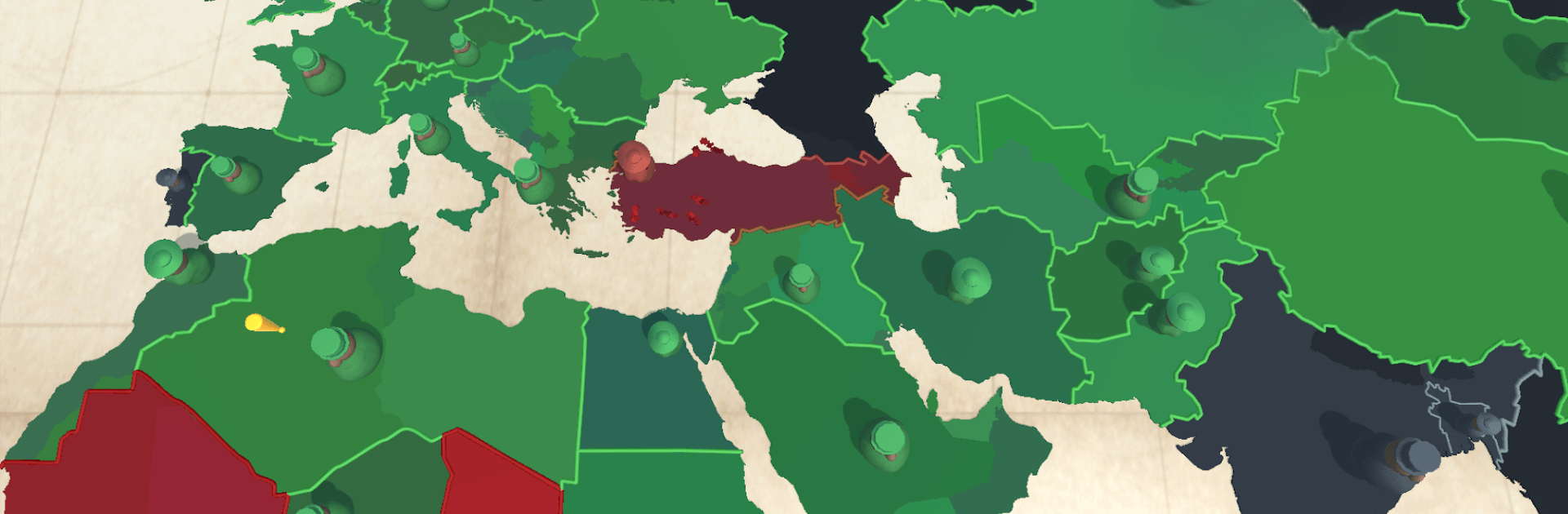
Corruption is a dark Strategy playground where you pull strings from the shadows and bend entire nations to your will. Grease palms, plant insiders, and quietly remove obstacles while keeping an eye on your cash flow, public mood, and the heat from international watchdogs. Prefer a bigger screen and precision controls? It works great on PC with BlueStacks.

Game Features

  • Global Sandbox: Command operations on a living world map where borders shift, leaders rise and fall, and crises throw your plans off balance.
  • Covert Playbook: Bribe officials, infiltrate ministries, leak scandals, and—when subtlety fails—silence rivals with surgical strikes.
  • Money, Heat, and Morale: Balance your budget, keep citizens calm enough not to riot, and avoid drawing too much attention from global agencies.
  • Infamous Figureheads: Back uniquely twisted leaders with powerful perks, then use their influence to push your agenda further than anyone thinks possible.
  • The Opposition Fights Back: Expect coalitions of democracies and watchdog groups to coordinate, expose your networks, and try to shut you down.
  • Headlines That Change the Board: Unpredictable political shocks and pivotal events reshape alliances and force you to adapt on the fly.
  • Countries With Personality: Each nation reacts differently to pressure—some buckle with a bribe, others need leverage, and a few only understand force.
  • Multiple Paths to Control: Rule through puppet regimes, economic chokeholds, or fear-driven crackdowns—the route you take is up to your style and nerve.

Start your journey now. Download the game on BlueStacks, invite your friends, and march on a new adventure.


Game Features

Enhancements

  • Macros
  • Multi Instance
  • Multi Instance Sync
  • Eco Mode
  • Enhancements
Macros

Macros

Skip the boring parts of a game. Play Corruption with Macros and get the edge. Simply record a sequence of commands and execute them at any moment.
Multi Instance

Multi Instance

Why limit to one game on your phone when you can play many on your PC? Open multiple instances of Corruption at once with Multi-Instance. Leverage the power of different accounts by doing more.
Multi Instance Sync

Multi Instance Sync

Get the best out of Corruption with Multi-Instance Sync. Play the game from different accounts and build your own empire. Use Multi-instance sync to repeat the action in the main BlueStacks instance on all other instances.
Eco Mode

Eco Mode

Find the rarest heroes by making multiple summons in Corruption. And while you are at it, reduce your PC’s resource consumption with the Eco Mode. Farm efficiently. Get the best results.
Read More

How to Download and Play Corruption on PC or Mac

  • Download and install BlueStacks on your PC or Mac

  • Complete Google sign-in to access the Play Store, or do it later

  • Look for Corruption in the search bar at the top right corner

  • Click to install Corruption from the search results

  • Complete Google sign-in (if you skipped step 2) to install Corruption

  • Click the Corruption icon on the home screen to start playing

video
Watch Video

Minimum System Requirements

With BlueStacks 5, you can get started on a PC that fulfills the following requirements.

  • Operating System

    Microsoft Windows 7 or above, macOS 11 (Big Sur) or above

  • Processor

    Intel, AMD or Apple Silicon Processor

  • RAM

    at least 4GB

  • HDD

    10GB Free Disk Space

Note:

* You must be an Administrator on your PC. Up to date graphics drivers from Microsoft or the chipset vendor.

Corruption - FAQs

  • How to play Corruption on Windows PC & Mac?

    Play Corruption on your PC or Mac by following these simple steps.

    • Click on 'Play Corruption on PC’ to download BlueStacks
    • Install it and log-in to Google Play Store
    • Launch and play the game.
  • Why is BlueStacks the fastest and safest platform to play games on PC?

    BlueStacks respects your privacy and is always safe and secure to use. It does not carry any malware, spyware, or any sort of additional software that could harm your PC.

    It is engineered to optimize speed and performance for a seamless gaming experience.

  • What are Corruption PC requirements?

    Minimum requirement to run Corruption on your PC

    • OS: Microsoft Windows 7 or above MacOS 11 (Big Sur) or above
    • Processor: Intel, AMD or Apple Silicon Processor
    • RAM: Your PC must have at least 4GB of RAM. (Note that having 4GB or more disk space is not a substitute for RAM)
    • HDD: 10GB Free Disk Space.
    • You must be an Administrator on your PC.







