High Schoolgirl Love Life Game

High Schoolgirl Love Life Game

Strategy

| Game Genix Studios

Play on PC with BlueStacks or from our cloud

  • Overview
  • Game Features
  • How to Play

Page Modified On: September 11, 2026

Play High Schoolgirl Love Life Game on PC or Mac

High Schoolgirl Love Life Game by Game Genix Studios has plenty to keep you busy. BlueStacks lets you play it on PC or Mac with more screen space, better control, and fewer mobile limits.

About the Game

High Schoolgirl Love Life Game lets you live out a school year that’s part slice-of-life, part teen drama, and all about your choices. You’ll juggle classes, friendships, sports, and a budding crush while exploring a lively campus full of little surprises. It’s a Strategy take on high school life, where planning your day and picking your moments really matters. Prefer playing on a bigger screen? It feels right at home on PC with BlueStacks.

Game Features

  • Your Choices, Your Rhythm: Map out your routine, from catching morning classes to hanging out after school, and decide when to study hard—or when to go all-in on your crush.
  • Class Time & Pop Quizzes: Show up, take notes, and stay sharp for surprise quizzes that can boost your standing if you’re prepared.
  • Sports Day & Dance Practice: Join friendly competitions, hit practice, and step onto the stage for a performance that can make you the talk of the hallway.
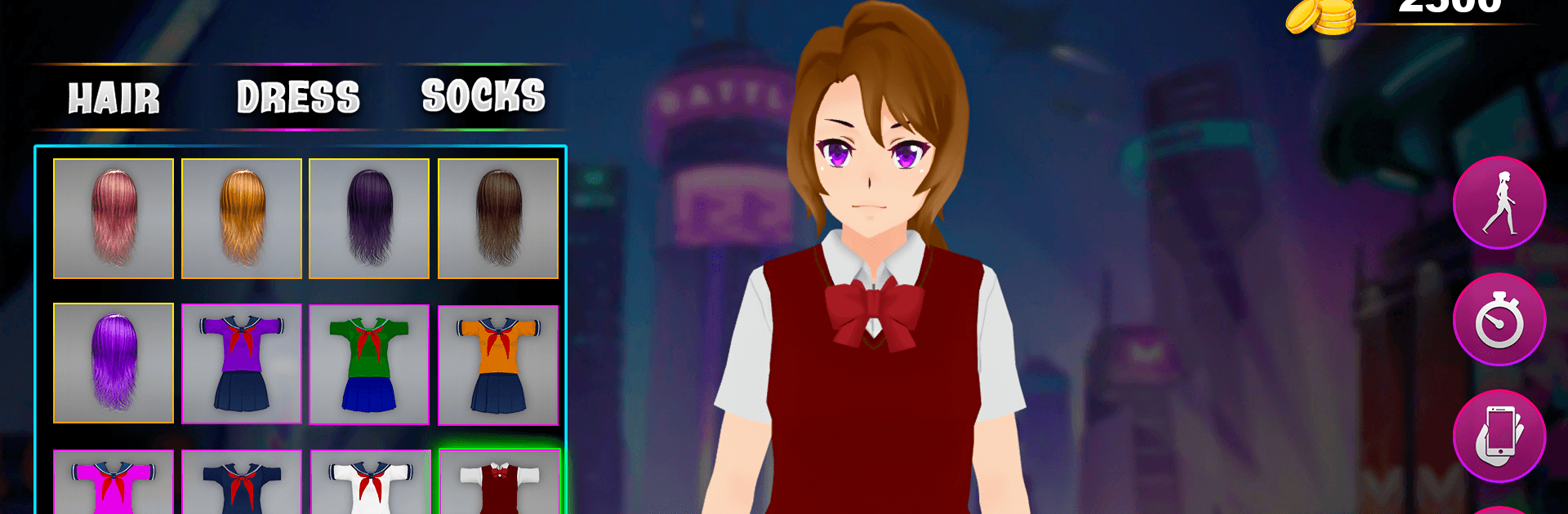
  • Style Your Look: Mix and match outfits, switch up hairstyles and colors, and create a look that actually feels like you.
  • A Campus Worth Exploring: Check the library for exam prep, grab lunch at the cafeteria, finish assignments in the computer lab, and wander past blooming Sakura trees between classes.
  • Friends, Crushes, Moments: Build real connections, swap notes, share jokes, and—when it feels right—confess your feelings to that one special classmate.
  • Missions Big and Small: Tackle quick tasks between bells or sink into longer story moments that reward good planning and smart decisions.
  • Take a Drive: Hop into a sleek ride for a breezy cruise after school and clear your head before the next big choice.
  • Handle the Tough Stuff: Keep your cool around bullies, pick your responses carefully, and protect your reputation without losing who you are.
  • Smooth Feel, Clean Look: Enjoy a bright 3D campus with fluid animations and responsive controls that make every hallway sprint and dance routine feel natural.

Ready to top the leaderboard? We bet you do. Let precise controls and sharp visuals optimized on BlueStacks lead you to victory.


Game Features

Enhancements

  • Macros
  • Multi Instance
  • Multi Instance Sync
  • Eco Mode
  • Enhancements
Macros

Macros

Skip the boring parts of a game. Play High Schoolgirl Love Life Game with Macros and get the edge. Simply record a sequence of commands and execute them at any moment.
Multi Instance

Multi Instance

Why limit to one game on your phone when you can play many on your PC? Open multiple instances of High Schoolgirl Love Life Game at once with Multi-Instance. Leverage the power of different accounts by doing more.
Multi Instance Sync

Multi Instance Sync

Get the best out of High Schoolgirl Love Life Game with Multi-Instance Sync. Play the game from different accounts and build your own empire. Use Multi-instance sync to repeat the action in the main BlueStacks instance on all other instances.
Eco Mode

Eco Mode

Find the rarest heroes by making multiple summons in High Schoolgirl Love Life Game. And while you are at it, reduce your PC’s resource consumption with the Eco Mode. Farm efficiently. Get the best results.
Read More

How to Download and Play High Schoolgirl Love Life Game on PC or Mac

  • Download and install BlueStacks on your PC or Mac

  • Complete Google sign-in to access the Play Store, or do it later

  • Look for High Schoolgirl Love Life Game in the search bar at the top right corner

  • Click to install High Schoolgirl Love Life Game from the search results

  • Complete Google sign-in (if you skipped step 2) to install High Schoolgirl Love Life Game

  • Click the High Schoolgirl Love Life Game icon on the home screen to start playing

video
Watch Video

Minimum System Requirements

With BlueStacks 5, you can get started on a PC that fulfills the following requirements.

  • Operating System

    Microsoft Windows 7 or above, macOS 11 (Big Sur) or above

  • Processor

    Intel, AMD or Apple Silicon Processor

  • RAM

    at least 4GB

  • HDD

    10GB Free Disk Space

Note:

* You must be an Administrator on your PC. Up to date graphics drivers from Microsoft or the chipset vendor.

High Schoolgirl Love Life Game - FAQs

  • How to play High Schoolgirl Love Life Game on Windows PC & Mac?

    Play High Schoolgirl Love Life Game on your PC or Mac by following these simple steps.

    • Click on 'Play High Schoolgirl Love Life Game on PC’ to download BlueStacks
    • Install it and log-in to Google Play Store
    • Launch and play the game.
  • Why is BlueStacks the fastest and safest platform to play games on PC?

    BlueStacks respects your privacy and is always safe and secure to use. It does not carry any malware, spyware, or any sort of additional software that could harm your PC.

    It is engineered to optimize speed and performance for a seamless gaming experience.

  • What are High Schoolgirl Love Life Game PC requirements?

    Minimum requirement to run High Schoolgirl Love Life Game on your PC

    • OS: Microsoft Windows 7 or above MacOS 11 (Big Sur) or above
    • Processor: Intel, AMD or Apple Silicon Processor
    • RAM: Your PC must have at least 4GB of RAM. (Note that having 4GB or more disk space is not a substitute for RAM)
    • HDD: 10GB Free Disk Space.
    • You must be an Administrator on your PC.