Humans vs Ai: Battle Simulator

Humans vs Ai: Battle Simulator

Strategy

| Abstract Software Inc.

Play on PC with BlueStacks or from our cloud

  • Overview
  • Game Features
  • How to Play

Page Modified On: October 09, 2026

Play Humans vs Ai: Battle Simulator on PC or Mac

Humans vs Ai: Battle Simulator by Abstract Software Inc. has plenty to keep you busy. BlueStacks lets you play it on PC or Mac with more screen space, better control, and fewer mobile limits.

About the Game

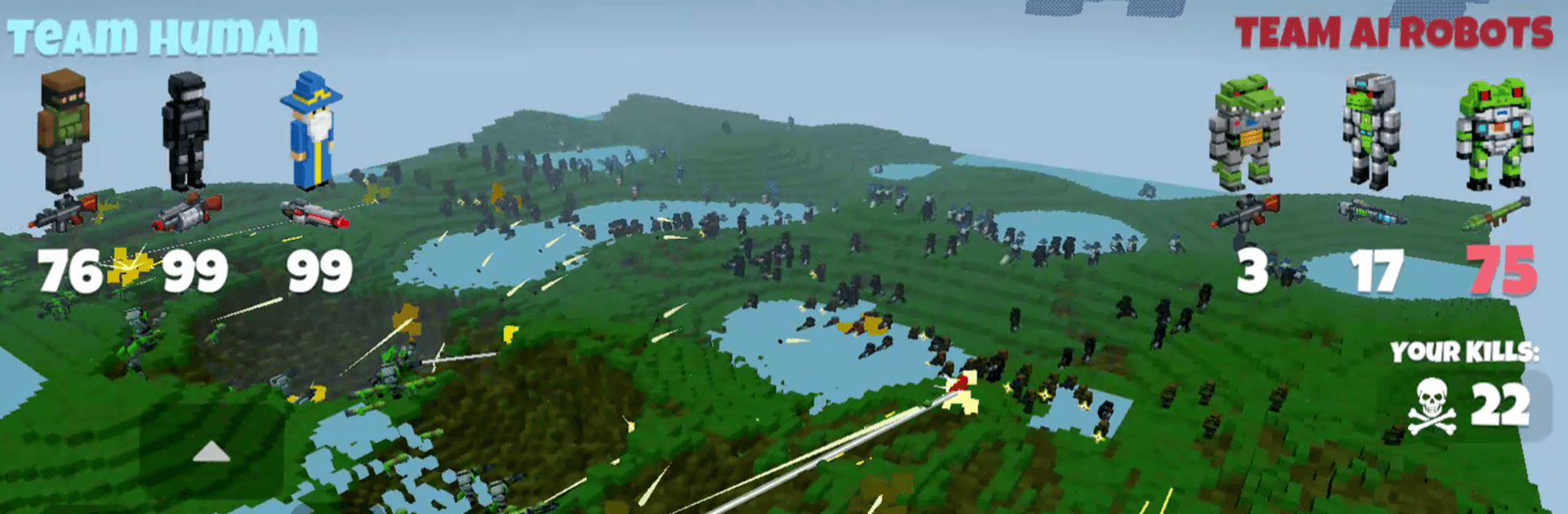
Humans vs Ai: Battle Simulator throws people and machines into outrageous clashes across a world you can tear apart piece by piece. It’s a Strategy sandbox with real bite—plan clever formations, or just let the chaos rip and see what survives. Build armies, wreck terrain, and unleash jaw-dropping powers to decide who comes out on top. Prefer a bigger screen? It runs smoothly on BlueStacks without making a fuss.

Game Features

  • Colossal Clashes: Drop hundreds of units onto the field and watch the front lines buckle, regroup, and explode into all-out mayhem.
  • Breakable Voxel Worlds: Blast craters, level cover, and literally reshape the map mid-battle as the environment crumbles under fire.
  • Story Mode: Follow humanity’s pushback against the machines through hand-built scenarios that mix tight objectives with big, cinematic fights.
  • Creative Mode: Build your own outrageous setups, tweak the rules, and run experiments until you find the perfect brand of chaos.
  • Custom Weapons: Craft new toys—from punchy close-range gear to long-range instruments of destruction—and put them through brutal trials.
  • Custom Characters: Mix parts and traits to forge units that match your tactics, then slot them into squads that actually feel like yours.
  • Over-the-Top Powers: Call down reality-bending abilities that can flip a losing fight in seconds—timing them is half the thrill.
  • Offline Play: Set up battles, tinker with loadouts, and run tests anytime, no connection required.
  • Tactics Your Way: Play tight and methodical or go full sandbox—terrain, army mix, and wild powers make every matchup play out differently.

Ready to top the leaderboard? We bet you do. Let precise controls and sharp visuals optimized on BlueStacks lead you to victory.


Game Features

Enhancements

  • Macros
  • Multi Instance
  • Multi Instance Sync
  • Eco Mode
  • Enhancements
Macros

Macros

Skip the boring parts of a game. Play Humans vs Ai: Battle Simulator with Macros and get the edge. Simply record a sequence of commands and execute them at any moment.
Multi Instance

Multi Instance

Why limit to one game on your phone when you can play many on your PC? Open multiple instances of Humans vs Ai: Battle Simulator at once with Multi-Instance. Leverage the power of different accounts by doing more.
Multi Instance Sync

Multi Instance Sync

Get the best out of Humans vs Ai: Battle Simulator with Multi-Instance Sync. Play the game from different accounts and build your own empire. Use Multi-instance sync to repeat the action in the main BlueStacks instance on all other instances.
Eco Mode

Eco Mode

Find the rarest heroes by making multiple summons in Humans vs Ai: Battle Simulator. And while you are at it, reduce your PC’s resource consumption with the Eco Mode. Farm efficiently. Get the best results.
Read More

How to Download and Play Humans vs Ai: Battle Simulator on PC or Mac

  • Download and install BlueStacks on your PC or Mac

  • Complete Google sign-in to access the Play Store, or do it later

  • Look for Humans vs Ai: Battle Simulator in the search bar at the top right corner

  • Click to install Humans vs Ai: Battle Simulator from the search results

  • Complete Google sign-in (if you skipped step 2) to install Humans vs Ai: Battle Simulator

  • Click the Humans vs Ai: Battle Simulator icon on the home screen to start playing

video
Watch Video

Minimum System Requirements

With BlueStacks 5, you can get started on a PC that fulfills the following requirements.

  • Operating System

    Microsoft Windows 7 or above, macOS 11 (Big Sur) or above

  • Processor

    Intel, AMD or Apple Silicon Processor

  • RAM

    at least 4GB

  • HDD

    10GB Free Disk Space

Note:

* You must be an Administrator on your PC. Up to date graphics drivers from Microsoft or the chipset vendor.

Humans vs Ai: Battle Simulator - FAQs

  • How to play Humans vs Ai: Battle Simulator on Windows PC & Mac?

    Play Humans vs Ai: Battle Simulator on your PC or Mac by following these simple steps.

    • Click on 'Play Humans vs Ai: Battle Simulator on PC’ to download BlueStacks
    • Install it and log-in to Google Play Store
    • Launch and play the game.
  • Why is BlueStacks the fastest and safest platform to play games on PC?

    BlueStacks respects your privacy and is always safe and secure to use. It does not carry any malware, spyware, or any sort of additional software that could harm your PC.

    It is engineered to optimize speed and performance for a seamless gaming experience.

  • What are Humans vs Ai: Battle Simulator PC requirements?

    Minimum requirement to run Humans vs Ai: Battle Simulator on your PC

    • OS: Microsoft Windows 7 or above MacOS 11 (Big Sur) or above
    • Processor: Intel, AMD or Apple Silicon Processor
    • RAM: Your PC must have at least 4GB of RAM. (Note that having 4GB or more disk space is not a substitute for RAM)
    • HDD: 10GB Free Disk Space.
    • You must be an Administrator on your PC.