Medieval Empires
Medieval Empires

Medieval Empires

Strategy

| Everline Publishing

Play on PC with BlueStacks or from our cloud

  • Overview
  • Game Features
  • How to Play

Page Modified On: April 24, 2026

Play Medieval Empires on PC or Mac

Medieval Empires brings the Strategy genre to life, and throws up exciting challenges for gamers. Developed by Everline Publishing, this Android game is best experienced on BlueStacks, the World’s #1 app player for PC and Mac users.

About the Game

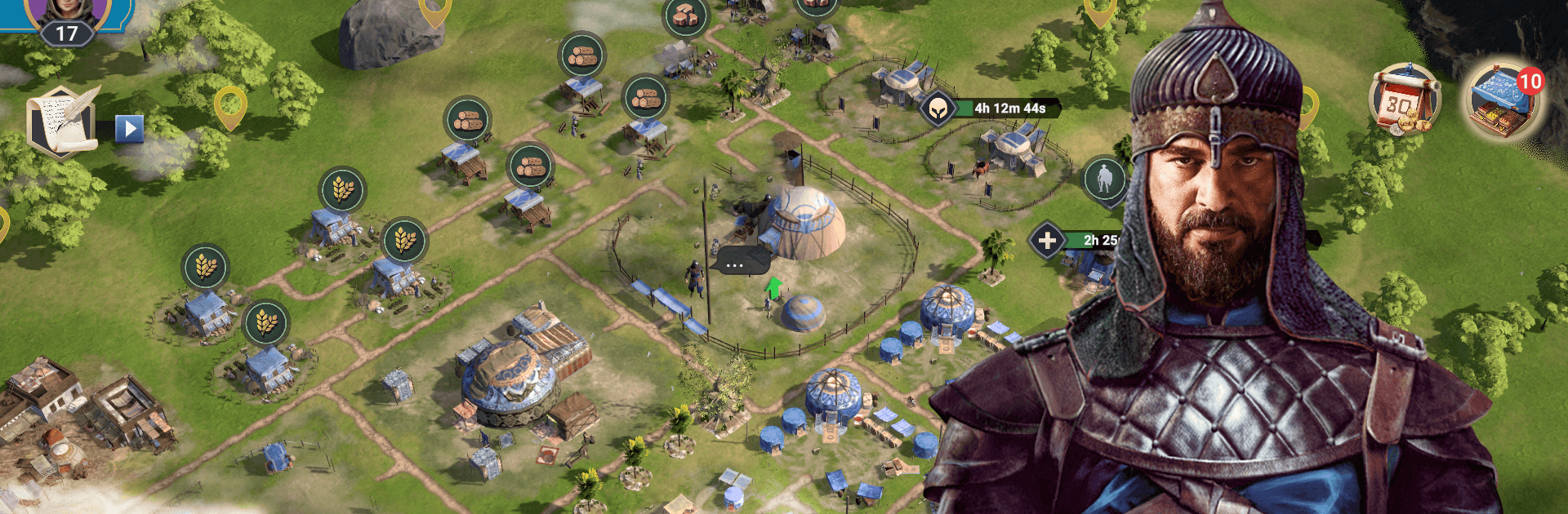
Medieval Empires drops you into a gritty, late-13th-century sandbox where every choice shapes your future. As a rising chieftain, you’ll build a resilient town, recruit standout heroes, and decide whether your power comes from sharp blades or sharp trading. Built by Everline Publishing, this multiplayer Strategy experience kicks off with Ertuğrul Gazi and his Kayı tribe clashing with English Crusaders on the shifting frontiers of Anatolia. Prefer a bigger screen? It plays smoothly on PC with BlueStacks.

Game Features

  • Build and Expand
    Grow a bustling town from scratch—upgrade structures, manage resources, and keep your people safe as your borders push outward.

  • Lead Notable Heroes
    Train and equip commanders with unique strengths, then pair them with the right troops to tip battles your way.

  • Tactical Combat
    Plan formations, scout enemies, and strike where it hurts. Careless attacks waste supplies; smart strategies win wars.

  • Alliances That Matter
    Form or join player alliances to share resources, coordinate defenses, and launch joint offensives when it counts.

  • War or Wealth—Your Call
    Prefer the sword? March on rival factions. Rather get rich? Trade, produce, and corner markets to grow influence without constant fighting.

  • Missions with Momentum
    Mix daily tasks with story-driven objectives tied to Ertuğrul’s campaign, keeping progress steady and meaningful.

  • PvE Expeditions and Events
    Explore the map for bandits, treasures, and time-limited challenges that reward careful planning and teamwork.

  • Living, Expanding World
    The map isn’t static—new regions and threats appear, nudging you to adapt, reposition, and rethink your long game.

Get ready for a buttery smooth, high-performance gaming action only on BlueStacks.

Game Features

Enhancements

  • Macros
  • Multi Instance
  • Multi Instance Sync
  • Eco Mode
  • Enhancements
Macros

Macros

Skip the boring parts of a game. Play Medieval Empires with Macros and get the edge. Simply record a sequence of commands and execute them at any moment.
Multi Instance

Multi Instance

Why limit to one game on your phone when you can play many on your PC? Open multiple instances of Medieval Empires at once with Multi-Instance. Leverage the power of different accounts by doing more.
Multi Instance Sync

Multi Instance Sync

Get the best out of Medieval Empires with Multi-Instance Sync. Play the game from different accounts and build your own empire. Use Multi-instance sync to repeat the action in the main BlueStacks instance on all other instances.
Eco Mode

Eco Mode

Find the rarest heroes by making multiple summons in Medieval Empires. And while you are at it, reduce your PC’s resource consumption with the Eco Mode. Farm efficiently. Get the best results.
Read More

How to Download and Play Medieval Empires on PC or Mac

  • Download and install BlueStacks on your PC or Mac

  • Complete Google sign-in to access the Play Store, or do it later

  • Look for Medieval Empires in the search bar at the top right corner

  • Click to install Medieval Empires from the search results

  • Complete Google sign-in (if you skipped step 2) to install Medieval Empires

  • Click the Medieval Empires icon on the home screen to start playing

video
Watch Video

Minimum System Requirements

With BlueStacks 5, you can get started on a PC that fulfills the following requirements.

  • Operating System

    Microsoft Windows 7 or above, macOS 11 (Big Sur) or above

  • Processor

    Intel, AMD or Apple Silicon Processor

  • RAM

    at least 4GB

  • HDD

    10GB Free Disk Space

Note:

* You must be an Administrator on your PC. Up to date graphics drivers from Microsoft or the chipset vendor.

Medieval Empires - FAQs

  • How to play Medieval Empires on Windows PC & Mac?

    Play Medieval Empires on your PC or Mac by following these simple steps.

    • Click on 'Play Medieval Empires on PC’ to download BlueStacks
    • Install it and log-in to Google Play Store
    • Launch and play the game.
  • Why is BlueStacks the fastest and safest platform to play games on PC?

    BlueStacks respects your privacy and is always safe and secure to use. It does not carry any malware, spyware, or any sort of additional software that could harm your PC.

    It is engineered to optimize speed and performance for a seamless gaming experience.

  • What are Medieval Empires PC requirements?

    Minimum requirement to run Medieval Empires on your PC

    • OS: Microsoft Windows 7 or above MacOS 11 (Big Sur) or above
    • Processor: Intel, AMD or Apple Silicon Processor
    • RAM: Your PC must have at least 4GB of RAM. (Note that having 4GB or more disk space is not a substitute for RAM)
    • HDD: 10GB Free Disk Space.
    • You must be an Administrator on your PC.