Norse Expansion Medieval RTS

Norse Expansion Medieval RTS

Strategy

| HerringByte

Play on PC with BlueStacks or from our cloud

  • Overview
  • Game Features
  • How to Play

Page Modified On: September 07, 2026

Play Norse Expansion Medieval RTS on PC or Mac

Step into the World of Norse Expansion Medieval RTS, a thrilling Strategy game from the house of HerringByte. Play this Android game on BlueStacks App Player and experience immersive gaming on PC or Mac.

About the Game

Norse Expansion Medieval RTS puts you in charge of a growing medieval realm, from its first huts to a fortified seat of power. It’s a Strategy experience built around smart planning, smooth battles, and a steady climb from survival to dominance. Want a bigger view of your empire? It plays nicely on PC with BlueStacks.

Game Features

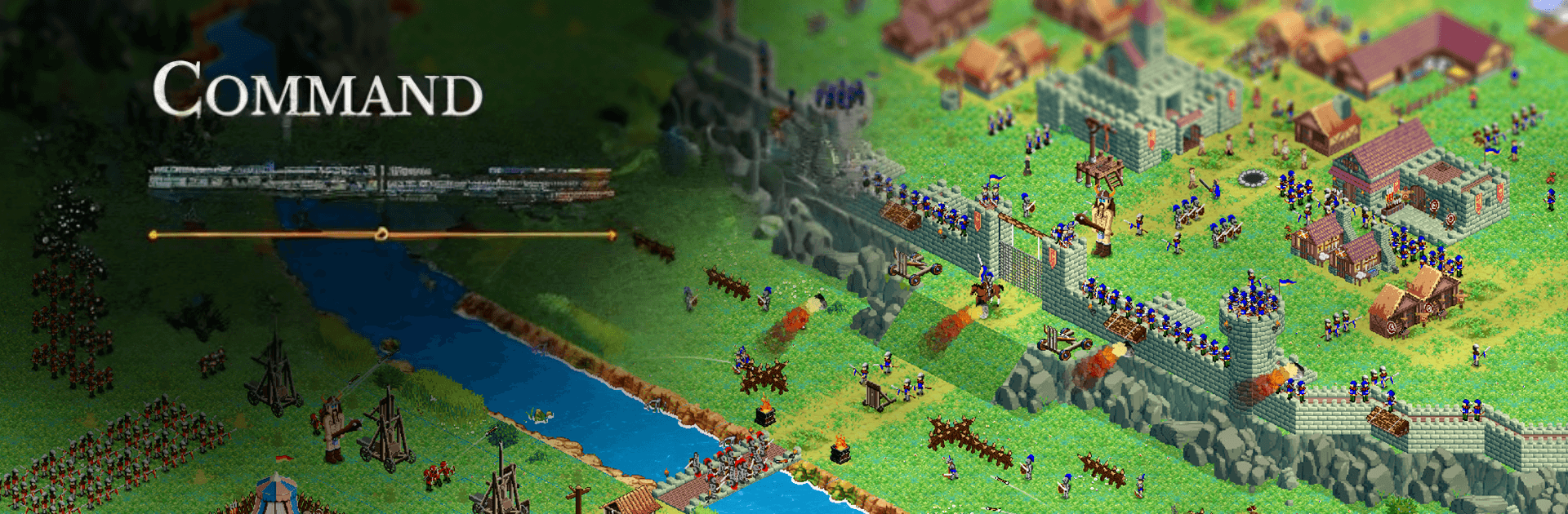
  • Real-time command: Make snap decisions as you manage workers, marshal troops, and react to shifting fronts without missing a beat.
  • Fortified strongholds: Build up your castle, reinforce vulnerable spots, and turn your settlement into a fortress that actually holds the line.
  • Resource-driven economy: Collect vital materials, balance production, and keep your people busy so your war machine never stalls.
  • Recruit and lead: Train a proper army and coordinate it on the field—group units, set priorities, and watch coordinated pushes pay off.
  • Defense and conquest: Hold your ground against raids, then push out with calculated strikes to break enemy positions.
  • Varied foes: Face rival kings, crafty bandits, towering giants, and even wizards, each forcing you to adapt your approach.
  • Campaign challenges: Tackle a sequence of handcrafted missions with different objectives, new hazards, and escalating stakes.
  • Offline play, zero waiting: Play anywhere without a connection and build at your pace—no energy bars, no timers getting in the way.

BlueStacks gives you more room to focus on the game and less time adjusting around mobile limitations.


Game Features

Enhancements

  • Macros
  • Multi Instance
  • Multi Instance Sync
  • Eco Mode
  • Enhancements
Macros

Macros

Skip the boring parts of a game. Play Norse Expansion Medieval RTS with Macros and get the edge. Simply record a sequence of commands and execute them at any moment.
Multi Instance

Multi Instance

Why limit to one game on your phone when you can play many on your PC? Open multiple instances of Norse Expansion Medieval RTS at once with Multi-Instance. Leverage the power of different accounts by doing more.
Multi Instance Sync

Multi Instance Sync

Get the best out of Norse Expansion Medieval RTS with Multi-Instance Sync. Play the game from different accounts and build your own empire. Use Multi-instance sync to repeat the action in the main BlueStacks instance on all other instances.
Eco Mode

Eco Mode

Find the rarest heroes by making multiple summons in Norse Expansion Medieval RTS. And while you are at it, reduce your PC’s resource consumption with the Eco Mode. Farm efficiently. Get the best results.
Read More

How to Download and Play Norse Expansion Medieval RTS on PC or Mac

  • Download and install BlueStacks on your PC or Mac

  • Complete Google sign-in to access the Play Store, or do it later

  • Look for Norse Expansion Medieval RTS in the search bar at the top right corner

  • Click to install Norse Expansion Medieval RTS from the search results

  • Complete Google sign-in (if you skipped step 2) to install Norse Expansion Medieval RTS

  • Click the Norse Expansion Medieval RTS icon on the home screen to start playing

video
Watch Video

Minimum System Requirements

With BlueStacks 5, you can get started on a PC that fulfills the following requirements.

  • Operating System

    Microsoft Windows 7 or above, macOS 11 (Big Sur) or above

  • Processor

    Intel, AMD or Apple Silicon Processor

  • RAM

    at least 4GB

  • HDD

    10GB Free Disk Space

Note:

* You must be an Administrator on your PC. Up to date graphics drivers from Microsoft or the chipset vendor.

Norse Expansion Medieval RTS - FAQs

  • How to play Norse Expansion Medieval RTS on Windows PC & Mac?

    Play Norse Expansion Medieval RTS on your PC or Mac by following these simple steps.

    • Click on 'Play Norse Expansion Medieval RTS on PC’ to download BlueStacks
    • Install it and log-in to Google Play Store
    • Launch and play the game.
  • Why is BlueStacks the fastest and safest platform to play games on PC?

    BlueStacks respects your privacy and is always safe and secure to use. It does not carry any malware, spyware, or any sort of additional software that could harm your PC.

    It is engineered to optimize speed and performance for a seamless gaming experience.

  • What are Norse Expansion Medieval RTS PC requirements?

    Minimum requirement to run Norse Expansion Medieval RTS on your PC

    • OS: Microsoft Windows 7 or above MacOS 11 (Big Sur) or above
    • Processor: Intel, AMD or Apple Silicon Processor
    • RAM: Your PC must have at least 4GB of RAM. (Note that having 4GB or more disk space is not a substitute for RAM)
    • HDD: 10GB Free Disk Space.
    • You must be an Administrator on your PC.