Over Space - Alliance Wars

Over Space - Alliance Wars

Strategy

| Player Two Games

Play on PC with BlueStacks or from our cloud

  • Overview
  • Game Features
  • How to Play

Page Modified On: January 06, 2026

Play Over Space - Alliance Wars on PC or Mac

Join millions to experience Over Space – Alliance Wars, an exciting Strategy game from Player Two Games. With BlueStacks App Player, you are always a step ahead of your opponent, ready to outplay them with faster gameplay and better control with the mouse and keyboard on your PC or Mac.

About the Game

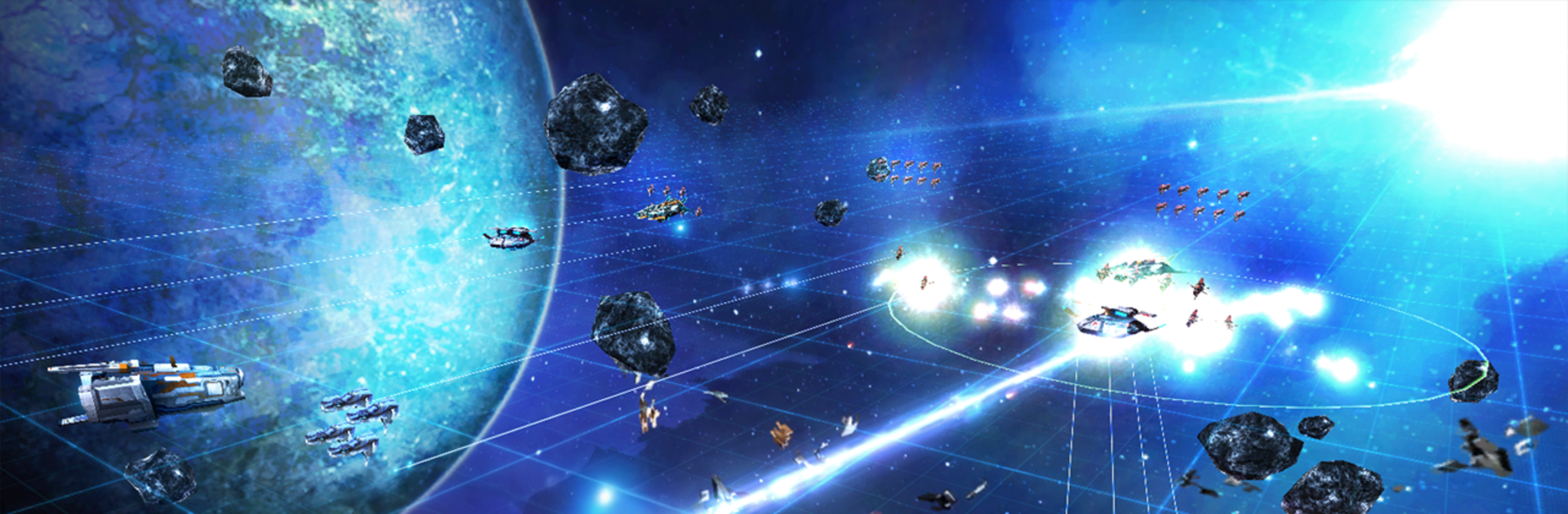
Over Space – Alliance Wars is a Strategy MMO where you stop flying solo and start running the whole war room. You’ll command sprawling fleets, coordinate with allies, and push across planets and deep space as the universe keeps shifting around you. Built by Player Two Games, it’s all about smart planning, bold calls, and winning fights you “shouldn’t” win.

Game Features

  • Command the big picture: You’re not a cockpit hero—you’re the commander. Arrange formations, set roles, and watch 100+ ships clash in screen-filling fleet battles.
  • Planet-side operations: Space isn’t the only front. Scout worlds, secure resources, and send in ground units—Armoroids, bots, and drones—to support your push.
  • Alliance wars that matter: Team up, coordinate strikes, and hold territory together. The right partners can turn a stalemate into a sweep.
  • Deep ship customization: Outfit corvettes, frigates, destroyers, and cruisers with unique extension modules and advanced variants. Build to your style, not a template.
  • Crew and specialists: Recruit standout talent to tweak ship behavior and unlock new tactical angles. The right mix can completely change how your fleet plays.
  • Formations that feel tactical: Columns, wedges, echelons, tight clusters—you choose the shape, spacing, and purpose to break shields, bait fire, or punch through lines.
  • Outsmart stronger foes: PvP pits your ideas against other commanders, online or while they’re away. Outsmarting bigger fleets is not only possible—it’s rewarded.
  • A living galaxy: Planet environments shift and the strategic map evolves, pushing you to adapt rather than repeat the same plan forever.
  • Smooth on PC with BlueStacks: Prefer mouse-and-keyboard control? It runs comfortably there too, without changing how the game plays.

Start your journey now. Download the game on BlueStacks, invite your friends, and march on a new adventure.


Game Features

Enhancements

  • Macros
  • Multi Instance
  • Multi Instance Sync
  • Eco Mode
  • Enhancements
Macros

Macros

Skip the boring parts of a game. Play Over Space - Alliance Wars with Macros and get the edge. Simply record a sequence of commands and execute them at any moment.
Multi Instance

Multi Instance

Why limit to one game on your phone when you can play many on your PC? Open multiple instances of Over Space - Alliance Wars at once with Multi-Instance. Leverage the power of different accounts by doing more.
Multi Instance Sync

Multi Instance Sync

Get the best out of Over Space - Alliance Wars with Multi-Instance Sync. Play the game from different accounts and build your own empire. Use Multi-instance sync to repeat the action in the main BlueStacks instance on all other instances.
Eco Mode

Eco Mode

Find the rarest heroes by making multiple summons in Over Space - Alliance Wars. And while you are at it, reduce your PC’s resource consumption with the Eco Mode. Farm efficiently. Get the best results.
Read More

How to Download and Play Over Space - Alliance Wars on PC or Mac

  • Download and install BlueStacks on your PC or Mac

  • Complete Google sign-in to access the Play Store, or do it later

  • Look for Over Space - Alliance Wars in the search bar at the top right corner

  • Click to install Over Space - Alliance Wars from the search results

  • Complete Google sign-in (if you skipped step 2) to install Over Space - Alliance Wars

  • Click the Over Space - Alliance Wars icon on the home screen to start playing

video
Watch Video

Minimum System Requirements

With BlueStacks 5, you can get started on a PC that fulfills the following requirements.

  • Operating System

    Microsoft Windows 7 or above, macOS 11 (Big Sur) or above

  • Processor

    Intel, AMD or Apple Silicon Processor

  • RAM

    at least 4GB

  • HDD

    10GB Free Disk Space

Note:

* You must be an Administrator on your PC. Up to date graphics drivers from Microsoft or the chipset vendor.

Over Space - Alliance Wars - FAQs

  • How to play Over Space - Alliance Wars on Windows PC & Mac?

    Play Over Space - Alliance Wars on your PC or Mac by following these simple steps.

    • Click on 'Play Over Space - Alliance Wars on PC’ to download BlueStacks
    • Install it and log-in to Google Play Store
    • Launch and play the game.
  • Why is BlueStacks the fastest and safest platform to play games on PC?

    BlueStacks respects your privacy and is always safe and secure to use. It does not carry any malware, spyware, or any sort of additional software that could harm your PC.

    It is engineered to optimize speed and performance for a seamless gaming experience.

  • What are Over Space - Alliance Wars PC requirements?

    Minimum requirement to run Over Space - Alliance Wars on your PC

    • OS: Microsoft Windows 7 or above MacOS 11 (Big Sur) or above
    • Processor: Intel, AMD or Apple Silicon Processor
    • RAM: Your PC must have at least 4GB of RAM. (Note that having 4GB or more disk space is not a substitute for RAM)
    • HDD: 10GB Free Disk Space.
    • You must be an Administrator on your PC.