Panzers to Leningrad

Panzers to Leningrad

Strategy

| Joni Nuutinen

Play on PC with BlueStacks or from our cloud

  • Overview
  • Game Features
  • How to Play

Page Modified On: July 06, 2026

Play Panzers to Leningrad on PC or Mac

Bring your A-game to Panzers to Leningrad, the Strategy game sensation from Joni Nuutinen. Give your gameplay the much-needed boost with precise game controls, high FPS graphics, and top-tier features on your PC or Mac with BlueStacks.

About the Game

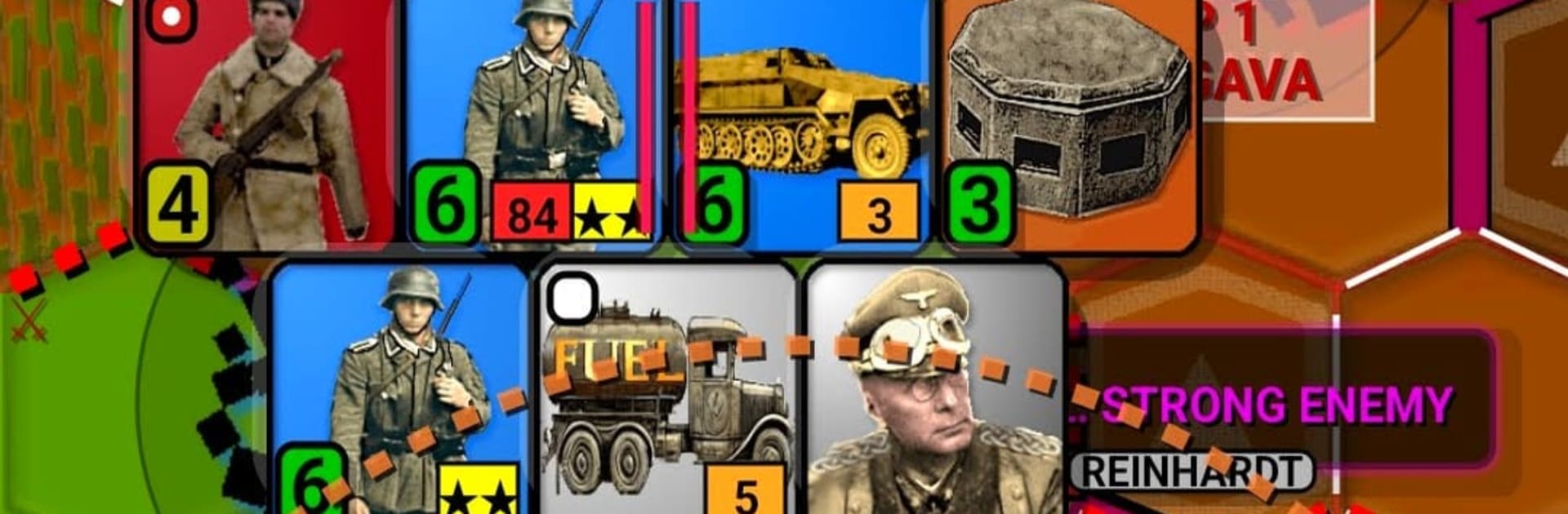
Panzers to Leningrad drops you into the northern push of Operation Barbarossa. You lead Army Group North through the Baltic region toward Leningrad, while the Red Army, rough terrain, and fickle weather try to slow you down. It’s a thoughtful, turn-based Strategy experience where planning, positioning, and timing decide everything.

Game Features

  • Authentic Eastern Front setting: Fight across forests, swamps, and fortified cities that mirror the historical campaign toward Leningrad, complete with the pressure of growing Soviet resistance.
  • Smart, adaptive opponent: The AI doesn’t just charge straight ahead—it probes, encircles, and shifts priorities between taking objectives and trapping your units.
  • Supply matters (and it’s customizable): Manage fuel and supply lines to keep your panzers rolling—or switch fuel rules off in the settings if you prefer a cleaner focus on maneuver.
  • Encirclement over brute force: Adjacent units provide support fire, so coordinated attacks and pocket-making often beat head-on assaults.
  • Terrain and weather bite back: Roads clog, swamps bog you down, and poor conditions can stall even a perfect plan. You’ll feel the campaign’s seasonal grind.
  • Deep customization: Tweak difficulty, hex size, and animation speed. Pick your unit icons (NATO or realistic) and city styles (Round, Shield, Square, or block-of-houses), and toggle map layers to suit your taste.
  • Classic hex-based Strategy feel: Clear turn structure and familiar mechanics reward careful planning and calculated risks.
  • High replay value: Built-in variation ensures each run plays out differently, keeping operations fresh.
  • Plays nicely on PC: Prefer a larger battlefield and precise clicks? Running it with BlueStacks makes surveying the front simple.

BlueStacks gives you more room to focus on the game and less time adjusting around mobile limitations.


Game Features

Enhancements

  • Macros
  • Multi Instance
  • Multi Instance Sync
  • Eco Mode
  • Enhancements
Macros

Macros

Skip the boring parts of a game. Play Panzers to Leningrad with Macros and get the edge. Simply record a sequence of commands and execute them at any moment.
Multi Instance

Multi Instance

Why limit to one game on your phone when you can play many on your PC? Open multiple instances of Panzers to Leningrad at once with Multi-Instance. Leverage the power of different accounts by doing more.
Multi Instance Sync

Multi Instance Sync

Get the best out of Panzers to Leningrad with Multi-Instance Sync. Play the game from different accounts and build your own empire. Use Multi-instance sync to repeat the action in the main BlueStacks instance on all other instances.
Eco Mode

Eco Mode

Find the rarest heroes by making multiple summons in Panzers to Leningrad. And while you are at it, reduce your PC’s resource consumption with the Eco Mode. Farm efficiently. Get the best results.
Read More

How to Download and Play Panzers to Leningrad on PC or Mac

  • Download and install BlueStacks on your PC or Mac

  • Complete Google sign-in to access the Play Store, or do it later

  • Look for Panzers to Leningrad in the search bar at the top right corner

  • Click to install Panzers to Leningrad from the search results

  • Complete Google sign-in (if you skipped step 2) to install Panzers to Leningrad

  • Click the Panzers to Leningrad icon on the home screen to start playing

video
Watch Video

Minimum System Requirements

With BlueStacks 5, you can get started on a PC that fulfills the following requirements.

  • Operating System

    Microsoft Windows 7 or above, macOS 11 (Big Sur) or above

  • Processor

    Intel, AMD or Apple Silicon Processor

  • RAM

    at least 4GB

  • HDD

    10GB Free Disk Space

Note:

* You must be an Administrator on your PC. Up to date graphics drivers from Microsoft or the chipset vendor.

Panzers to Leningrad - FAQs

  • How to play Panzers to Leningrad on Windows PC & Mac?

    Play Panzers to Leningrad on your PC or Mac by following these simple steps.

    • Click on 'Play Panzers to Leningrad on PC’ to download BlueStacks
    • Install it and log-in to Google Play Store
    • Launch and play the game.
  • Why is BlueStacks the fastest and safest platform to play games on PC?

    BlueStacks respects your privacy and is always safe and secure to use. It does not carry any malware, spyware, or any sort of additional software that could harm your PC.

    It is engineered to optimize speed and performance for a seamless gaming experience.

  • What are Panzers to Leningrad PC requirements?

    Minimum requirement to run Panzers to Leningrad on your PC

    • OS: Microsoft Windows 7 or above MacOS 11 (Big Sur) or above
    • Processor: Intel, AMD or Apple Silicon Processor
    • RAM: Your PC must have at least 4GB of RAM. (Note that having 4GB or more disk space is not a substitute for RAM)
    • HDD: 10GB Free Disk Space.
    • You must be an Administrator on your PC.