American Civil War
American Civil War

American Civil War

Strategy

| Joni Nuutinen

Play on PC with BlueStacks or from our cloud

  • Overview
  • Game Features
  • How to Play

Page Modified On: January 09, 2026

Play American Civil War on PC or Mac

American Civil War brings the Strategy genre to life, and throws up exciting challenges for gamers. Developed by Joni Nuutinen, this Android game is best experienced on BlueStacks, the World’s #1 app player for PC and Mac users.

About the Game

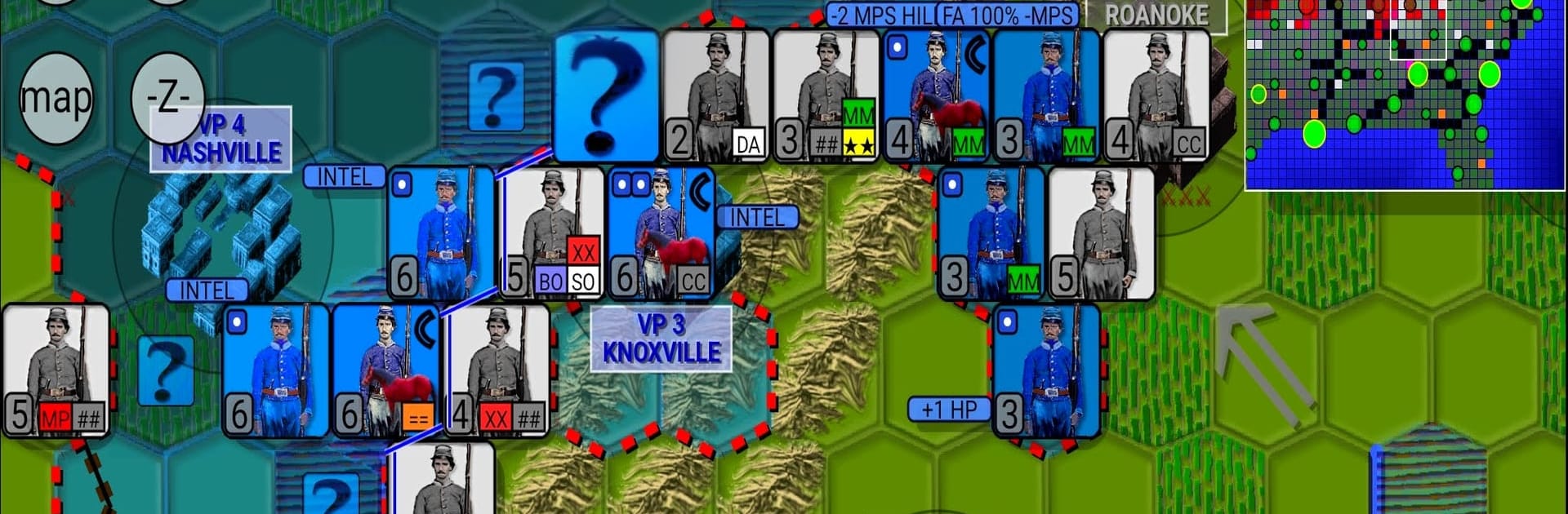
American Civil War is a thoughtful, turn-based Strategy experience where you command the Southern armies through the 1861–1865 conflict. Every turn is a balancing act: squeeze results from scarce resources, outmaneuver larger Union forces, and decide when to push for ground or simply outlast the pressure. It’s gritty, methodical, and rewarding when a plan finally clicks.

Game Features

  • Two Ways to Play: Pick NORMAL for automatic resource handling, or go with SUPPLY if you want to personally route ammo to frontline units and gold to key cities for a deeper logistics challenge.
  • Clear Win Conditions: Seize all key cities for a decisive result, or hold enough territory until the calendar flips to 1866 to avoid defeat.
  • Smart Opponent: The AI doesn’t just charge straight ahead. It probes, flanks, and looks for encirclements, forcing you to shore up gaps and think a few turns ahead.
  • Veteran Units Grow: Units gain perks as they survive battles—better offense or defense, special movement tricks like river crossings without wasting precious steps, and more.
  • Logistics Matter: Ammunition and funding decisions shape your offensives. Starve an enemy stack or keep your own spearhead supplied—either way, planning wins campaigns.
  • Replay-Friendly Campaigns: Built-in variation and adaptive AI keep each run fresh, so the same map can unfold in surprising ways. Chasing a higher spot on the Hall of Fame never gets old.
  • Hexes Your Way: Tune difficulty, hex size, animation speed, and what the map draws. Choose unit symbols (NATO or more realistic art) and different city icon styles to suit your taste.
  • Classic Wargame Feel: Tight turns, meaningful positioning, and that satisfying “got ’em” moment when an encirclement cuts off a Union force from supply.
  • Easy on the Eyes (and PC): Prefer a larger view of the front? American Civil War plays comfortably on your computer with BlueStacks, handy for scanning long supply lines and busy fronts.

Developer: Joni Nuutinen

Ready to top the leaderboard? We bet you do. Let precise controls and sharp visuals optimized on BlueStacks lead you to victory.


Game Features

Enhancements

  • Macros
  • Multi Instance
  • Multi Instance Sync
  • Eco Mode
  • Enhancements
Macros

Macros

Skip the boring parts of a game. Play American Civil War with Macros and get the edge. Simply record a sequence of commands and execute them at any moment.
Multi Instance

Multi Instance

Why limit to one game on your phone when you can play many on your PC? Open multiple instances of American Civil War at once with Multi-Instance. Leverage the power of different accounts by doing more.
Multi Instance Sync

Multi Instance Sync

Get the best out of American Civil War with Multi-Instance Sync. Play the game from different accounts and build your own empire. Use Multi-instance sync to repeat the action in the main BlueStacks instance on all other instances.
Eco Mode

Eco Mode

Find the rarest heroes by making multiple summons in American Civil War. And while you are at it, reduce your PC’s resource consumption with the Eco Mode. Farm efficiently. Get the best results.
Read More

How to Download and Play American Civil War on PC or Mac

  • Download and install BlueStacks on your PC or Mac

  • Complete Google sign-in to access the Play Store, or do it later

  • Look for American Civil War in the search bar at the top right corner

  • Click to install American Civil War from the search results

  • Complete Google sign-in (if you skipped step 2) to install American Civil War

  • Click the American Civil War icon on the home screen to start playing

video
Watch Video

Minimum System Requirements

With BlueStacks 5, you can get started on a PC that fulfills the following requirements.

  • Operating System

    Microsoft Windows 7 or above, macOS 11 (Big Sur) or above

  • Processor

    Intel, AMD or Apple Silicon Processor

  • RAM

    at least 4GB

  • HDD

    10GB Free Disk Space

Note:

* You must be an Administrator on your PC. Up to date graphics drivers from Microsoft or the chipset vendor.

American Civil War - FAQs

  • How to play American Civil War on Windows PC & Mac?

    Play American Civil War on your PC or Mac by following these simple steps.

    • Click on 'Play American Civil War on PC’ to download BlueStacks
    • Install it and log-in to Google Play Store
    • Launch and play the game.
  • Why is BlueStacks the fastest and safest platform to play games on PC?

    BlueStacks respects your privacy and is always safe and secure to use. It does not carry any malware, spyware, or any sort of additional software that could harm your PC.

    It is engineered to optimize speed and performance for a seamless gaming experience.

  • What are American Civil War PC requirements?

    Minimum requirement to run American Civil War on your PC

    • OS: Microsoft Windows 7 or above MacOS 11 (Big Sur) or above
    • Processor: Intel, AMD or Apple Silicon Processor
    • RAM: Your PC must have at least 4GB of RAM. (Note that having 4GB or more disk space is not a substitute for RAM)
    • HDD: 10GB Free Disk Space.
    • You must be an Administrator on your PC.