Play for Angry Teacher Camping

Play for Angry Teacher Camping

Strategy

| Awecom Games

Play on PC with BlueStacks or from our cloud

  • Overview
  • Game Features
  • How to Play

Page Modified On: December 22, 2025

Play Play for Angry Teacher Camping on PC or Mac

Step into the World of Play for Angry Teacher Camping, a thrilling Strategy game from the house of Awecom Games. Play this Android game on BlueStacks App Player and experience immersive gaming on PC or Mac.

About the Game

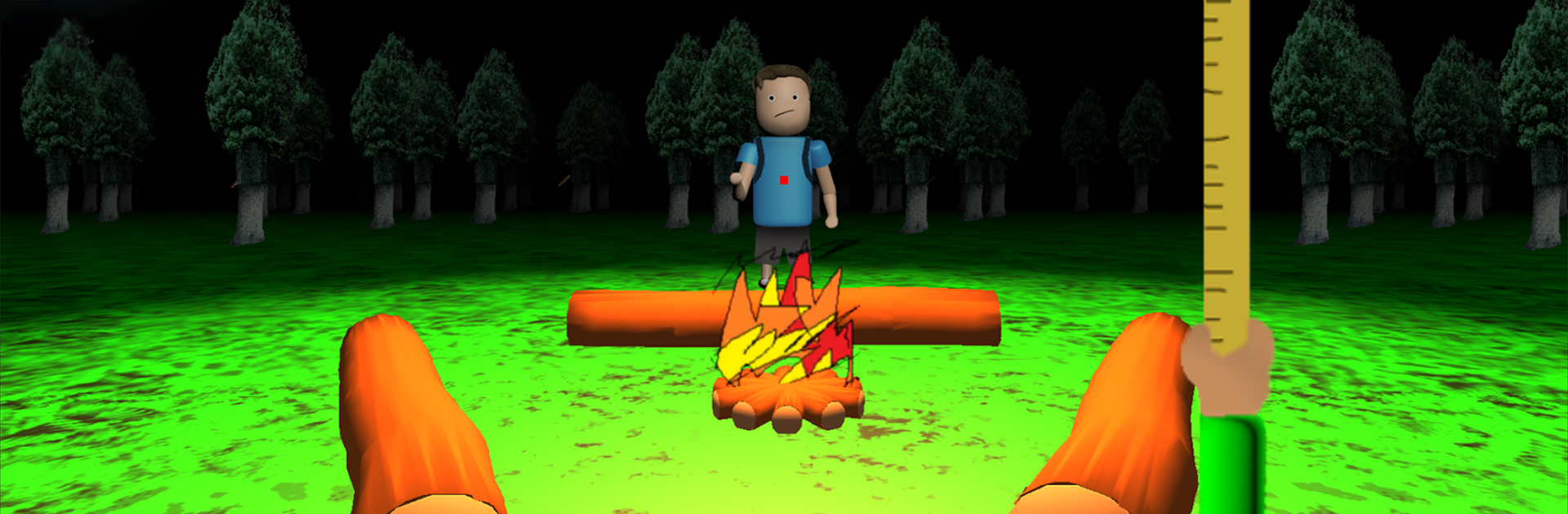
Play for Angry Teacher Camping turns a quiet night in the woods into a tense Strategy standoff. You play as the strict teacher, guarding the camp rules while a stubborn student scrambles to keep the campfire alive till morning. Think fast, set clever traps, and be ready to sprint when the flames start to fade. From Awecom Games, it’s all about timing, pressure, and outsmarting your target under the glow of the fire.

Game Features

  • Teacher vs. Student Showdown: You’re the angry teacher. The student’s job is to keep the fire burning; yours is to slow them down and, when the fire dies, close the gap and “educate” them with a catch.
  • Chase Mode Heat-Up: If the campfire goes out, the whole vibe shifts instantly into a fast chase. Cut off routes, anticipate turns, and use the dark forest to your advantage.
  • Trap Tactics: Rotate your view, read the student’s path, and drop traps to delay, redirect, or rattle their rhythm. Smart placement wins the night.
  • Two Control Styles: Move freely with a slider or touch panel for hands-on control, or switch to auto-move so you’re steering direction and timing instead of every step.
  • Smooth Rotation & Movement: Spin on the spot to scan the area, track the student, and line up your next move without losing your bearings.
  • Short Runs, Big Tension: Sessions are tight and focused, with quick momentum swings that keep you replaying “just one more round.”
  • Play Your Way: Prefer a bigger screen and crisp controls? You can run it on BlueStacks and guide your angry teacher with keyboard and mouse if that’s your style.

Get ready for a buttery smooth, high-performance gaming action only on BlueStacks.

Game Features

Enhancements

  • Macros
  • Multi Instance
  • Multi Instance Sync
  • Eco Mode
  • Enhancements
Macros

Macros

Skip the boring parts of a game. Play Play for Angry Teacher Camping with Macros and get the edge. Simply record a sequence of commands and execute them at any moment.
Multi Instance

Multi Instance

Why limit to one game on your phone when you can play many on your PC? Open multiple instances of Play for Angry Teacher Camping at once with Multi-Instance. Leverage the power of different accounts by doing more.
Multi Instance Sync

Multi Instance Sync

Get the best out of Play for Angry Teacher Camping with Multi-Instance Sync. Play the game from different accounts and build your own empire. Use Multi-instance sync to repeat the action in the main BlueStacks instance on all other instances.
Eco Mode

Eco Mode

Find the rarest heroes by making multiple summons in Play for Angry Teacher Camping. And while you are at it, reduce your PC’s resource consumption with the Eco Mode. Farm efficiently. Get the best results.
Read More

How to Download and Play Play for Angry Teacher Camping on PC or Mac

  • Download and install BlueStacks on your PC or Mac

  • Complete Google sign-in to access the Play Store, or do it later

  • Look for Play for Angry Teacher Camping in the search bar at the top right corner

  • Click to install Play for Angry Teacher Camping from the search results

  • Complete Google sign-in (if you skipped step 2) to install Play for Angry Teacher Camping

  • Click the Play for Angry Teacher Camping icon on the home screen to start playing

video
Watch Video

Minimum System Requirements

With BlueStacks 5, you can get started on a PC that fulfills the following requirements.

  • Operating System

    Microsoft Windows 7 or above, macOS 11 (Big Sur) or above

  • Processor

    Intel, AMD or Apple Silicon Processor

  • RAM

    at least 4GB

  • HDD

    10GB Free Disk Space

Note:

* You must be an Administrator on your PC. Up to date graphics drivers from Microsoft or the chipset vendor.

Play for Angry Teacher Camping - FAQs

  • How to play Play for Angry Teacher Camping on Windows PC & Mac?

    Play Play for Angry Teacher Camping on your PC or Mac by following these simple steps.

    • Click on 'Play Play for Angry Teacher Camping on PC’ to download BlueStacks
    • Install it and log-in to Google Play Store
    • Launch and play the game.
  • Why is BlueStacks the fastest and safest platform to play games on PC?

    BlueStacks respects your privacy and is always safe and secure to use. It does not carry any malware, spyware, or any sort of additional software that could harm your PC.

    It is engineered to optimize speed and performance for a seamless gaming experience.

  • What are Play for Angry Teacher Camping PC requirements?

    Minimum requirement to run Play for Angry Teacher Camping on your PC

    • OS: Microsoft Windows 7 or above MacOS 11 (Big Sur) or above
    • Processor: Intel, AMD or Apple Silicon Processor
    • RAM: Your PC must have at least 4GB of RAM. (Note that having 4GB or more disk space is not a substitute for RAM)
    • HDD: 10GB Free Disk Space.
    • You must be an Administrator on your PC.