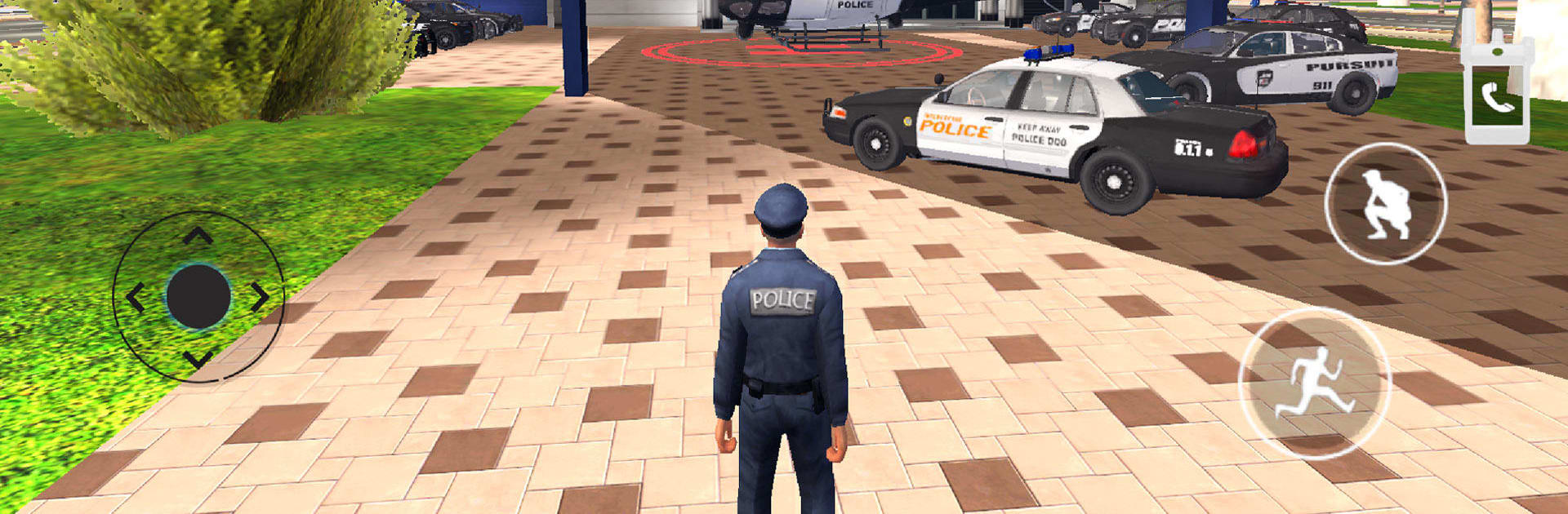
Police Simulator: Car Games

Police Simulator: Car Games

Strategy

| Prism Studios

Play on PC with BlueStacks or from our cloud

  • Overview
  • Game Features
  • How to Play

Page Modified On: October 30, 2026

Play Police Simulator: Car Games on PC or Mac

Step into the World of Police Simulator: Car Games, a thrilling Strategy game from the house of Prism Studios. Play this Android game on BlueStacks App Player and experience immersive gaming on PC or Mac.

About the Game

Police Simulator: Car Games puts you in the driver’s seat of a cop who actually runs the show—patrol the streets, chase suspects, and take charge when things go sideways. It blends fast driving with smart decision-making, so your route choices, backup calls, and timing matter. At its core, it leans into Strategy while still giving you that thrill of lights-and-sirens action. Prefer a roomier setup? It plays smoothly on BlueStacks without making a big fuss about it.

Game Features

  • Open-world patrols: Roam a sprawling city with highways, tight alleys, and busy districts, picking your routes and setting your own patrol rhythm.
  • Mission variety: Answer urgent callouts, foil heists, run escorts, and track high-profile targets—each scenario plays differently and asks for new tactics.
  • Command and rank: Complete briefed tasks from the top brass, earn promotions, and unlock tougher operations as your reputation grows.
  • Vehicle garage: Roll out in patrol cruisers, nimble bikes, heavy interceptors, or take the skies in helicopters—each handles with its own personality.
  • Real driving views: Switch camera angles on the fly, including an immersive interior view that puts you right behind the wheel.
  • Tactics and gear: Deploy advanced tools, coordinate with armed units, set roadblocks, and box in suspects before they bolt.
  • Offline ready: Jump into patrols and missions anytime—no connection needed to keep the streets clean.
  • Realistic feel: Crisp visuals, responsive handling, and convincing sirens bring chases, traffic, and city life to a believable edge.
  • Intel-driven hunts: Use tips from the intelligence unit to track criminals scattered around town and line up the perfect takedown.

Start playing Police Simulator: Car Games on BlueStacks and get a smoother, more comfortable PC or Mac setup.


Game Features

Enhancements

  • Macros
  • Multi Instance
  • Multi Instance Sync
  • Eco Mode
  • Enhancements
Macros

Macros

Skip the boring parts of a game. Play Police Simulator: Car Games with Macros and get the edge. Simply record a sequence of commands and execute them at any moment.
Multi Instance

Multi Instance

Why limit to one game on your phone when you can play many on your PC? Open multiple instances of Police Simulator: Car Games at once with Multi-Instance. Leverage the power of different accounts by doing more.
Multi Instance Sync

Multi Instance Sync

Get the best out of Police Simulator: Car Games with Multi-Instance Sync. Play the game from different accounts and build your own empire. Use Multi-instance sync to repeat the action in the main BlueStacks instance on all other instances.
Eco Mode

Eco Mode

Find the rarest heroes by making multiple summons in Police Simulator: Car Games. And while you are at it, reduce your PC’s resource consumption with the Eco Mode. Farm efficiently. Get the best results.
Read More

How to Download and Play Police Simulator: Car Games on PC or Mac

  • Download and install BlueStacks on your PC or Mac

  • Complete Google sign-in to access the Play Store, or do it later

  • Look for Police Simulator: Car Games in the search bar at the top right corner

  • Click to install Police Simulator: Car Games from the search results

  • Complete Google sign-in (if you skipped step 2) to install Police Simulator: Car Games

  • Click the Police Simulator: Car Games icon on the home screen to start playing

video
Watch Video

Minimum System Requirements

With BlueStacks 5, you can get started on a PC that fulfills the following requirements.

  • Operating System

    Microsoft Windows 7 or above, macOS 11 (Big Sur) or above

  • Processor

    Intel, AMD or Apple Silicon Processor

  • RAM

    at least 4GB

  • HDD

    10GB Free Disk Space

Note:

* You must be an Administrator on your PC. Up to date graphics drivers from Microsoft or the chipset vendor.

Police Simulator: Car Games - FAQs

  • How to play Police Simulator: Car Games on Windows PC & Mac?

    Play Police Simulator: Car Games on your PC or Mac by following these simple steps.

    • Click on 'Play Police Simulator: Car Games on PC’ to download BlueStacks
    • Install it and log-in to Google Play Store
    • Launch and play the game.
  • Why is BlueStacks the fastest and safest platform to play games on PC?

    BlueStacks respects your privacy and is always safe and secure to use. It does not carry any malware, spyware, or any sort of additional software that could harm your PC.

    It is engineered to optimize speed and performance for a seamless gaming experience.

  • What are Police Simulator: Car Games PC requirements?

    Minimum requirement to run Police Simulator: Car Games on your PC

    • OS: Microsoft Windows 7 or above MacOS 11 (Big Sur) or above
    • Processor: Intel, AMD or Apple Silicon Processor
    • RAM: Your PC must have at least 4GB of RAM. (Note that having 4GB or more disk space is not a substitute for RAM)
    • HDD: 10GB Free Disk Space.
    • You must be an Administrator on your PC.