Tank Battle: North Africa

Tank Battle: North Africa

Strategy

| Hunted Cow Games

Play on PC with BlueStacks or from our cloud

  • Overview
  • Game Features
  • How to Play

Page Modified On: May 11, 2026

Play Tank Battle: North Africa on PC or Mac

Join millions to experience Tank Battle: North Africa, an exciting Strategy game from Hunted Cow Games. With BlueStacks App Player, you are always a step ahead of your opponent, ready to outplay them with faster gameplay and better control with the mouse and keyboard on your PC or Mac.

About the Game

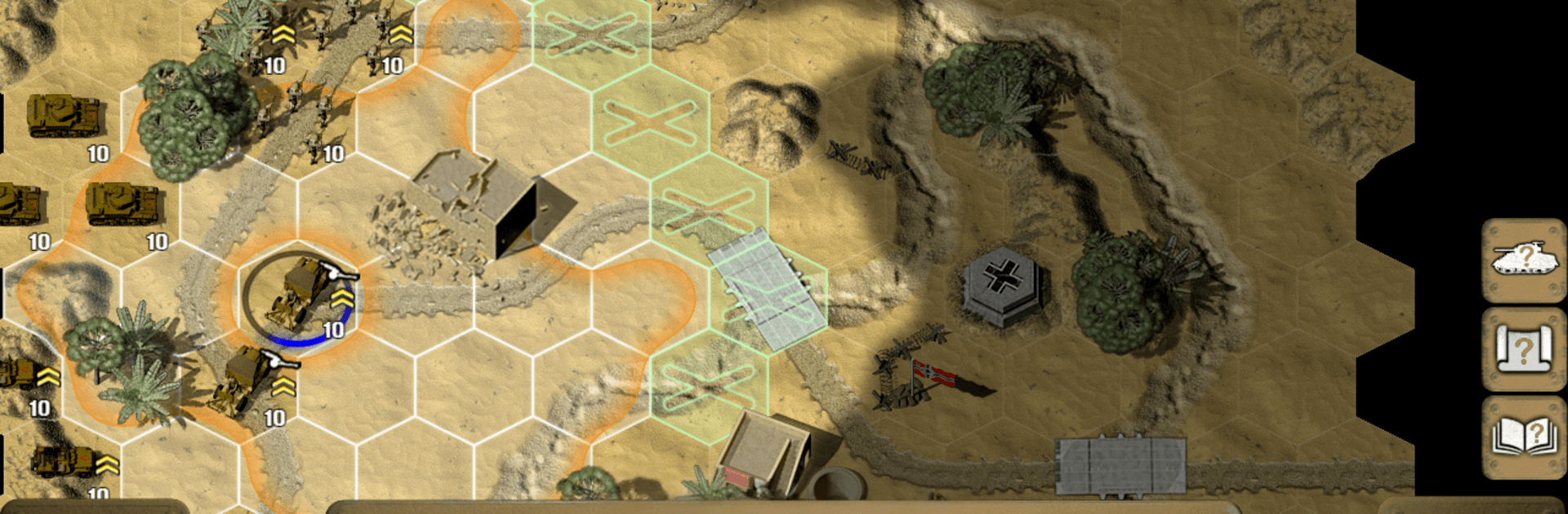
Tank Battle: North Africa is a Strategy wargame from Hunted Cow Games that puts you in the dust and heat of WWII’s desert campaigns. You’ll coordinate armor, infantry, and support across wide-open battlefields where every ridge and sand dune matters. It’s turn-based, tactical, and surprisingly tense—one smart flank or well-timed airstrike can flip the whole fight.

Game Features

  • Tactical depth: Use flanking, relocation-and-fire moves, transports, and careful positioning to outthink enemy armor and infantry.
  • Three playable forces: Command British Commonwealth, American, or German units, each with a distinct toolkit and battlefield feel.
  • Big unit roster: Field more than 36 unit types—from M3 mediums and Crusaders to Bazooka teams, AT guns, jeeps, and classic Panzer variants.
  • Experience matters: Lead squads ranging from rookies and regulars to hardened veterans and elite troops, and feel the difference in performance.
  • Air and artillery support: Call in strikes and indirect fire to crack dug-in positions or soften targets before your tanks roll.
  • Mobility and logistics: Mount and dismount from vehicles, shuttle troops quickly, and make bold strategic moves between objectives.
  • Clear combat breakdowns: See how terrain, armor, range, and other modifiers shape your odds before you pull the trigger.
  • Handy references: In-game unit info and quick charts make it easy to compare stats and plan your next push without pausing the action.
  • Campaign variety: Tackle 10 campaigns packed with multi-mission operations—including a full tutorial—covering British advances, American offensives, and German counterattacks.
  • Crisp desert presentation: Clean, high-definition WWII visuals make spotting lines of fire and hull-down positions straightforward.
  • Play how you like: Prefer a bigger screen and mouse control? It runs smoothly on BlueStacks too.

Start your journey now. Download the game on BlueStacks, invite your friends, and march on a new adventure.


Game Features

Enhancements

  • Macros
  • Multi Instance
  • Multi Instance Sync
  • Eco Mode
  • Enhancements
Macros

Macros

Skip the boring parts of a game. Play Tank Battle: North Africa with Macros and get the edge. Simply record a sequence of commands and execute them at any moment.
Multi Instance

Multi Instance

Why limit to one game on your phone when you can play many on your PC? Open multiple instances of Tank Battle: North Africa at once with Multi-Instance. Leverage the power of different accounts by doing more.
Multi Instance Sync

Multi Instance Sync

Get the best out of Tank Battle: North Africa with Multi-Instance Sync. Play the game from different accounts and build your own empire. Use Multi-instance sync to repeat the action in the main BlueStacks instance on all other instances.
Eco Mode

Eco Mode

Find the rarest heroes by making multiple summons in Tank Battle: North Africa. And while you are at it, reduce your PC’s resource consumption with the Eco Mode. Farm efficiently. Get the best results.
Read More

How to Download and Play Tank Battle: North Africa on PC or Mac

  • Download and install BlueStacks on your PC or Mac

  • Complete Google sign-in to access the Play Store, or do it later

  • Look for Tank Battle: North Africa in the search bar at the top right corner

  • Click to install Tank Battle: North Africa from the search results

  • Complete Google sign-in (if you skipped step 2) to install Tank Battle: North Africa

  • Click the Tank Battle: North Africa icon on the home screen to start playing

video
Watch Video

Minimum System Requirements

With BlueStacks 5, you can get started on a PC that fulfills the following requirements.

  • Operating System

    Microsoft Windows 7 or above, macOS 11 (Big Sur) or above

  • Processor

    Intel, AMD or Apple Silicon Processor

  • RAM

    at least 4GB

  • HDD

    10GB Free Disk Space

Note:

* You must be an Administrator on your PC. Up to date graphics drivers from Microsoft or the chipset vendor.

Tank Battle: North Africa - FAQs

  • How to play Tank Battle: North Africa on Windows PC & Mac?

    Play Tank Battle: North Africa on your PC or Mac by following these simple steps.

    • Click on 'Play Tank Battle: North Africa on PC’ to download BlueStacks
    • Install it and log-in to Google Play Store
    • Launch and play the game.
  • Why is BlueStacks the fastest and safest platform to play games on PC?

    BlueStacks respects your privacy and is always safe and secure to use. It does not carry any malware, spyware, or any sort of additional software that could harm your PC.

    It is engineered to optimize speed and performance for a seamless gaming experience.

  • What are Tank Battle: North Africa PC requirements?

    Minimum requirement to run Tank Battle: North Africa on your PC

    • OS: Microsoft Windows 7 or above MacOS 11 (Big Sur) or above
    • Processor: Intel, AMD or Apple Silicon Processor
    • RAM: Your PC must have at least 4GB of RAM. (Note that having 4GB or more disk space is not a substitute for RAM)
    • HDD: 10GB Free Disk Space.
    • You must be an Administrator on your PC.