Total War: EMPIRE
Total War: EMPIRE

Total War: EMPIRE

Strategy

| Feral Interactive

Play on PC with BlueStacks or from our cloud

  • Overview
  • Game Features
  • How to Play

Page Modified On: November 28, 2025

Play Total War: EMPIRE on PC or Mac

Join millions to experience Total War: EMPIRE, an exciting Strategy game from Feral Interactive. With BlueStacks App Player, you are always a step ahead of your opponent, ready to outplay them with faster gameplay and better control with the mouse and keyboard on your PC or Mac.

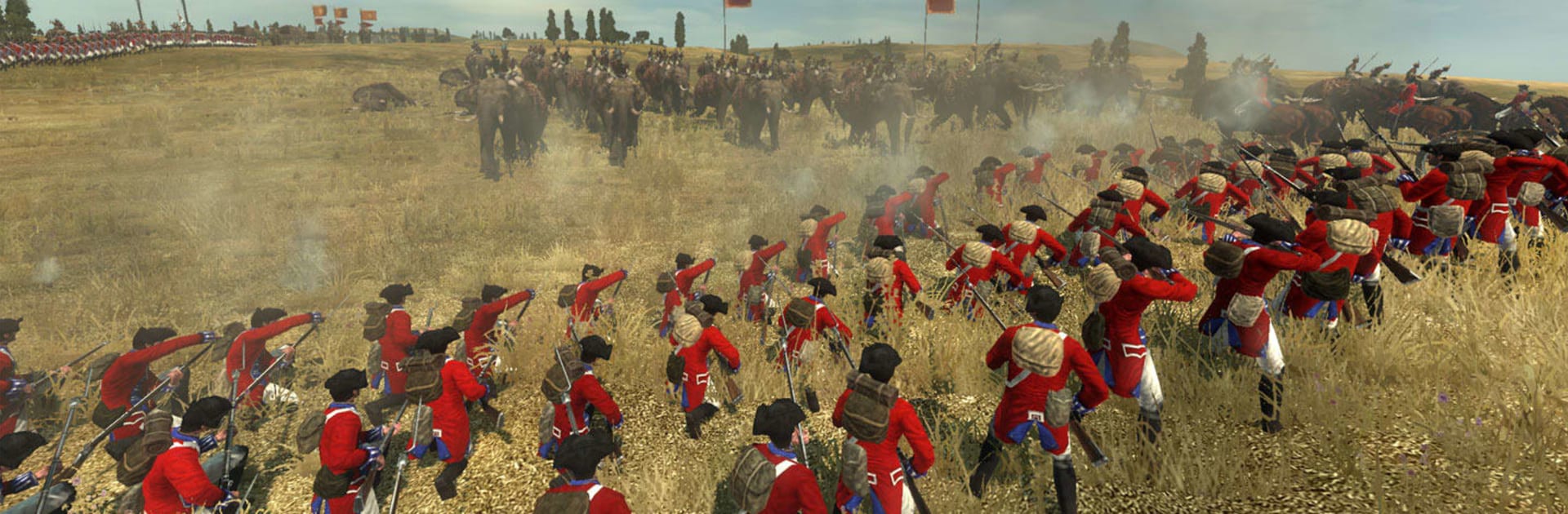
Total War: EMPIRE is a big 18th‑century strategy game that mixes a turn map with real time battles, so planning and positioning matter more than twitchy clicks. It is muskets and cannon, line infantry holding their nerve, cavalry looking for a weak flank, and artillery that can erase a unit if the angle is right. The campaign stretches across Europe, India, and the Americas, with trade routes and colonies to juggle, taxes to balance, and a tech tree that nudges a nation from flintlocks to proper industrial firepower. Naval fights are a whole thing on their own, with wind direction actually deciding who gets a clean broadside and who ends up stuck turning in place. On PC through BlueStacks, the mouse makes arranging formations and poking through menus feel natural, and the Android UI scales well enough that it does not fight the player.

The New World add‑on is a chunky unlock if someone wants more toys. It opens up dozens of factions across the main campaign, so there is room to try Greece, Gran Colombia, Mexico, the Mamelukes, and a lot more, not just the usual majors. There are two extra campaign styles too. Late Start jumps forward to 1783, so armies have better gear and colonials are already restless, which makes wars messier and faster. Warpath focuses on five Native American factions on a tighter American map, which pushes scouting, ambushes, and terrain use rather than just throwing line infantry at each other. Late game sea play gets a boost with extra ship types, including that massive 140‑gun monster people love to show off. It is not a quick match kind of title, turns can take a bit, and the economy screen can look busy at first, but once the flow clicks, it is all about setting up that one decisive volley or locking down a lucrative port and watching a small nation turn into something scary.

Get ready for a buttery smooth, high-performance gaming action only on BlueStacks.

Game Features

Enhancements

  • Macros
  • Multi Instance
  • Multi Instance Sync
  • Eco Mode
  • Enhancements
Macros

Macros

Skip the boring parts of a game. Play Total War: EMPIRE with Macros and get the edge. Simply record a sequence of commands and execute them at any moment.
Multi Instance

Multi Instance

Why limit to one game on your phone when you can play many on your PC? Open multiple instances of Total War: EMPIRE at once with Multi-Instance. Leverage the power of different accounts by doing more.
Multi Instance Sync

Multi Instance Sync

Get the best out of Total War: EMPIRE with Multi-Instance Sync. Play the game from different accounts and build your own empire. Use Multi-instance sync to repeat the action in the main BlueStacks instance on all other instances.
Eco Mode

Eco Mode

Find the rarest heroes by making multiple summons in Total War: EMPIRE. And while you are at it, reduce your PC’s resource consumption with the Eco Mode. Farm efficiently. Get the best results.
Read More

How to Download and Play Total War: EMPIRE on PC or Mac

  • Download and install BlueStacks on your PC or Mac

  • Complete Google sign-in to access the Play Store, or do it later

  • Look for Total War: EMPIRE in the search bar at the top right corner

  • Click to install Total War: EMPIRE from the search results

  • Complete Google sign-in (if you skipped step 2) to install Total War: EMPIRE

  • Click the Total War: EMPIRE icon on the home screen to start playing

video
Watch Video

Minimum System Requirements

With BlueStacks 5, you can get started on a PC that fulfills the following requirements.

  • Operating System

    Microsoft Windows 7 or above, macOS 11 (Big Sur) or above

  • Processor

    Intel, AMD or Apple Silicon Processor

  • RAM

    at least 4GB

  • HDD

    10GB Free Disk Space

Note:

* You must be an Administrator on your PC. Up to date graphics drivers from Microsoft or the chipset vendor.

Total War: EMPIRE - FAQs

  • How to play Total War: EMPIRE on Windows PC & Mac?

    Play Total War: EMPIRE on your PC or Mac by following these simple steps.

    • Click on 'Play Total War: EMPIRE on PC’ to download BlueStacks
    • Install it and log-in to Google Play Store
    • Launch and play the game.
  • Why is BlueStacks the fastest and safest platform to play games on PC?

    BlueStacks respects your privacy and is always safe and secure to use. It does not carry any malware, spyware, or any sort of additional software that could harm your PC.

    It is engineered to optimize speed and performance for a seamless gaming experience.

  • What are Total War: EMPIRE PC requirements?

    Minimum requirement to run Total War: EMPIRE on your PC

    • OS: Microsoft Windows 7 or above MacOS 11 (Big Sur) or above
    • Processor: Intel, AMD or Apple Silicon Processor
    • RAM: Your PC must have at least 4GB of RAM. (Note that having 4GB or more disk space is not a substitute for RAM)
    • HDD: 10GB Free Disk Space.
    • You must be an Administrator on your PC.