



Upgrade your experience. Try Virtuino, the fantastic Tools app from Ilias Lamprou, from the comfort of your laptop, PC, or Mac, only on BlueStacks.
About the App
Ever wish you could keep tabs on your Arduino projects—no matter where you are? Virtuino makes that possible, whether you’re chilling at home or tinkering in the workshop. With its practical tools and customizable interfaces, it’s like having a dashboard for your Arduino, right in your pocket. Designed by Ilias Lamprou, this handy app keeps remote control of your boards a few taps away, packed with just enough flexibility to work how you want.
App Features
-
Wireless Connections
Run things your way—Virtuino lets you connect to your Arduino over Bluetooth, WiFi (like with ESP8266), or through the Internet using an Ethernet shield. Set up the one that fits your project and start sending commands instantly. -
Multi-Board Support
Juggling more than one Arduino? No problem. You can manage multiple boards at the same time from one place. Handy if you love to experiment or have a few home automation devices going at once. -
Intuitive Visual Dashboard
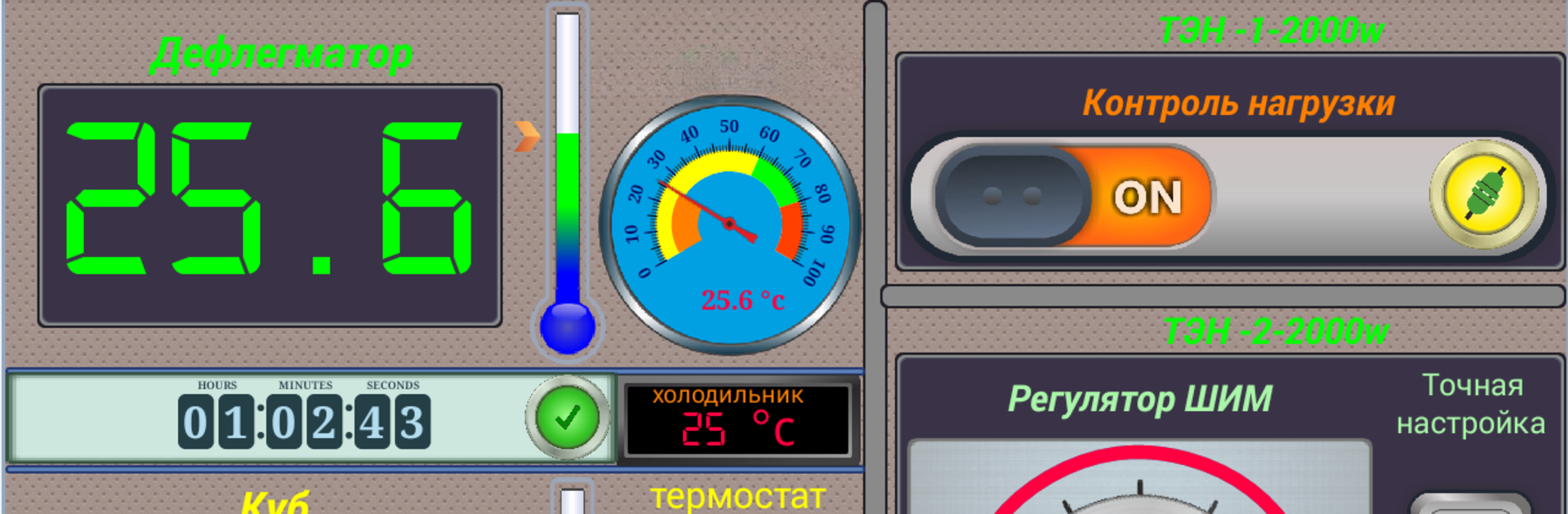
Build your own control panels using widgets like LEDs, switches, buttons, value displays, gauges, and even regulators. Set up dashboards that actually make sense for the way you work. -
Easy Setup with Minimal Coding
You don’t have to write pages of code just to get Virtuino working. Simply plug in a few lines to your Arduino sketch and follow clear setup steps in the app—it really streamlines the process. -
IoT & Data Monitoring
Interested in internet of things setups? Monitor Thingspeak data right from within Virtuino, making it easy to keep track of your remote sensors or smart devices. -
Beginner-Friendly Guidance
If you’re just getting started, Virtuino includes in-app tutorials and examples (like connecting with Bluetooth or over WiFi), so you’re never left guessing.
Virtuino delivers a straightforward, customizable toolkit for Arduino control, and if you’re using BlueStacks, keeping all your dashboards open on your bigger screen is a breeze.
Switch to BlueStacks and make the most of your apps on your PC or Mac.





