Word Beads
Word Beads

Word Beads

Word

| MCZ Apps developer

Play on PC with BlueStacks or from our cloud

  • Overview
  • Game Features
  • How to Play

Page Modified On: September 18, 2026

Play Word Beads on PC or Mac

Explore a whole new adventure with Word Beads, a Word game created by MCZ Apps developer. Experience great gameplay with BlueStacks, the most popular gaming platform to play Android games on your PC or Mac.

About the Game

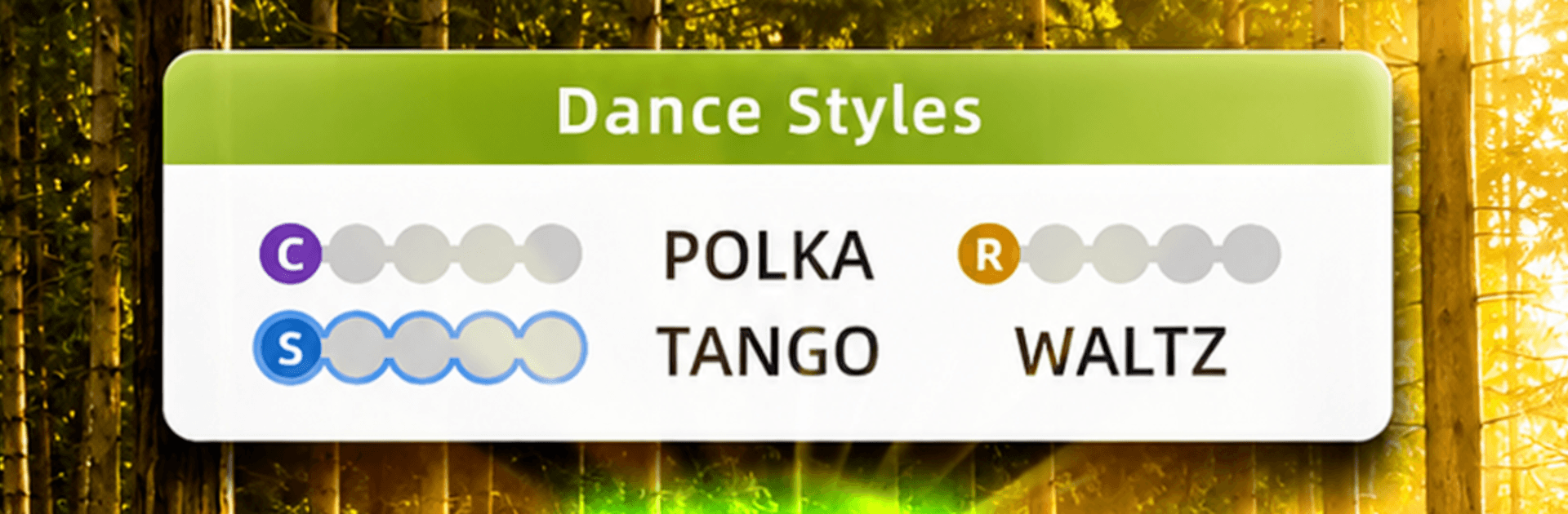
Word Beads is a calm, satisfying take on letter hunting. This Word game lays tiny “beads” of letters on a strand, and your job is to trace paths to form words that all fit a single theme. Play at your own pace, online or offline—and if you prefer a bigger screen, it runs smoothly on PC with BlueStacks.

Game Features

  • One-theme puzzles: Each board sticks to a clear topic—think Pets, Flowers, Weather, Music, Movies, Trees, and more—so every find belongs.
  • Swipe to connect: Drag through neighboring letters horizontally or vertically to thread words together in a clean, tactile way.
  • Forward or backward: Words read in either direction, so flipping your route can be the trick that breaks a stubborn board.
  • Bonus finds: Spot a real word that isn’t required? It still counts—bank a little bonus and feel clever about it.
  • Long road of levels: Work through a handcrafted journey with fresh additions rolled in over time.
  • Daily Bead: Get one new puzzle every day and keep a streak going as long as you keep showing up.
  • Hints when needed: Stuck? Use simple tools that nudge you forward without spoiling the whole board.
  • Earn and spend: Collect coins just by playing and spend them only on the helpers you actually use.
  • Dozens of themes: Browse hundreds of word lists spanning everyday life, nature, arts, and beyond.
  • Quiet, comfy design: Soft tiles, gentle sounds, and a distraction-free layout keep the focus on thinking, not flashing stuff.
  • Fully offline: Play anywhere—even in airplane mode or spots with spotty signal—without missing a beat.

Ready to top the leaderboard? We bet you do. Let precise controls and sharp visuals optimized on BlueStacks lead you to victory.


Game Features

Enhancements

  • Macros
  • Multi Instance
  • Multi Instance Sync
  • Script
  • Enhancements
Macros

Macros

Automate the predictable in Word Beads and transform your gameplay with Macros. Get access to inventive Macros in the BlueStacks Macro Community
Multi Instance

Multi Instance

Play Word Beads on one window. And chat with your friend on the other. Press CTRL + Shift + 8 to open the Multi-Instance Manager. And start creating fresh instances or clone an existing one.
Multi Instance Sync

Multi Instance Sync

Play Word Beads with the power of Multi-Instance Sync. Replicate what you are doing on the main instance on all other instances. Level up faster, play more.
Script

Script

Script your way to gaming glory in Word Beads with BlueStacks Script. Write and run a set of commands to automate repeated tasks. Trigger the command by assigning it to any key.
Read More

How to Download and Play Word Beads on PC or Mac

  • Download and install BlueStacks on your PC or Mac

  • Complete Google sign-in to access the Play Store, or do it later

  • Look for Word Beads in the search bar at the top right corner

  • Click to install Word Beads from the search results

  • Complete Google sign-in (if you skipped step 2) to install Word Beads

  • Click the Word Beads icon on the home screen to start playing

video
Watch Video

Minimum System Requirements

With BlueStacks 5, you can get started on a PC that fulfills the following requirements.

  • Operating System

    Microsoft Windows 7 or above, macOS 11 (Big Sur) or above

  • Processor

    Intel, AMD or Apple Silicon Processor

  • RAM

    at least 4GB

  • HDD

    10GB Free Disk Space

Note:

* You must be an Administrator on your PC. Up to date graphics drivers from Microsoft or the chipset vendor.

Word Beads - FAQs

  • How to play Word Beads on Windows PC & Mac?

    Play Word Beads on your PC or Mac by following these simple steps.

    • Click on 'Play Word Beads on PC’ to download BlueStacks
    • Install it and log-in to Google Play Store
    • Launch and play the game.
  • Why is BlueStacks the fastest and safest platform to play games on PC?

    BlueStacks respects your privacy and is always safe and secure to use. It does not carry any malware, spyware, or any sort of additional software that could harm your PC.

    It is engineered to optimize speed and performance for a seamless gaming experience.

  • What are Word Beads PC requirements?

    Minimum requirement to run Word Beads on your PC

    • OS: Microsoft Windows 7 or above MacOS 11 (Big Sur) or above
    • Processor: Intel, AMD or Apple Silicon Processor
    • RAM: Your PC must have at least 4GB of RAM. (Note that having 4GB or more disk space is not a substitute for RAM)
    • HDD: 10GB Free Disk Space.
    • You must be an Administrator on your PC.