Galaxy Division: Space Battles

Galaxy Division: Space Battles

Action

| Armada Forge Games

Play on PC with BlueStacks or from our cloud

  • Overview
  • Game Features
  • How to Play

Page Modified On: April 07, 2026

Play Galaxy Division: Space Battles on PC or Mac

Explore a whole new adventure with Galaxy Division: Space Battles, a Action game created by Armada Forge Games. Experience great gameplay with BlueStacks, the most popular gaming platform to play Android games on your PC or Mac.

About the Game

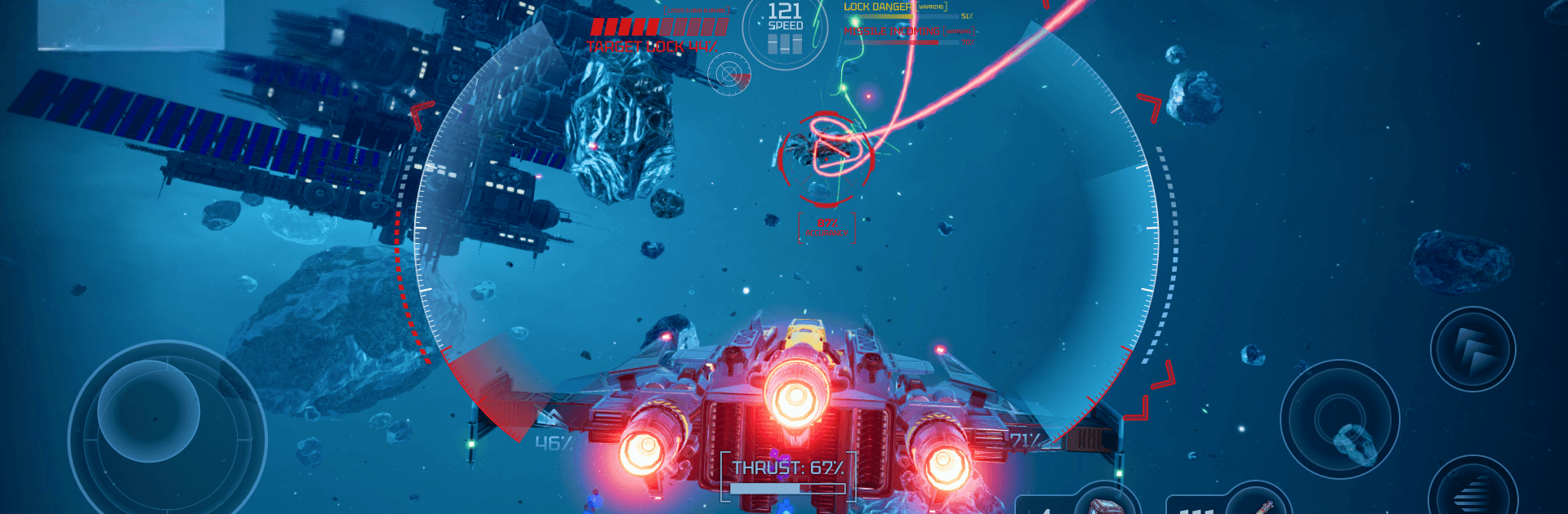
Galaxy Division: Space Battles is a fast, third-person space shooter where you’re always a split second from glory or a fiery spin into the void. It’s an Action game from Armada Forge Games that’s all about sharp piloting, clever builds, and flashy shootouts that feel great the moment you grab the controls. Prefer a bigger screen and precise aim? It plays smoothly on BlueStacks with keyboard and mouse, too.

Game Features

  • Fly Your Style: Choose from 40+ distinct spacecraft, from nimble interceptors to bruiser gunships, each with its own handling, role, and personality in the fight.
  • Build a Deadly Loadout: Mix more than 100 weapons and modules—lasers, missiles, railguns, drones, shields, and more—to create wild synergies that fit your playstyle.
  • Deep Upgrades: Reinforce hulls, boost power systems, fine-tune cooldowns, and hunt rare modules that push your ship from “solid” to “scary.”
  • Solo Campaign Adventure: Chart routes across star systems, deal with ambushes and trade lanes, and square off against bosses that demand smart movement and timing.
  • Competitive PvP Arenas: Jump into tight dogfights with fast matchmaking and climb ranked ladders where every outplay (and every mistake) matters.
  • Skill-First Combat: Master drift boosts, perfect shield windows, and chain module combos to slip past firing lines and turn the tables mid‑fight.
  • Crisp Controls, Big Effects: Smooth handling meets punchy visuals—clean UI, bold explosions, and feedback that makes every hit feel earned.
  • Daily Goals, Solid Rewards: Knock out short quests for resources that fuel new builds, upgrades, and experiments without slowing your momentum.
  • Strategy in Motion: Swap parts, tweak energy priorities, and tailor tactics for each encounter—surgical strikes, brawling slugfests, or slippery hit-and-run runs all work when you set them up right.

Make your gaming sessions memorable with precise controls that give you an edge in close combats and visuals that pop up, bringing every character to life.


Game Features

Enhancements

  • Macros
  • Multi Instance
  • Multi Instance Sync
  • Eco Mode
  • Enhancements
Macros

Macros

Skip the boring parts of a game. Play Galaxy Division: Space Battles with Macros and get the edge. Simply record a sequence of commands and execute them at any moment.
Multi Instance

Multi Instance

Why limit to one game on your phone when you can play many on your PC? Open multiple instances of Galaxy Division: Space Battles at once with Multi-Instance. Leverage the power of different accounts by doing more.
Multi Instance Sync

Multi Instance Sync

Get the best out of Galaxy Division: Space Battles with Multi-Instance Sync. Play the game from different accounts and build your own empire. Use Multi-instance sync to repeat the action in the main BlueStacks instance on all other instances.
Eco Mode

Eco Mode

Find the rarest heroes by making multiple summons in Galaxy Division: Space Battles. And while you are at it, reduce your PC’s resource consumption with the Eco Mode. Farm efficiently. Get the best results.
Read More

How to Download and Play Galaxy Division: Space Battles on PC or Mac

  • Download and install BlueStacks on your PC or Mac

  • Complete Google sign-in to access the Play Store, or do it later

  • Look for Galaxy Division: Space Battles in the search bar at the top right corner

  • Click to install Galaxy Division: Space Battles from the search results

  • Complete Google sign-in (if you skipped step 2) to install Galaxy Division: Space Battles

  • Click the Galaxy Division: Space Battles icon on the home screen to start playing

video
Watch Video

Minimum System Requirements

With BlueStacks 5, you can get started on a PC that fulfills the following requirements.

  • Operating System

    Microsoft Windows 7 or above, macOS 11 (Big Sur) or above

  • Processor

    Intel, AMD or Apple Silicon Processor

  • RAM

    at least 4GB

  • HDD

    10GB Free Disk Space

Note:

* You must be an Administrator on your PC. Up to date graphics drivers from Microsoft or the chipset vendor.

Galaxy Division: Space Battles - FAQs

  • How to play Galaxy Division: Space Battles on Windows PC & Mac?

    Play Galaxy Division: Space Battles on your PC or Mac by following these simple steps.

    • Click on 'Play Galaxy Division: Space Battles on PC’ to download BlueStacks
    • Install it and log-in to Google Play Store
    • Launch and play the game.
  • Why is BlueStacks the fastest and safest platform to play games on PC?

    BlueStacks respects your privacy and is always safe and secure to use. It does not carry any malware, spyware, or any sort of additional software that could harm your PC.

    It is engineered to optimize speed and performance for a seamless gaming experience.

  • What are Galaxy Division: Space Battles PC requirements?

    Minimum requirement to run Galaxy Division: Space Battles on your PC

    • OS: Microsoft Windows 7 or above MacOS 11 (Big Sur) or above
    • Processor: Intel, AMD or Apple Silicon Processor
    • RAM: Your PC must have at least 4GB of RAM. (Note that having 4GB or more disk space is not a substitute for RAM)
    • HDD: 10GB Free Disk Space.
    • You must be an Administrator on your PC.