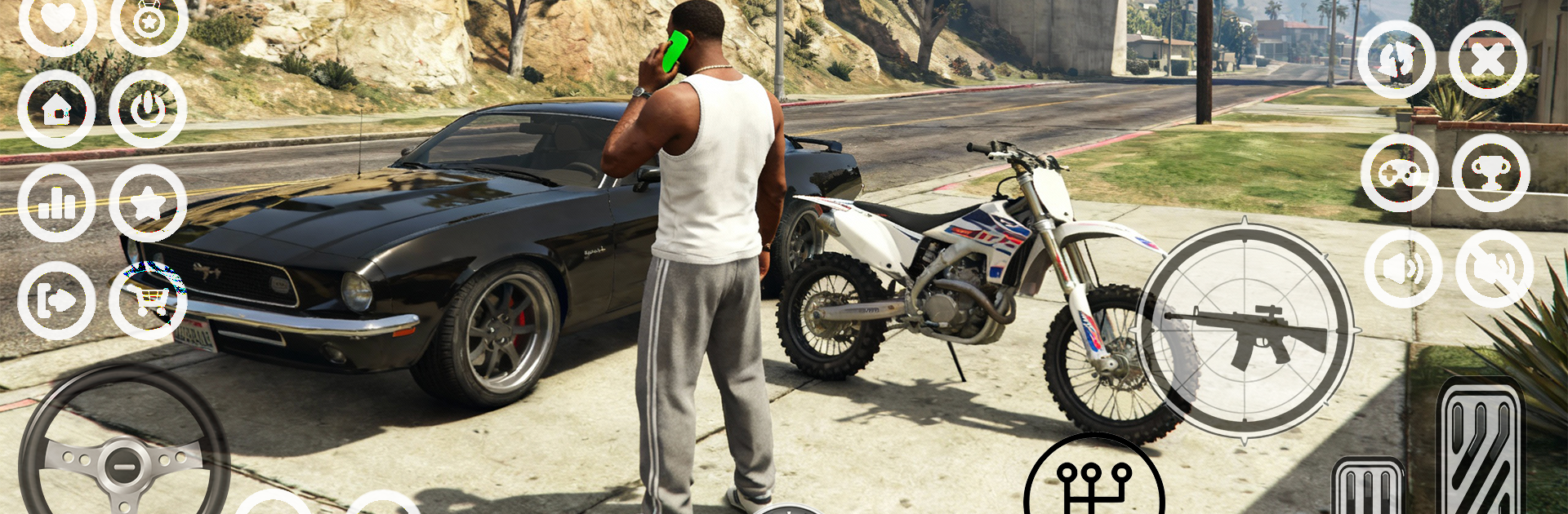
Gang City: Grand RP Vice Game

Gang City: Grand RP Vice Game

Action

| NovaG Studio

Play on PC with BlueStacks or from our cloud

  • Overview
  • Game Features
  • How to Play

Page Modified On: October 23, 2025

Play Gang City: Grand RP Vice Game on PC or Mac

Explore a whole new adventure with Gang City: Grand RP Vice Game, a Action game created by NovaG Studio. Experience great gameplay with BlueStacks, the most popular gaming platform to play Android games on your PC or Mac.

About the Game

Gang City: Grand RP Vice Game is a street-level, open-world Action sandbox from NovaG Studio where your choices actually shape your story. Want a clean paycheck or a messy criminal empire? Build a life, tune wicked cars, and carve out a name across a city that never really slows down. Prefer playing on a bigger screen with keyboard controls? It also works great on BlueStacks.

Game Features

  • A living city: Cruise through busy boulevards, smoky back alleys, and rooftops with a view. Expect random encounters, side jobs, and plenty of unscripted moments.
  • Choose your role: Be a cop, medic, mechanic, or the boss everyone whispers about. Swap careers, stack cash, and find the grind that fits your style.
  • Turf and power: Team up with gangs, pull off heists, and fight for control of key zones. Strategy matters as much as firepower.
  • Missions with bite: Street fights, risky deliveries, tense showdowns—every job carries consequences, and your rep follows you.
  • Cars that count: Collect muscle, luxury, and street racers. Tune the engine, tweak the look, and test your build in races or high-speed getaways.
  • Build a life: Buy houses, open businesses, earn legit money—or don’t. Manage your funds, gear, and relationships to keep your empire alive.
  • Gear and growth: Unlock clothes, upgrade weapons, and level your character to match the way you play, whether stealthy or loud.
  • Solo or squad: Free-roam alone or jump into multiplayer scenes filled with rival crews and helpful allies. NPCs round out the city when you need a quieter run.
  • Heat and escape: Police chases ramp up fast. Outsmart patrols, switch cars, and vanish before the sirens catch up.
  • Real RP systems: Jobs feel like jobs, arrests feel real, and success feels earned. Write your story one choice at a time.

Ready to top the leaderboard? We bet you do. Let precise controls and sharp visuals optimized on BlueStacks lead you to victory.


Game Features

Enhancements

  • Macros
  • Multi Instance
  • Multi Instance Sync
  • Eco Mode
  • Enhancements
Macros

Macros

Skip the boring parts of a game. Play Gang City: Grand RP Vice Game with Macros and get the edge. Simply record a sequence of commands and execute them at any moment.
Multi Instance

Multi Instance

Why limit to one game on your phone when you can play many on your PC? Open multiple instances of Gang City: Grand RP Vice Game at once with Multi-Instance. Leverage the power of different accounts by doing more.
Multi Instance Sync

Multi Instance Sync

Get the best out of Gang City: Grand RP Vice Game with Multi-Instance Sync. Play the game from different accounts and build your own empire. Use Multi-instance sync to repeat the action in the main BlueStacks instance on all other instances.
Eco Mode

Eco Mode

Find the rarest heroes by making multiple summons in Gang City: Grand RP Vice Game. And while you are at it, reduce your PC’s resource consumption with the Eco Mode. Farm efficiently. Get the best results.
Read More

How to Download and Play Gang City: Grand RP Vice Game on PC or Mac

  • Download and install BlueStacks on your PC or Mac

  • Complete Google sign-in to access the Play Store, or do it later

  • Look for Gang City: Grand RP Vice Game in the search bar at the top right corner

  • Click to install Gang City: Grand RP Vice Game from the search results

  • Complete Google sign-in (if you skipped step 2) to install Gang City: Grand RP Vice Game

  • Click the Gang City: Grand RP Vice Game icon on the home screen to start playing

video
Watch Video

Minimum System Requirements

With BlueStacks 5, you can get started on a PC that fulfills the following requirements.

  • Operating System

    Microsoft Windows 7 or above, macOS 11 (Big Sur) or above

  • Processor

    Intel, AMD or Apple Silicon Processor

  • RAM

    at least 4GB

  • HDD

    10GB Free Disk Space

Note:

* You must be an Administrator on your PC. Up to date graphics drivers from Microsoft or the chipset vendor.

Gang City: Grand RP Vice Game - FAQs

  • How to play Gang City: Grand RP Vice Game on Windows PC & Mac?

    Play Gang City: Grand RP Vice Game on your PC or Mac by following these simple steps.

    • Click on 'Play Gang City: Grand RP Vice Game on PC’ to download BlueStacks
    • Install it and log-in to Google Play Store
    • Launch and play the game.
  • Why is BlueStacks the fastest and safest platform to play games on PC?

    BlueStacks respects your privacy and is always safe and secure to use. It does not carry any malware, spyware, or any sort of additional software that could harm your PC.

    It is engineered to optimize speed and performance for a seamless gaming experience.

  • What are Gang City: Grand RP Vice Game PC requirements?

    Minimum requirement to run Gang City: Grand RP Vice Game on your PC

    • OS: Microsoft Windows 7 or above MacOS 11 (Big Sur) or above
    • Processor: Intel, AMD or Apple Silicon Processor
    • RAM: Your PC must have at least 4GB of RAM. (Note that having 4GB or more disk space is not a substitute for RAM)
    • HDD: 10GB Free Disk Space.
    • You must be an Administrator on your PC.