StreetDrive Online
StreetDrive Online

StreetDrive Online

Racing

| NovaG Studio

Play on PC with BlueStacks or from our cloud

  • Overview
  • Game Features
  • How to Play

Page Modified On: August 22, 2025

Play StreetDrive Online on PC or Mac

StreetDrive Online brings the Racing genre to life, and throws up exciting challenges for gamers. Developed by NovaG Studio, this Android game is best experienced on BlueStacks, the World’s #1 app player for PC and Mac users.

About the Game

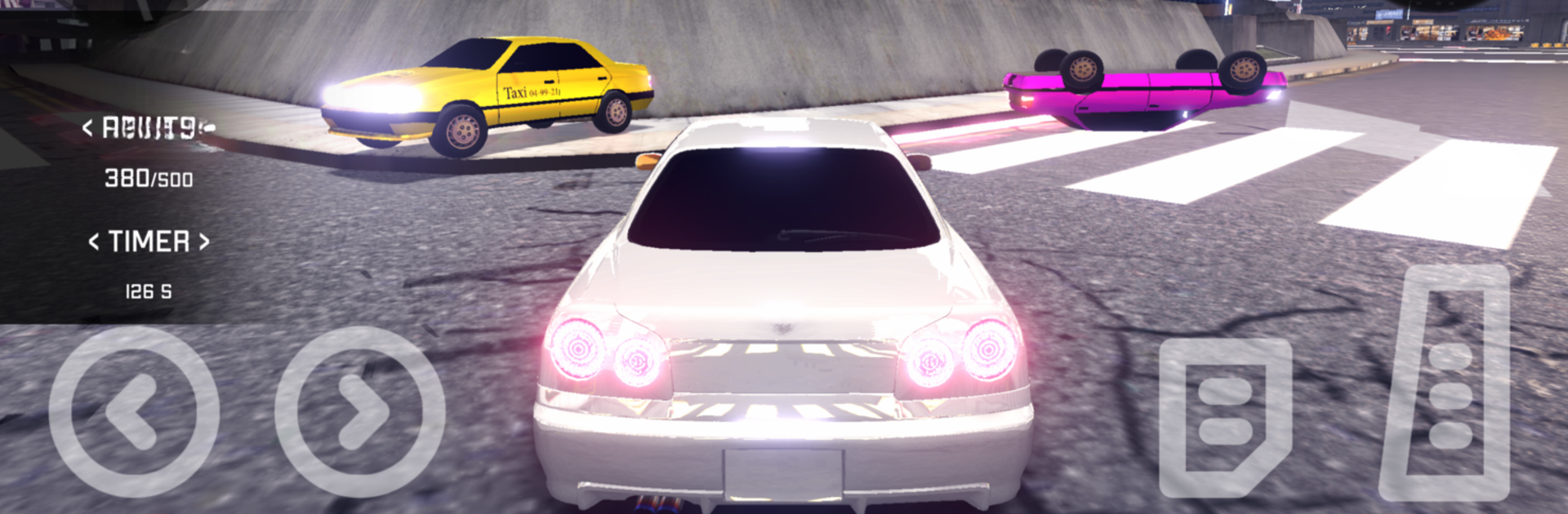
If you’ve ever wanted to rule the streets in a flashy ride, StreetDrive Online is your playground. This racing game from NovaG Studio throws you into a huge city where you can drift, race, and customize your favorite cars—all while going head-to-head with real players and AI rivals. Expect wild challenges, fast-paced competition, and endless ways to make your car truly yours.

Game Features

  • Massive Open City
    Cruise around a gigantic 6×6 km city that changes from day to night, packed with moving traffic that keeps you on your toes.

  • Live PvP Events
    Feel the adrenaline as you jump into real-time PvP races and show off your skills against other racers around the globe.

  • Deep Customization
    Tweak just about every part of your ride—switch up the paint, slap on wild body kits, glow with neon, change up the rims, and mod your car for more speed or better handling.

  • Realistic Drifting and Visible Damage
    Get familiar with responsive drift controls—your mistakes (or epic drifts) actually leave marks, thanks to a detailed damage system.

  • Leaderboard Battles
    Chase your spot on weekly leaderboards and global rankings, where top racers snag special rewards and bragging rights.

  • Offline Missions & Daily Challenges
    There’s plenty to do solo, too; daily tasks and missions give you chances to earn credits, XP, and unique upgrades.

  • Smooth Play Across Devices
    The optimized netcode means gameplay’s buttery-smooth, even if you’re not sporting the latest phone.

  • New Player Perks
    Sign up and you’ll get a week-long spin with a Legendary Car—yeah, you read that right. Monthly updates keep things fresh with new vehicles, routes, and game types.

You’ll get the most out of StreetDrive Online if you hop in on BlueStacks, where everything looks and runs even better.

Ready to top the leaderboard? We bet you do. Let precise controls and sharp visuals optimized on BlueStacks lead you to victory.


Game Features

Enhancements

  • Macros
  • Multi Instance
  • Multi Instance Sync
  • Script
  • Enhancements
Macros

Macros

Automate the predictable in StreetDrive Online and transform your gameplay with Macros. Get access to inventive Macros in the BlueStacks Macro Community
Multi Instance

Multi Instance

Play StreetDrive Online on one window. And chat with your friend on the other. Press CTRL + Shift + 8 to open the Multi-Instance Manager. And start creating fresh instances or clone an existing one.
Multi Instance Sync

Multi Instance Sync

Play StreetDrive Online with the power of Multi-Instance Sync. Replicate what you are doing on the main instance on all other instances. Level up faster, play more.
Script

Script

Script your way to gaming glory in StreetDrive Online with BlueStacks Script. Write and run a set of commands to automate repeated tasks. Trigger the command by assigning it to any key.
Read More

How to Download and Play StreetDrive Online on PC or Mac

  • Download and install BlueStacks on your PC or Mac

  • Complete Google sign-in to access the Play Store, or do it later

  • Look for StreetDrive Online in the search bar at the top right corner

  • Click to install StreetDrive Online from the search results

  • Complete Google sign-in (if you skipped step 2) to install StreetDrive Online

  • Click the StreetDrive Online icon on the home screen to start playing

video
Watch Video

Minimum System Requirements

With BlueStacks 5, you can get started on a PC that fulfills the following requirements.

  • Operating System

    Microsoft Windows 7 or above, macOS 11 (Big Sur) or above

  • Processor

    Intel, AMD or Apple Silicon Processor

  • RAM

    at least 4GB

  • HDD

    10GB Free Disk Space

Note:

* You must be an Administrator on your PC. Up to date graphics drivers from Microsoft or the chipset vendor.

StreetDrive Online - FAQs

  • How to play StreetDrive Online on Windows PC & Mac?

    Play StreetDrive Online on your PC or Mac by following these simple steps.

    • Click on 'Play StreetDrive Online on PC’ to download BlueStacks
    • Install it and log-in to Google Play Store
    • Launch and play the game.
  • Why is BlueStacks the fastest and safest platform to play games on PC?

    BlueStacks respects your privacy and is always safe and secure to use. It does not carry any malware, spyware, or any sort of additional software that could harm your PC.

    It is engineered to optimize speed and performance for a seamless gaming experience.

  • What are StreetDrive Online PC requirements?

    Minimum requirement to run StreetDrive Online on your PC

    • OS: Microsoft Windows 7 or above MacOS 11 (Big Sur) or above
    • Processor: Intel, AMD or Apple Silicon Processor
    • RAM: Your PC must have at least 4GB of RAM. (Note that having 4GB or more disk space is not a substitute for RAM)
    • HDD: 10GB Free Disk Space.
    • You must be an Administrator on your PC.