God Rivals: RPG Roguelike

God Rivals: RPG Roguelike

Action

| God Rivals

Play on PC with BlueStacks or from our cloud

Click here to Pre-Register for God Rivals: RPG Roguelike
  • Overview
  • Features
  • How to Play

Page Modified On: April 02, 2026

Play God Rivals: RPG Roguelike on PC or Mac

God Rivals: RPG Roguelike brings the Action genre to life, and throws up exciting challenges for gamers. Developed by God Rivals, this Android game is best experienced on BlueStacks, the World’s #1 app player for PC and Mac users.

About the Game

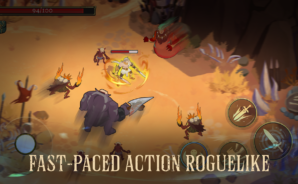
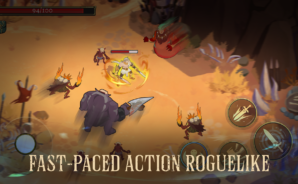
God Rivals: RPG Roguelike drops you into a bleak, high-stakes world where gods, monsters, and traps are all out to end your run. Every attempt feels fresh—you start small, make gutsy choices, and shape a build that can snowball into something wild. From God Rivals, it sits firmly in the Genre: Action lane and plays great on mobile; it’s also easy to kick back on BlueStacks if you want a bigger view.

Game Features

  • Snappy, skill-first combat: Timing matters. Read enemy tells, weave through hazards, and strike when it counts. It’s fast, reactive, and constantly pushes your reflexes.
  • Roguelike variety every time: Routes, enemy mixes, and upgrade options shift from run to run, so you’re always adapting on the fly.
  • Progress that sticks: Win or lose, you’re earning unlocks and upgrades that open new strategies and help you push deeper on the next try.
  • Boss fights with bite: Square off against towering rivals and godlike foes that demand pattern recognition, smart positioning, and a cool head under pressure.
  • Build it your way: Mix skills and upgrades to match your style—go aggressive and flashy or methodical and safe. Find combos that turn a solid kit into pure chaos.
  • Moody dark fantasy world: Explore a hostile realm full of threats, secrets, and high-risk rewards. It’s grim, mysterious, and built for repeat runs that never feel the same.

Ready to top the leaderboard? We bet you do. Let precise controls and sharp visuals optimized on BlueStacks lead you to victory.

Features

  • Macros

    Skip the boring parts of a game. Play God Rivals: RPG Roguelike with Macros and get the edge. Simply record a sequence of commands and execute them at any moment.

  • Multi Instance

    Why limit to one game on your phone when you can play many on your PC? Open multiple instances of God Rivals: RPG Roguelike at once with Multi-Instance. Leverage the power of different accounts by doing more.

  • Multi Instance Sync

    Get the best out of God Rivals: RPG Roguelike with Multi-Instance Sync. Play the game from different accounts and build your own empire. Use Multi-instance sync to repeat the action in the main BlueStacks instance on all other instances.

  • Eco Mode

    Find the rarest heroes by making multiple summons in God Rivals: RPG Roguelike. And while you are at it, reduce your PC’s resource consumption with the Eco Mode. Farm efficiently. Get the best results.

How to Download and Play God Rivals: RPG Roguelike on PC or Mac

  • Download and install BlueStacks on your PC or Mac

  • Complete Google sign-in to access the Play Store, or do it later

  • Look for God Rivals: RPG Roguelike in the search bar at the top right corner

  • Click to install God Rivals: RPG Roguelike from the search results

  • Complete Google sign-in (if you skipped step 2) to install God Rivals: RPG Roguelike

  • Click the God Rivals: RPG Roguelike icon on the home screen to start playing

video
Watch Video

Minimum System Requirements

With BlueStacks 5, you can get started on a PC that fulfills the following requirements.

  • Operating System

    Microsoft Windows 7 or above, macOS 11 (Big Sur) or above

  • Processor

    Intel, AMD or Apple Silicon Processor

  • RAM

    at least 4GB

  • HDD

    10GB Free Disk Space

Note:

* You must be an Administrator on your PC. Up to date graphics drivers from Microsoft or the chipset vendor.

Exclusive Gaming Content. And More.

Get the latest updates on the BlueStacks Blog.

See More
God Rivals: RPG Roguelike

Be among the first to play God Rivals: RPG Roguelike on PC

Get notified when the Game launches

God Rivals: RPG Roguelike - FAQs

  • How to play God Rivals: RPG Roguelike on Windows PC & Mac?

    Play God Rivals: RPG Roguelike on your PC or Mac by following these simple steps.

    • Click on 'Play God Rivals: RPG Roguelike on PC’ to download BlueStacks
    • Install it and log-in to Google Play Store
    • Launch and play the game.
  • Why is BlueStacks the fastest and safest platform to play games on PC?

    BlueStacks respects your privacy and is always safe and secure to use. It does not carry any malware, spyware, or any sort of additional software that could harm your PC.

    It is engineered to optimize speed and performance for a seamless gaming experience.

  • What are God Rivals: RPG Roguelike PC requirements?

    Minimum requirement to run God Rivals: RPG Roguelike on your PC

    • OS: Microsoft Windows 7 or above MacOS 11 (Big Sur) or above
    • Processor: Intel, AMD or Apple Silicon Processor
    • RAM: Your PC must have at least 4GB of RAM. (Note that having 4GB or more disk space is not a substitute for RAM)
    • HDD: 10GB Free Disk Space.
    • You must be an Administrator on your PC.