Last Bastion
Last Bastion

Last Bastion

Action

| Mankrik

Play on PC with BlueStacks or from our cloud

  • Overview
  • Game Features
  • How to Play

Page Modified On: August 20, 2026

Play Last Bastion on PC or Mac

Play Last Bastion by Mankrik on PC or Mac with BlueStacks. Use a bigger screen, mouse and keyboard controls, and smoother performance while you play.

About the Game

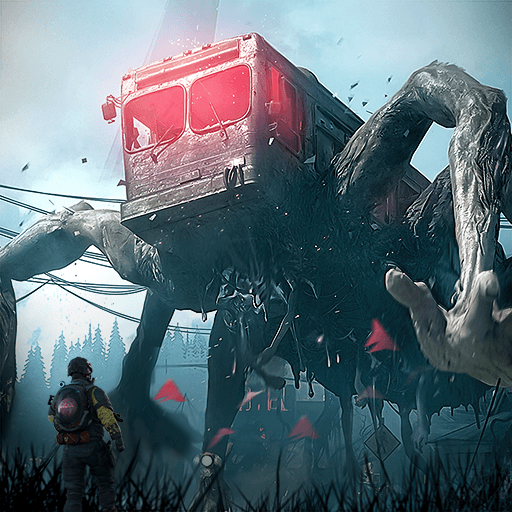
Last Bastion is a gritty Action survival-builder where every run outside the walls feels risky—and worth it. You’re rebuilding a safe haven in a world that won’t stop throwing the undead at you, scavenging parts, crafting better gear, and holding the line when it counts. If you prefer a bigger view and comfy controls, it plays smoothly on PC with BlueStacks.

Game Features

  • Stronghold building: Turn a barebones checkpoint into a fortified base with essentials like a clinic, workshop, storage, and defensive emplacements.
  • Scavenging the wastes: Push past barricades to open new sectors packed with materials, hidden stashes, and plenty of trouble for the unprepared.
  • Real fights against the horde: Tangle with shambling packs, quick sprinters, and chunky mini-bosses, then swap from patrols to home defense at a moment’s notice.
  • Deep crafting loop: Smelt ore into bars, assemble components, and tune up tools and weapons so you can brave nastier zones and tougher threats.
  • Smart resource economy: Refine basics into higher-tier materials, trade extras at the exchange, and funnel the good stuff into upgrades that actually matter.
  • Survivors that matter: Rescue folks out there, bring them inside, assign jobs, and watch your production tick up while your defenses get sturdier.
  • Steady progression: New buildings, fresh regions, and mission chains keep unlocking as you push the frontier and piece together what went wrong in this world.
  • Defense on demand: Expect sudden, focused assaults; reinforce walls, place traps, and reposition units while the sirens wail and the gate buckles.

Ready to top the leaderboard? We bet you do. Let precise controls and sharp visuals optimized on BlueStacks lead you to victory.


Game Features

Enhancements

  • Macros
  • Multi Instance
  • Multi Instance Sync
  • Eco Mode
  • Enhancements
Macros

Macros

Skip the boring parts of a game. Play Last Bastion with Macros and get the edge. Simply record a sequence of commands and execute them at any moment.
Multi Instance

Multi Instance

Why limit to one game on your phone when you can play many on your PC? Open multiple instances of Last Bastion at once with Multi-Instance. Leverage the power of different accounts by doing more.
Multi Instance Sync

Multi Instance Sync

Get the best out of Last Bastion with Multi-Instance Sync. Play the game from different accounts and build your own empire. Use Multi-instance sync to repeat the action in the main BlueStacks instance on all other instances.
Eco Mode

Eco Mode

Find the rarest heroes by making multiple summons in Last Bastion. And while you are at it, reduce your PC’s resource consumption with the Eco Mode. Farm efficiently. Get the best results.
Read More

How to Download and Play Last Bastion on PC or Mac

  • Download and install BlueStacks on your PC or Mac

  • Complete Google sign-in to access the Play Store, or do it later

  • Look for Last Bastion in the search bar at the top right corner

  • Click to install Last Bastion from the search results

  • Complete Google sign-in (if you skipped step 2) to install Last Bastion

  • Click the Last Bastion icon on the home screen to start playing

video
Watch Video

Minimum System Requirements

With BlueStacks 5, you can get started on a PC that fulfills the following requirements.

  • Operating System

    Microsoft Windows 7 or above, macOS 11 (Big Sur) or above

  • Processor

    Intel, AMD or Apple Silicon Processor

  • RAM

    at least 4GB

  • HDD

    10GB Free Disk Space

Note:

* You must be an Administrator on your PC. Up to date graphics drivers from Microsoft or the chipset vendor.

Last Bastion - FAQs

  • How to play Last Bastion on Windows PC & Mac?

    Play Last Bastion on your PC or Mac by following these simple steps.

    • Click on 'Play Last Bastion on PC’ to download BlueStacks
    • Install it and log-in to Google Play Store
    • Launch and play the game.
  • Why is BlueStacks the fastest and safest platform to play games on PC?

    BlueStacks respects your privacy and is always safe and secure to use. It does not carry any malware, spyware, or any sort of additional software that could harm your PC.

    It is engineered to optimize speed and performance for a seamless gaming experience.

  • What are Last Bastion PC requirements?

    Minimum requirement to run Last Bastion on your PC

    • OS: Microsoft Windows 7 or above MacOS 11 (Big Sur) or above
    • Processor: Intel, AMD or Apple Silicon Processor
    • RAM: Your PC must have at least 4GB of RAM. (Note that having 4GB or more disk space is not a substitute for RAM)
    • HDD: 10GB Free Disk Space.
    • You must be an Administrator on your PC.