President Kombat
President Kombat

President Kombat

Action

| Mankrik

Play on PC with BlueStacks or from our cloud

  • Overview
  • Game Features
  • How to Play

Page Modified On: January 02, 2026

Play President Kombat on PC or Mac

Join millions to experience President Kombat, an exciting Action game from Mankrik. With BlueStacks App Player, you are always a step ahead of your opponent, ready to outplay them with faster gameplay and better control with the mouse and keyboard on your PC or Mac.

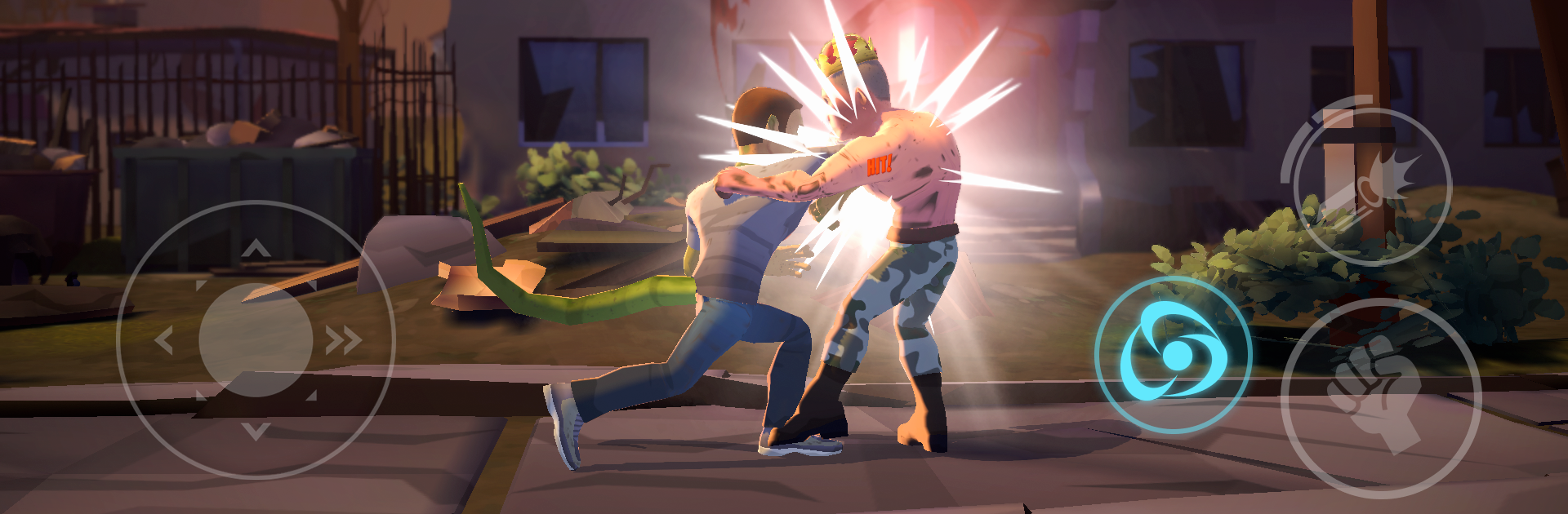
President Kombat is a tongue‑in‑cheek 1v1 fighter that throws exaggerated versions of famous leaders and celebs into the ring and lets the jokes land through punches. It feels like an arcade cabinet brawler at heart. Mash a bit and the first few rounds go fine, but timing, spacing, and knowing when to block or counter start to matter fast. Each character has a strange little gimmick that changes how they play, so swapping fighters actually feels different, not just a new skin. One might charge with a power pose, another drops a surprise gadget, someone else has a taunt that baits you into whiffing. Specials come out clean with simple inputs, and there are enough cancels and juggles to reward practice without turning it into homework.

The arenas lean hard into world‑tour parody. New York lights, Tokyo signs, and a very recognizable peninsula all show up, and the backgrounds move just enough to keep fights lively without being distracting. The art is bright and a bit cartoonish, hits have a chunky pop, and the sound sells the slapstick. Humor is obvious and sometimes blunt, so if political satire is not your thing, fair warning. On PC through BlueStacks, key mapping for specials and movement helps a lot, and the higher frame rate makes reactions feel snappier. Great for quick matches between other games, but there is enough depth to grind out a main, learn matchups, and try to perfect a few bread‑and‑butter strings.

Make your gaming sessions memorable with precise controls that give you an edge in close combats and visuals that pop up, bringing every character to life.


Game Features

Enhancements

  • Macros
  • Multi Instance
  • Multi Instance Sync
  • Eco Mode
  • Enhancements
Macros

Macros

Skip the boring parts of a game. Play President Kombat with Macros and get the edge. Simply record a sequence of commands and execute them at any moment.
Multi Instance

Multi Instance

Why limit to one game on your phone when you can play many on your PC? Open multiple instances of President Kombat at once with Multi-Instance. Leverage the power of different accounts by doing more.
Multi Instance Sync

Multi Instance Sync

Get the best out of President Kombat with Multi-Instance Sync. Play the game from different accounts and build your own empire. Use Multi-instance sync to repeat the action in the main BlueStacks instance on all other instances.
Eco Mode

Eco Mode

Find the rarest heroes by making multiple summons in President Kombat. And while you are at it, reduce your PC’s resource consumption with the Eco Mode. Farm efficiently. Get the best results.
Read More

How to Download and Play President Kombat on PC or Mac

  • Download and install BlueStacks on your PC or Mac

  • Complete Google sign-in to access the Play Store, or do it later

  • Look for President Kombat in the search bar at the top right corner

  • Click to install President Kombat from the search results

  • Complete Google sign-in (if you skipped step 2) to install President Kombat

  • Click the President Kombat icon on the home screen to start playing

video
Watch Video

Minimum System Requirements

With BlueStacks 5, you can get started on a PC that fulfills the following requirements.

  • Operating System

    Microsoft Windows 7 or above, macOS 11 (Big Sur) or above

  • Processor

    Intel, AMD or Apple Silicon Processor

  • RAM

    at least 4GB

  • HDD

    10GB Free Disk Space

Note:

* You must be an Administrator on your PC. Up to date graphics drivers from Microsoft or the chipset vendor.

President Kombat - FAQs

  • How to play President Kombat on Windows PC & Mac?

    Play President Kombat on your PC or Mac by following these simple steps.

    • Click on 'Play President Kombat on PC’ to download BlueStacks
    • Install it and log-in to Google Play Store
    • Launch and play the game.
  • Why is BlueStacks the fastest and safest platform to play games on PC?

    BlueStacks respects your privacy and is always safe and secure to use. It does not carry any malware, spyware, or any sort of additional software that could harm your PC.

    It is engineered to optimize speed and performance for a seamless gaming experience.

  • What are President Kombat PC requirements?

    Minimum requirement to run President Kombat on your PC

    • OS: Microsoft Windows 7 or above MacOS 11 (Big Sur) or above
    • Processor: Intel, AMD or Apple Silicon Processor
    • RAM: Your PC must have at least 4GB of RAM. (Note that having 4GB or more disk space is not a substitute for RAM)
    • HDD: 10GB Free Disk Space.
    • You must be an Administrator on your PC.