Ninja's Creed 2: 3D FPS Game

Ninja's Creed 2: 3D FPS Game

Action

| 707 INTERACTIVE: Fun Epic Casual Games

Play on PC with BlueStacks or from our cloud

  • Overview
  • Game Features
  • How to Play

Page Modified On: April 07, 2026

Play Ninja's Creed 2: 3D FPS Game on PC or Mac

Explore a whole new adventure with Ninja’s Creed 2: 3D FPS Game, a Action game created by 707 INTERACTIVE: Fun Epic Casual Games. Experience great gameplay with BlueStacks, the most popular gaming platform to play Android games on your PC or Mac.

About the Game

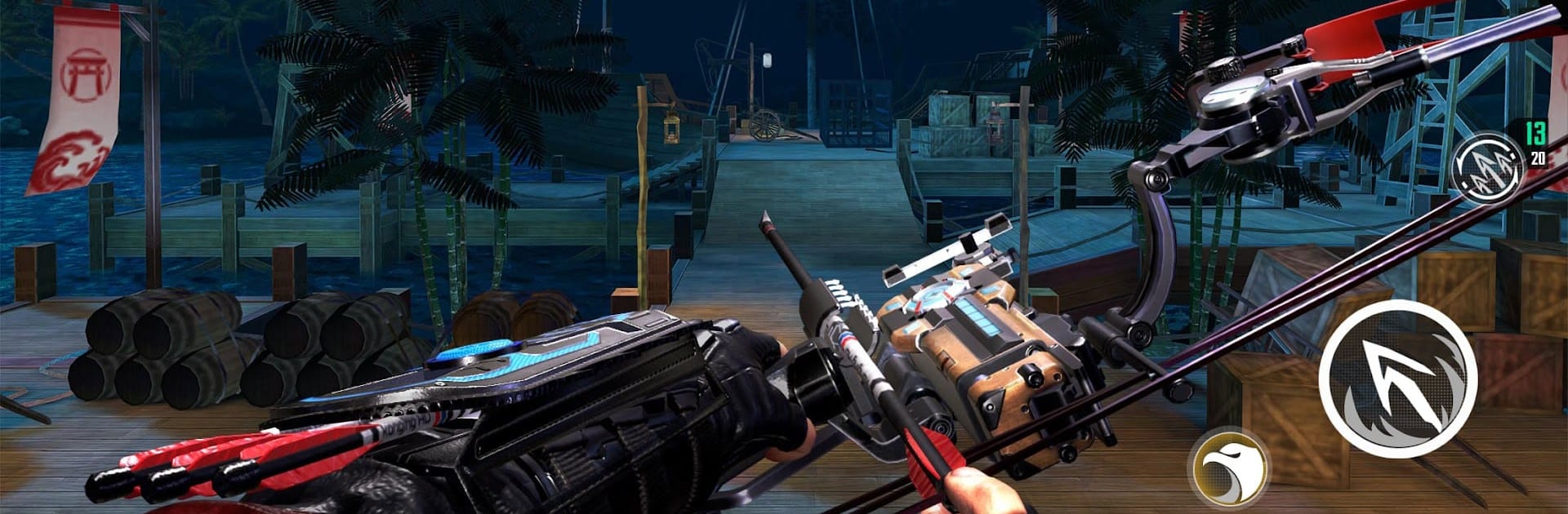
Ninja’s Creed 2: 3D FPS Game is an Action title from 707 INTERACTIVE: Fun Epic Casual Games, built around tense stealth, clean shots, and razor‑sharp timing. You play as K, a top-tier operative working the shadows of a neon-soaked city, swapping between silent takedowns and precision bow shots. It’s slick, punchy, and moody—great if you like first-person sneaking with a strong sense of place. Prefer a PC setup? It also feels right at home on BlueStacks.

Game Features

  • Shadow-Stealth FPS: First-person missions built for patience and precision—sneak in, line up the shot, and vanish before anyone knows what happened.
  • Gritty Urban Locales: Creep through underground markets, weather-beaten docks, and other tight spaces where every corner can turn ugly fast.
  • Master the Arsenal: Use bows for long, brutal hits; dual crossbows for fast mid-range pressure; and throwing blades to thin out clustered threats.
  • Physics That Matter: Arrows fly with weight and arc, and lighting plays to your advantage—use the gloom to stay unseen.
  • Chaptered Story Runs: Track K’s path across distinct regions, each with its own vibe, targets, and a big showdown waiting at the end.
  • Side Jobs With Bite: Pick up bounties, special ops, target lists, and armed skirmishes. Hit the shooting range to sharpen that one-shot instinct.
  • Upgrades That Count: Strengthen region-specific gear to break tougher defenses and keep your kit mission-ready.
  • Flexible Talent Builds: Unlock and combine skills to lean harder into ghost-like stealth or a more assertive hunter style.
  • Daily Goals and Achievements: Knock out beginner tasks, check-ins, and limited-time events for steady resources, plus hidden challenges with exclusive rewards.

Start your journey now. Download the game on BlueStacks, invite your friends, and march on a new adventure.


Game Features

Enhancements

  • Macros
  • Multi Instance
  • Multi Instance Sync
  • Eco Mode
  • Enhancements
Macros

Macros

Skip the boring parts of a game. Play Ninja's Creed 2: 3D FPS Game with Macros and get the edge. Simply record a sequence of commands and execute them at any moment.
Multi Instance

Multi Instance

Why limit to one game on your phone when you can play many on your PC? Open multiple instances of Ninja's Creed 2: 3D FPS Game at once with Multi-Instance. Leverage the power of different accounts by doing more.
Multi Instance Sync

Multi Instance Sync

Get the best out of Ninja's Creed 2: 3D FPS Game with Multi-Instance Sync. Play the game from different accounts and build your own empire. Use Multi-instance sync to repeat the action in the main BlueStacks instance on all other instances.
Eco Mode

Eco Mode

Find the rarest heroes by making multiple summons in Ninja's Creed 2: 3D FPS Game. And while you are at it, reduce your PC’s resource consumption with the Eco Mode. Farm efficiently. Get the best results.
Read More

How to Download and Play Ninja's Creed 2: 3D FPS Game on PC or Mac

  • Download and install BlueStacks on your PC or Mac

  • Complete Google sign-in to access the Play Store, or do it later

  • Look for Ninja's Creed 2: 3D FPS Game in the search bar at the top right corner

  • Click to install Ninja's Creed 2: 3D FPS Game from the search results

  • Complete Google sign-in (if you skipped step 2) to install Ninja's Creed 2: 3D FPS Game

  • Click the Ninja's Creed 2: 3D FPS Game icon on the home screen to start playing

video
Watch Video

Minimum System Requirements

With BlueStacks 5, you can get started on a PC that fulfills the following requirements.

  • Operating System

    Microsoft Windows 7 or above, macOS 11 (Big Sur) or above

  • Processor

    Intel, AMD or Apple Silicon Processor

  • RAM

    at least 4GB

  • HDD

    10GB Free Disk Space

Note:

* You must be an Administrator on your PC. Up to date graphics drivers from Microsoft or the chipset vendor.

Ninja's Creed 2: 3D FPS Game - FAQs

  • How to play Ninja's Creed 2: 3D FPS Game on Windows PC & Mac?

    Play Ninja's Creed 2: 3D FPS Game on your PC or Mac by following these simple steps.

    • Click on 'Play Ninja's Creed 2: 3D FPS Game on PC’ to download BlueStacks
    • Install it and log-in to Google Play Store
    • Launch and play the game.
  • Why is BlueStacks the fastest and safest platform to play games on PC?

    BlueStacks respects your privacy and is always safe and secure to use. It does not carry any malware, spyware, or any sort of additional software that could harm your PC.

    It is engineered to optimize speed and performance for a seamless gaming experience.

  • What are Ninja's Creed 2: 3D FPS Game PC requirements?

    Minimum requirement to run Ninja's Creed 2: 3D FPS Game on your PC

    • OS: Microsoft Windows 7 or above MacOS 11 (Big Sur) or above
    • Processor: Intel, AMD or Apple Silicon Processor
    • RAM: Your PC must have at least 4GB of RAM. (Note that having 4GB or more disk space is not a substitute for RAM)
    • HDD: 10GB Free Disk Space.
    • You must be an Administrator on your PC.