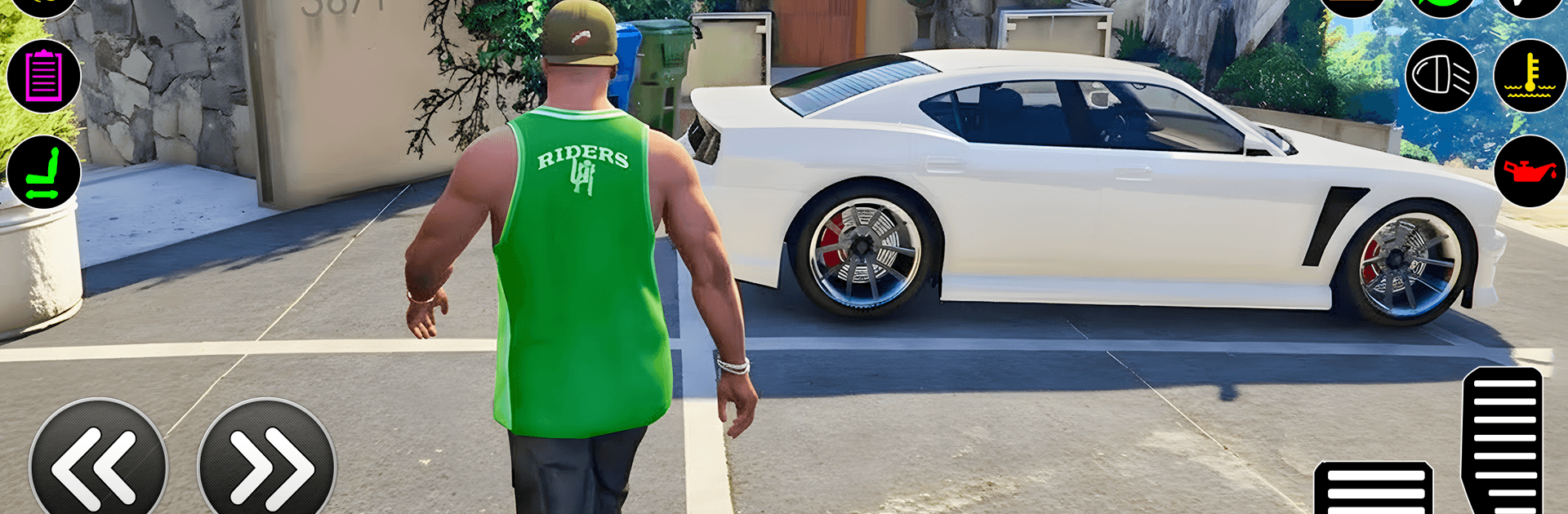
Real Miami Gangster Game 3D

Real Miami Gangster Game 3D

Action

| Route Games LTD

Play on PC with BlueStacks or from our cloud

  • Overview
  • Game Features
  • How to Play

Page Modified On: April 24, 2026

Play Real Miami Gangster Game 3D on PC or Mac

Bring your A-game to Real Miami Gangster Game 3D, the Action game sensation from Route Games LTD. Give your gameplay the much-needed boost with precise game controls, high FPS graphics, and top-tier features on your PC or Mac with BlueStacks.

About the Game

Real Miami Gangster Game 3D is an Action sandbox from Route Games LTD where you build a criminal empire in a sun-soaked city that never really sleeps. Start as a small-timer, make risky moves, and climb your way up through turf fights, smart heists, and fast getaways. It’s open-world chaos with story missions, side hustles, and plenty of ways to stir up trouble—or slip away when things get loud.

Game Features

  • Open-World Miami Vibes – Roam a sprawling city inspired by Miami, packed with busy streets, neon nights, and districts worth taking over.
  • Story Missions + Side Hustles – Tackle narrative-driven jobs, quick contracts, and gang battles that shape your rise through the ranks.
  • Vehicles for Every Job – Steal sleek cars, hop on bikes, commandeer helicopters, and roll out heavy vehicles when subtlety’s not the plan.
  • Weapons and Upgrades – Switch gear on the fly, stack powerful loadouts, and improve your kit to survive tougher shootouts.
  • Heists with a Plan – Case the spot, time your entry, and make a clean exit—strategy matters as much as firepower.
  • Police and Rival AI – Cops and gangs react to what you do, so expect chases, ambushes, and escalating heat if you push your luck.
  • Territory Control – Win gang wars, knock out enemy bosses, and lock down key areas to expand your influence.
  • Driving Feel That Hits – Enjoy damage modeling, drift control, and boost mechanics that make high-speed escapes feel punchy and precise.
  • Customization That Shows – Put your mark on your character and ride with visual tweaks and performance upgrades.
  • Stunts and Secrets – Hunt for hidden ramps, rooftops, and tucked-away challenge spots that reward skill (and a bit of curiosity).
  • Subtle PC Option – Prefer a keyboard and mouse? BlueStacks can help you play on your PC while keeping the city mayhem smooth.

Get ready for a buttery smooth, high-performance gaming action only on BlueStacks.

Game Features

Enhancements

  • Macros
  • Multi Instance
  • Multi Instance Sync
  • Eco Mode
  • Enhancements
Macros

Macros

Skip the boring parts of a game. Play Real Miami Gangster Game 3D with Macros and get the edge. Simply record a sequence of commands and execute them at any moment.
Multi Instance

Multi Instance

Why limit to one game on your phone when you can play many on your PC? Open multiple instances of Real Miami Gangster Game 3D at once with Multi-Instance. Leverage the power of different accounts by doing more.
Multi Instance Sync

Multi Instance Sync

Get the best out of Real Miami Gangster Game 3D with Multi-Instance Sync. Play the game from different accounts and build your own empire. Use Multi-instance sync to repeat the action in the main BlueStacks instance on all other instances.
Eco Mode

Eco Mode

Find the rarest heroes by making multiple summons in Real Miami Gangster Game 3D. And while you are at it, reduce your PC’s resource consumption with the Eco Mode. Farm efficiently. Get the best results.
Read More

How to Download and Play Real Miami Gangster Game 3D on PC or Mac

  • Download and install BlueStacks on your PC or Mac

  • Complete Google sign-in to access the Play Store, or do it later

  • Look for Real Miami Gangster Game 3D in the search bar at the top right corner

  • Click to install Real Miami Gangster Game 3D from the search results

  • Complete Google sign-in (if you skipped step 2) to install Real Miami Gangster Game 3D

  • Click the Real Miami Gangster Game 3D icon on the home screen to start playing

video
Watch Video

Minimum System Requirements

With BlueStacks 5, you can get started on a PC that fulfills the following requirements.

  • Operating System

    Microsoft Windows 7 or above, macOS 11 (Big Sur) or above

  • Processor

    Intel, AMD or Apple Silicon Processor

  • RAM

    at least 4GB

  • HDD

    10GB Free Disk Space

Note:

* You must be an Administrator on your PC. Up to date graphics drivers from Microsoft or the chipset vendor.

Real Miami Gangster Game 3D - FAQs

  • How to play Real Miami Gangster Game 3D on Windows PC & Mac?

    Play Real Miami Gangster Game 3D on your PC or Mac by following these simple steps.

    • Click on 'Play Real Miami Gangster Game 3D on PC’ to download BlueStacks
    • Install it and log-in to Google Play Store
    • Launch and play the game.
  • Why is BlueStacks the fastest and safest platform to play games on PC?

    BlueStacks respects your privacy and is always safe and secure to use. It does not carry any malware, spyware, or any sort of additional software that could harm your PC.

    It is engineered to optimize speed and performance for a seamless gaming experience.

  • What are Real Miami Gangster Game 3D PC requirements?

    Minimum requirement to run Real Miami Gangster Game 3D on your PC

    • OS: Microsoft Windows 7 or above MacOS 11 (Big Sur) or above
    • Processor: Intel, AMD or Apple Silicon Processor
    • RAM: Your PC must have at least 4GB of RAM. (Note that having 4GB or more disk space is not a substitute for RAM)
    • HDD: 10GB Free Disk Space.
    • You must be an Administrator on your PC.