Sombie
Sombie

Sombie

Action

| Makapar Games

Play on PC with BlueStacks or from our cloud

  • Overview
  • Game Features
  • How to Play

Page Modified On: November 17, 2026

Play Sombie on PC or Mac

Bring your A-game to Sombie, the Action game sensation from Makapar Games. Give your gameplay the much-needed boost with precise game controls, high FPS graphics, and top-tier features on your PC or Mac with BlueStacks.

About the Game

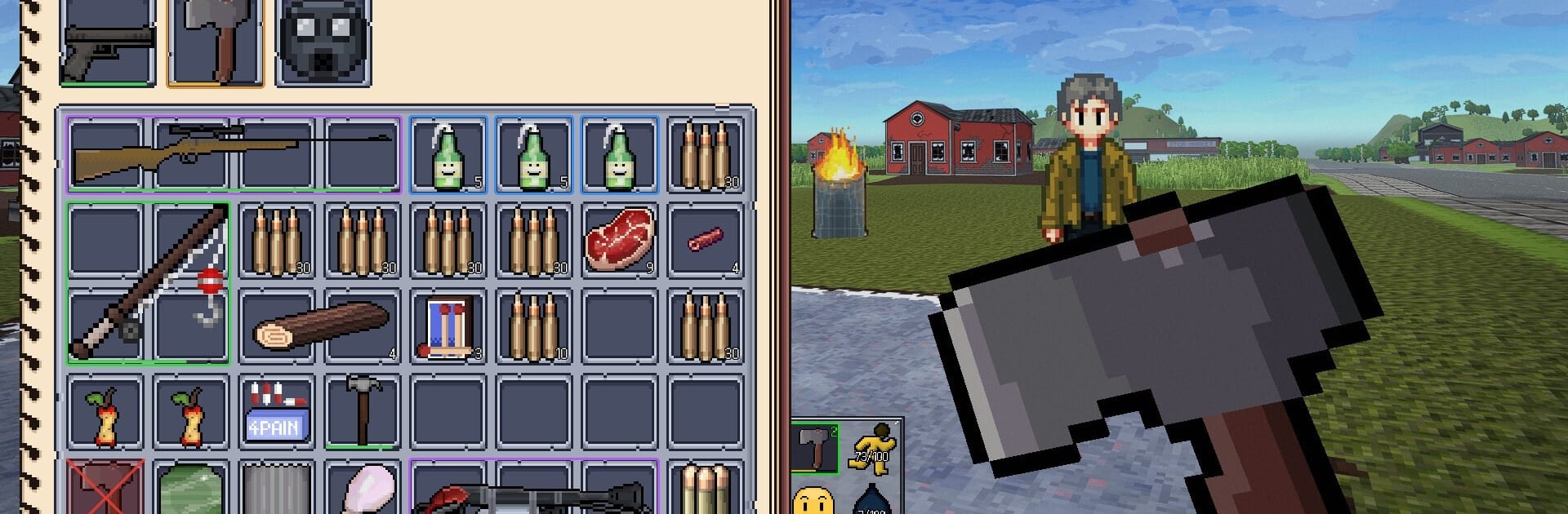
Zombies roam, supplies are scarce, and other survivors might be worse. Sombie is an always online Action survival MMO where every session turns into a story—scavenge, fight off the horde, and decide whether strangers are allies or targets across a boundless, procedurally generated world. Prefer a bigger view and comfy controls? It plays smoothly on PC with BlueStacks.

Game Features

  • Trust is optional: Team up with survivors to watch each other’s back—or ambush them and walk away with their stash. Your call.
  • Scavenge smart: Ransack homes and storefronts for food, weapons, and ammo; the best finds rarely sit in plain sight.
  • Build a hideout: Chop trees, stockpile materials, and put together a base that actually feels like yours.
  • Roll out in style: Find cars to cover ground fast or turn them into battering rams, but expect breakdowns and the need for repairs.
  • Cast a line: Take a breather with fishing to keep yourself fed, or sell your catch to merchants and snag the gear you’ve been eyeing.
  • Sound matters: Noise draws trouble—zombies react to nearby movement and loud gunfire, and players hear it too.
  • PvP and PvE anywhere: Wander into tense shootouts with survivors, swarming undead, or both at once when things go sideways.
  • Endless map: The world keeps generating as you explore, so there’s no edge to bump into—just new towns, forests, and dangers.
  • Speak or stay quiet: Use global chat for server-wide chatter, local chat for nearby talk, and proximity voice for face-to-face negotiations.
  • Ongoing updates: Fresh tweaks and features roll out regularly, shaped by what the community is asking for.
  • Always online: Requires an internet connection and sign-in to jump in and keep your progress synced.

Start playing Sombie on BlueStacks and get a smoother, more comfortable PC or Mac setup.

Game Features

Enhancements

  • Macros
  • Multi Instance
  • Multi Instance Sync
  • Eco Mode
  • Enhancements
Macros

Macros

Skip the boring parts of a game. Play Sombie with Macros and get the edge. Simply record a sequence of commands and execute them at any moment.
Multi Instance

Multi Instance

Why limit to one game on your phone when you can play many on your PC? Open multiple instances of Sombie at once with Multi-Instance. Leverage the power of different accounts by doing more.
Multi Instance Sync

Multi Instance Sync

Get the best out of Sombie with Multi-Instance Sync. Play the game from different accounts and build your own empire. Use Multi-instance sync to repeat the action in the main BlueStacks instance on all other instances.
Eco Mode

Eco Mode

Find the rarest heroes by making multiple summons in Sombie. And while you are at it, reduce your PC’s resource consumption with the Eco Mode. Farm efficiently. Get the best results.
Read More

How to Download and Play Sombie on PC or Mac

  • Download and install BlueStacks on your PC or Mac

  • Complete Google sign-in to access the Play Store, or do it later

  • Look for Sombie in the search bar at the top right corner

  • Click to install Sombie from the search results

  • Complete Google sign-in (if you skipped step 2) to install Sombie

  • Click the Sombie icon on the home screen to start playing

video
Watch Video

Minimum System Requirements

With BlueStacks 5, you can get started on a PC that fulfills the following requirements.

  • Operating System

    Microsoft Windows 7 or above, macOS 11 (Big Sur) or above

  • Processor

    Intel, AMD or Apple Silicon Processor

  • RAM

    at least 4GB

  • HDD

    10GB Free Disk Space

Note:

* You must be an Administrator on your PC. Up to date graphics drivers from Microsoft or the chipset vendor.

Sombie - FAQs

  • How to play Sombie on Windows PC & Mac?

    Play Sombie on your PC or Mac by following these simple steps.

    • Click on 'Play Sombie on PC’ to download BlueStacks
    • Install it and log-in to Google Play Store
    • Launch and play the game.
  • Why is BlueStacks the fastest and safest platform to play games on PC?

    BlueStacks respects your privacy and is always safe and secure to use. It does not carry any malware, spyware, or any sort of additional software that could harm your PC.

    It is engineered to optimize speed and performance for a seamless gaming experience.

  • What are Sombie PC requirements?

    Minimum requirement to run Sombie on your PC

    • OS: Microsoft Windows 7 or above MacOS 11 (Big Sur) or above
    • Processor: Intel, AMD or Apple Silicon Processor
    • RAM: Your PC must have at least 4GB of RAM. (Note that having 4GB or more disk space is not a substitute for RAM)
    • HDD: 10GB Free Disk Space.
    • You must be an Administrator on your PC.