Zombies War: The Last Battle

Zombies War: The Last Battle

Action

| VNGGames Studios

Play on PC with BlueStacks or from our cloud

  • Overview
  • Game Features
  • How to Play

Page Modified On: October 12, 2026

Play Zombies War: The Last Battle on PC or Mac

Zombies War: The Last Battle by VNGGames Studios has plenty to keep you busy. BlueStacks lets you play it on PC or Mac with more screen space, better control, and fewer mobile limits.

About the Game

Zombies War: The Last Battle is a gritty Action shooter where every street feels like the end of the world. You’ll fight through ruined neighborhoods, push back swarming undead, and clear compact missions that hit fast and hard, all playable offline. Prefer a bigger screen and steadier aim? You can also run it on PC with BlueStacks.

Game Features

  • Handcrafted missions: Tackle tight, high-intensity stages across devastated districts with clear objectives, rising pressure, and just enough breathing room to reload before the next push.
  • Offline anytime: The full experience works without a connection, so you can grind missions, test weapons, and survive wave after wave wherever you are.
  • Big, punchy arsenal: Carry rifles, shotguns, LMGs, launchers, and precise long-range options like snipers—each with its own feel, purpose, and satisfying kick.
  • Upgrade-focused loadouts: Boost damage, stability, and reload speeds to shape a setup that suits brutal close-quarters blasts or patient, across-the-street headshots.
  • Boss encounters that matter: Square off against nasty elites and towering brutes with distinct attack patterns—read the tells, hit weak points, and bring the right firepower.
  • Base defense moments: Hold key positions against escalating waves, manage sightlines, and make every round count when the horde closes in.
  • Smooth controls, heavy impact: Snappy aiming, weighty recoil, sharp sound cues, and screen-shaking explosions sell every near-miss and last-second save.
  • Varied battlegrounds: Move through wrecked streets, dark corridors, and abandoned markets full of ambush angles, choke points, and risky shortcuts.

Ready to top the leaderboard? We bet you do. Let precise controls and sharp visuals optimized on BlueStacks lead you to victory.


Game Features

Enhancements

  • Macros
  • Multi Instance
  • Multi Instance Sync
  • Eco Mode
  • Enhancements
Macros

Macros

Skip the boring parts of a game. Play Zombies War: The Last Battle with Macros and get the edge. Simply record a sequence of commands and execute them at any moment.
Multi Instance

Multi Instance

Why limit to one game on your phone when you can play many on your PC? Open multiple instances of Zombies War: The Last Battle at once with Multi-Instance. Leverage the power of different accounts by doing more.
Multi Instance Sync

Multi Instance Sync

Get the best out of Zombies War: The Last Battle with Multi-Instance Sync. Play the game from different accounts and build your own empire. Use Multi-instance sync to repeat the action in the main BlueStacks instance on all other instances.
Eco Mode

Eco Mode

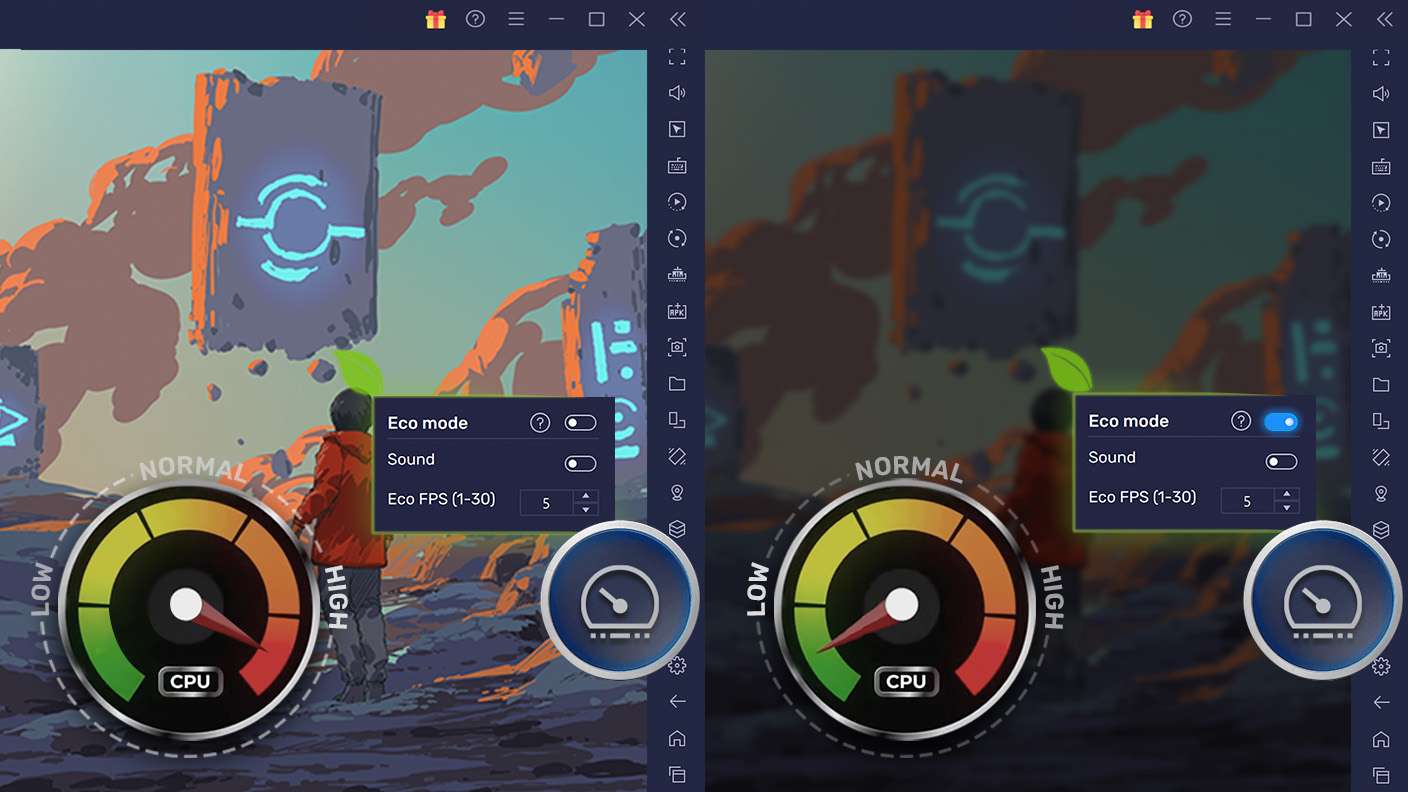
Find the rarest heroes by making multiple summons in Zombies War: The Last Battle. And while you are at it, reduce your PC’s resource consumption with the Eco Mode. Farm efficiently. Get the best results.
Read More

How to Download and Play Zombies War: The Last Battle on PC or Mac

  • Download and install BlueStacks on your PC or Mac

  • Complete Google sign-in to access the Play Store, or do it later

  • Look for Zombies War: The Last Battle in the search bar at the top right corner

  • Click to install Zombies War: The Last Battle from the search results

  • Complete Google sign-in (if you skipped step 2) to install Zombies War: The Last Battle

  • Click the Zombies War: The Last Battle icon on the home screen to start playing

video
Watch Video

Minimum System Requirements

With BlueStacks 5, you can get started on a PC that fulfills the following requirements.

  • Operating System

    Microsoft Windows 7 or above, macOS 11 (Big Sur) or above

  • Processor

    Intel, AMD or Apple Silicon Processor

  • RAM

    at least 4GB

  • HDD

    10GB Free Disk Space

Note:

* You must be an Administrator on your PC. Up to date graphics drivers from Microsoft or the chipset vendor.

Zombies War: The Last Battle - FAQs

  • How to play Zombies War: The Last Battle on Windows PC & Mac?

    Play Zombies War: The Last Battle on your PC or Mac by following these simple steps.

    • Click on 'Play Zombies War: The Last Battle on PC’ to download BlueStacks
    • Install it and log-in to Google Play Store
    • Launch and play the game.
  • Why is BlueStacks the fastest and safest platform to play games on PC?

    BlueStacks respects your privacy and is always safe and secure to use. It does not carry any malware, spyware, or any sort of additional software that could harm your PC.

    It is engineered to optimize speed and performance for a seamless gaming experience.

  • What are Zombies War: The Last Battle PC requirements?

    Minimum requirement to run Zombies War: The Last Battle on your PC

    • OS: Microsoft Windows 7 or above MacOS 11 (Big Sur) or above
    • Processor: Intel, AMD or Apple Silicon Processor
    • RAM: Your PC must have at least 4GB of RAM. (Note that having 4GB or more disk space is not a substitute for RAM)
    • HDD: 10GB Free Disk Space.
    • You must be an Administrator on your PC.