Shadow Sword Fighting Game

Shadow Sword Fighting Game

Adventure

| PrimElite Game

Play on PC with BlueStacks or from our cloud

  • Overview
  • Game Features
  • How to Play

Page Modified On: August 24, 2026

Play Shadow Sword Fighting Game on PC or Mac

Bring your A-game to Shadow Sword Fighting Game, the Adventure game sensation from PrimElite Game. Give your gameplay the much-needed boost with precise game controls, high FPS graphics, and top-tier features on your PC or Mac with BlueStacks.

About the Game

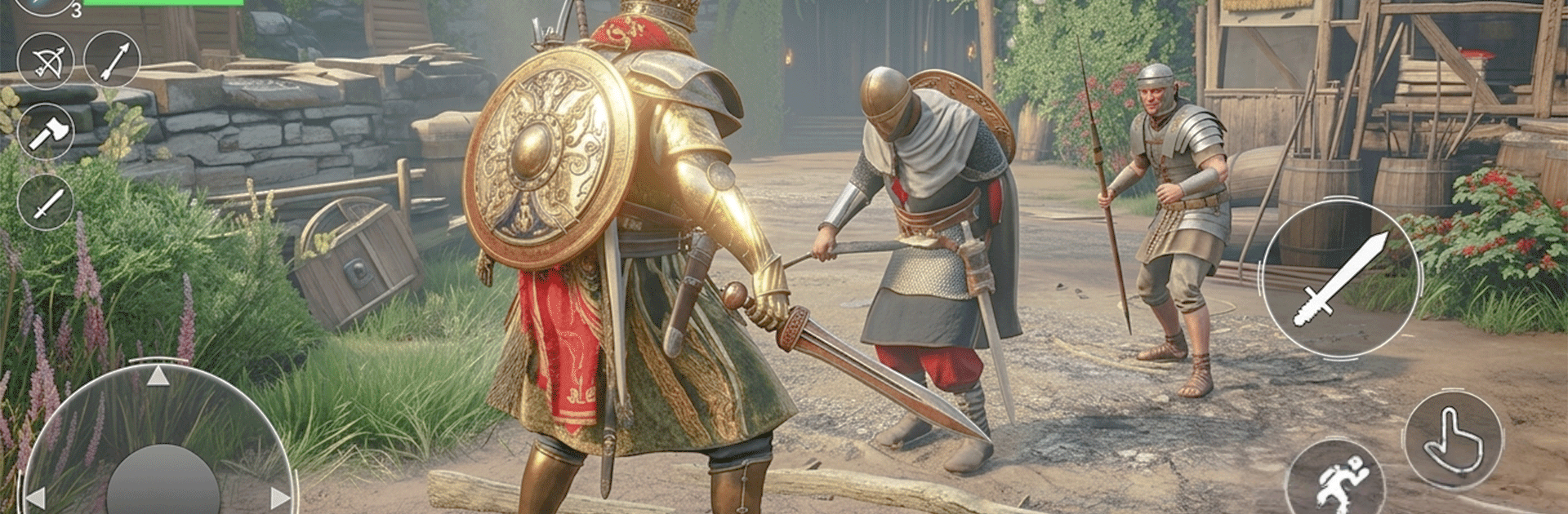
Shadow Sword Fighting Game is an Adventure about a dethroned prince clawing back his homeland, blade first. It mixes a character-driven story with tight swordplay, sneaking through torchlit corridors, and hard-fought clashes across a ruined fortress. Prefer a desk setup? You can also play it on BlueStacks.

Game Features

  • Gritty revenge story: Track the invaders who shattered the royal line and fight your way toward the throne room one encounter at a time.
  • Weighty sword combat: Learn the rhythm of strikes, parries, dodges, and brutal finishers where timing matters more than button mashing.
  • Stealth and ambush: Slip past patrols, hug the shadows, and open fights on your terms with silent takedowns and smart positioning.
  • Ruined castle to explore: Push through catacombs, towers, hidden chambers, and crumbling battlements packed with secrets and side paths.
  • Tough, varied enemies: Face shield-bearing elites, swift duelists, and hulking brutes that force you to adapt your tactics and spacing.
  • Offline play anytime: No connection needed, so you can chip away at missions and boss runs whenever you’ve got a few spare minutes.
  • Skills and techniques: Unlock new stances, counters, evasive moves, and stronger combos as your mastery—and confidence—grows.
  • Set-piece clashes and duels: Survive chaotic battlefield skirmishes, then settle grudges in tense one-on-one showdowns.
  • Hold what you’ve taken: Defend reclaimed areas with focused castle-defense missions that punish sloppy planning.
  • Night missions with mood: Fight by torchlight and moonlight as sound cues, fog, and darkness turn every corner into a risk.
  • Smart progression: Earn power by playing well—good timing, clean spacing, and measured aggression get rewarded more than raw stats.
  • BlueStacks option: Want a cleaner view and precise inputs on a larger display? Run Shadow Sword Fighting Game on BlueStacks and keep the action sharp.

Start your journey now. Download the game on BlueStacks, invite your friends, and march on a new adventure.


Game Features

Enhancements

  • Macros
  • Multi Instance
  • Multi Instance Sync
  • Script
  • Enhancements
Macros

Macros

Automate the predictable in Shadow Sword Fighting Game and transform your gameplay with Macros. Get access to inventive Macros in the BlueStacks Macro Community
Multi Instance

Multi Instance

Play Shadow Sword Fighting Game on one window. And chat with your friend on the other. Press CTRL + Shift + 8 to open the Multi-Instance Manager. And start creating fresh instances or clone an existing one.
Multi Instance Sync

Multi Instance Sync

Play Shadow Sword Fighting Game with the power of Multi-Instance Sync. Replicate what you are doing on the main instance on all other instances. Level up faster, play more.
Script

Script

Script your way to gaming glory in Shadow Sword Fighting Game with BlueStacks Script. Write and run a set of commands to automate repeated tasks. Trigger the command by assigning it to any key.
Read More

How to Download and Play Shadow Sword Fighting Game on PC or Mac

  • Download and install BlueStacks on your PC or Mac

  • Complete Google sign-in to access the Play Store, or do it later

  • Look for Shadow Sword Fighting Game in the search bar at the top right corner

  • Click to install Shadow Sword Fighting Game from the search results

  • Complete Google sign-in (if you skipped step 2) to install Shadow Sword Fighting Game

  • Click the Shadow Sword Fighting Game icon on the home screen to start playing

video
Watch Video

Minimum System Requirements

With BlueStacks 5, you can get started on a PC that fulfills the following requirements.

  • Operating System

    Microsoft Windows 7 or above, macOS 11 (Big Sur) or above

  • Processor

    Intel, AMD or Apple Silicon Processor

  • RAM

    at least 4GB

  • HDD

    10GB Free Disk Space

Note:

* You must be an Administrator on your PC. Up to date graphics drivers from Microsoft or the chipset vendor.

Shadow Sword Fighting Game - FAQs

  • How to play Shadow Sword Fighting Game on Windows PC & Mac?

    Play Shadow Sword Fighting Game on your PC or Mac by following these simple steps.

    • Click on 'Play Shadow Sword Fighting Game on PC’ to download BlueStacks
    • Install it and log-in to Google Play Store
    • Launch and play the game.
  • Why is BlueStacks the fastest and safest platform to play games on PC?

    BlueStacks respects your privacy and is always safe and secure to use. It does not carry any malware, spyware, or any sort of additional software that could harm your PC.

    It is engineered to optimize speed and performance for a seamless gaming experience.

  • What are Shadow Sword Fighting Game PC requirements?

    Minimum requirement to run Shadow Sword Fighting Game on your PC

    • OS: Microsoft Windows 7 or above MacOS 11 (Big Sur) or above
    • Processor: Intel, AMD or Apple Silicon Processor
    • RAM: Your PC must have at least 4GB of RAM. (Note that having 4GB or more disk space is not a substitute for RAM)
    • HDD: 10GB Free Disk Space.
    • You must be an Administrator on your PC.