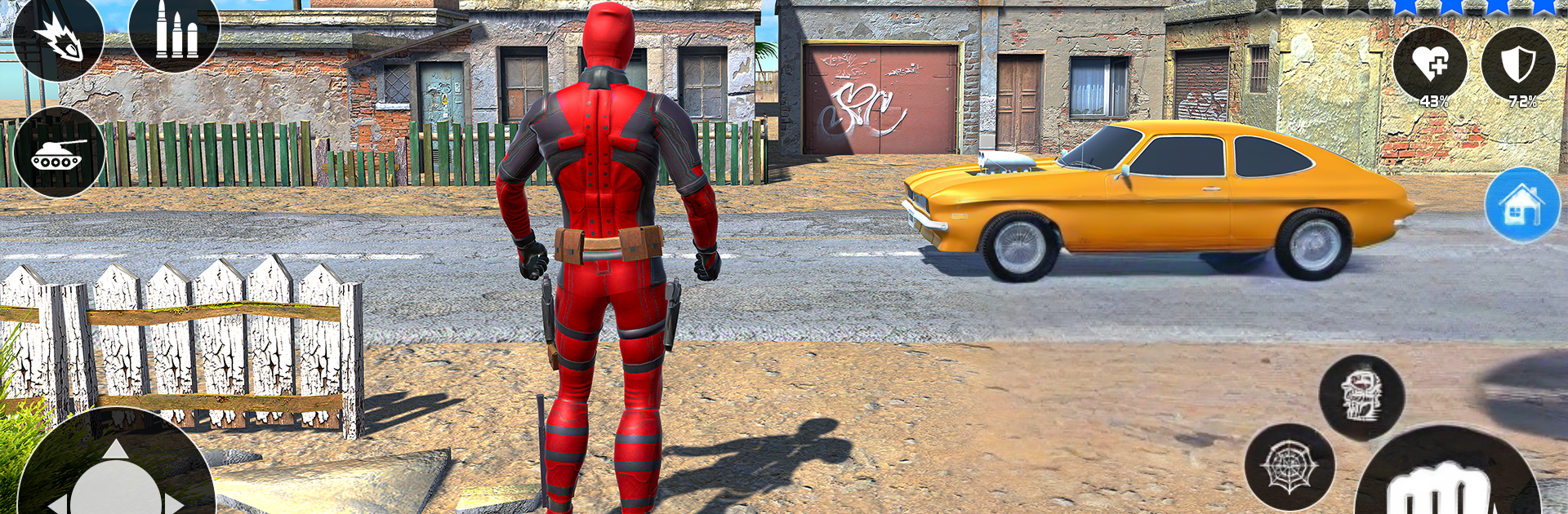
Spider Ninja Rope Hero Game

Spider Ninja Rope Hero Game

Adventure

| Zamsolutions

Play on PC with BlueStacks or from our cloud

  • Overview
  • Game Features
  • How to Play

Page Modified On: December 26, 2025

Play Spider Ninja Rope Hero Game on PC or Mac

Step into the World of Spider Ninja Rope Hero Game, a thrilling Adventure game from the house of Zamsolutions. Play this Android game on BlueStacks App Player and experience immersive gaming on PC or Mac.

About the Game

Spider Ninja Rope Hero Game from Zamsolutions is a fast, punchy Adventure that drops you into a sun-soaked metropolis teetering on chaos. You’re the masked vigilante with a ninja edge, a coil of rope, and a whole city of crooks to clean up—no wifi needed. Prefer playing on your computer? It runs smoothly with BlueStacks, too.

Game Features

  • Skyline Swinging
    Glide between towers, run along walls, and zip across rooftops with a fluid rope system that makes city travel quick, stylish, and a little addictive.

  • Big Open-World City
    Explore a dense 3D urban playground—bright boulevards, back-alley trouble, and plenty of side activity between major missions.

  • Mission Variety
    Rescue civilians, halt ambushes, break up heists, and square off against tough boss enemies that push your reflexes and timing.

  • Hands-On Combat + Firepower
    Chain melee combos and gadgets, then switch to rifles and sidearms when you want to solve problems from a distance.

  • Multiple Playable Heroes
    Swap between characters, each with distinct skills and supers that change how you approach fights and traversal.

  • Deep Customization
    Mix suits, colors, and gear, then mod weapons to fine-tune your build—go tanky, stealthy, or pure speed.

  • Earn, Upgrade, Repeat
    Complete jobs to score in-game rewards, unlock new abilities, and upgrade your favorite loadouts.

  • Wheels When You Want Them
    Jump into bikes and sleek cars for chases, timed runs, or just to tour the city in style.

  • Smooth Controls, Offline Ready
    Pick-up-and-play controls feel natural from the first swing, and the whole experience works great offline.

Get ready for a buttery smooth, high-performance gaming action only on BlueStacks.

Game Features

Enhancements

  • Macros
  • Multi Instance
  • Multi Instance Sync
  • Script
  • Enhancements
Macros

Macros

Automate the predictable in Spider Ninja Rope Hero Game and transform your gameplay with Macros. Get access to inventive Macros in the BlueStacks Macro Community
Multi Instance

Multi Instance

Play Spider Ninja Rope Hero Game on one window. And chat with your friend on the other. Press CTRL + Shift + 8 to open the Multi-Instance Manager. And start creating fresh instances or clone an existing one.
Multi Instance Sync

Multi Instance Sync

Play Spider Ninja Rope Hero Game with the power of Multi-Instance Sync. Replicate what you are doing on the main instance on all other instances. Level up faster, play more.
Script

Script

Script your way to gaming glory in Spider Ninja Rope Hero Game with BlueStacks Script. Write and run a set of commands to automate repeated tasks. Trigger the command by assigning it to any key.
Read More

How to Download and Play Spider Ninja Rope Hero Game on PC or Mac

  • Download and install BlueStacks on your PC or Mac

  • Complete Google sign-in to access the Play Store, or do it later

  • Look for Spider Ninja Rope Hero Game in the search bar at the top right corner

  • Click to install Spider Ninja Rope Hero Game from the search results

  • Complete Google sign-in (if you skipped step 2) to install Spider Ninja Rope Hero Game

  • Click the Spider Ninja Rope Hero Game icon on the home screen to start playing

video
Watch Video

Minimum System Requirements

With BlueStacks 5, you can get started on a PC that fulfills the following requirements.

  • Operating System

    Microsoft Windows 7 or above, macOS 11 (Big Sur) or above

  • Processor

    Intel, AMD or Apple Silicon Processor

  • RAM

    at least 4GB

  • HDD

    10GB Free Disk Space

Note:

* You must be an Administrator on your PC. Up to date graphics drivers from Microsoft or the chipset vendor.

Spider Ninja Rope Hero Game - FAQs

  • How to play Spider Ninja Rope Hero Game on Windows PC & Mac?

    Play Spider Ninja Rope Hero Game on your PC or Mac by following these simple steps.

    • Click on 'Play Spider Ninja Rope Hero Game on PC’ to download BlueStacks
    • Install it and log-in to Google Play Store
    • Launch and play the game.
  • Why is BlueStacks the fastest and safest platform to play games on PC?

    BlueStacks respects your privacy and is always safe and secure to use. It does not carry any malware, spyware, or any sort of additional software that could harm your PC.

    It is engineered to optimize speed and performance for a seamless gaming experience.

  • What are Spider Ninja Rope Hero Game PC requirements?

    Minimum requirement to run Spider Ninja Rope Hero Game on your PC

    • OS: Microsoft Windows 7 or above MacOS 11 (Big Sur) or above
    • Processor: Intel, AMD or Apple Silicon Processor
    • RAM: Your PC must have at least 4GB of RAM. (Note that having 4GB or more disk space is not a substitute for RAM)
    • HDD: 10GB Free Disk Space.
    • You must be an Administrator on your PC.