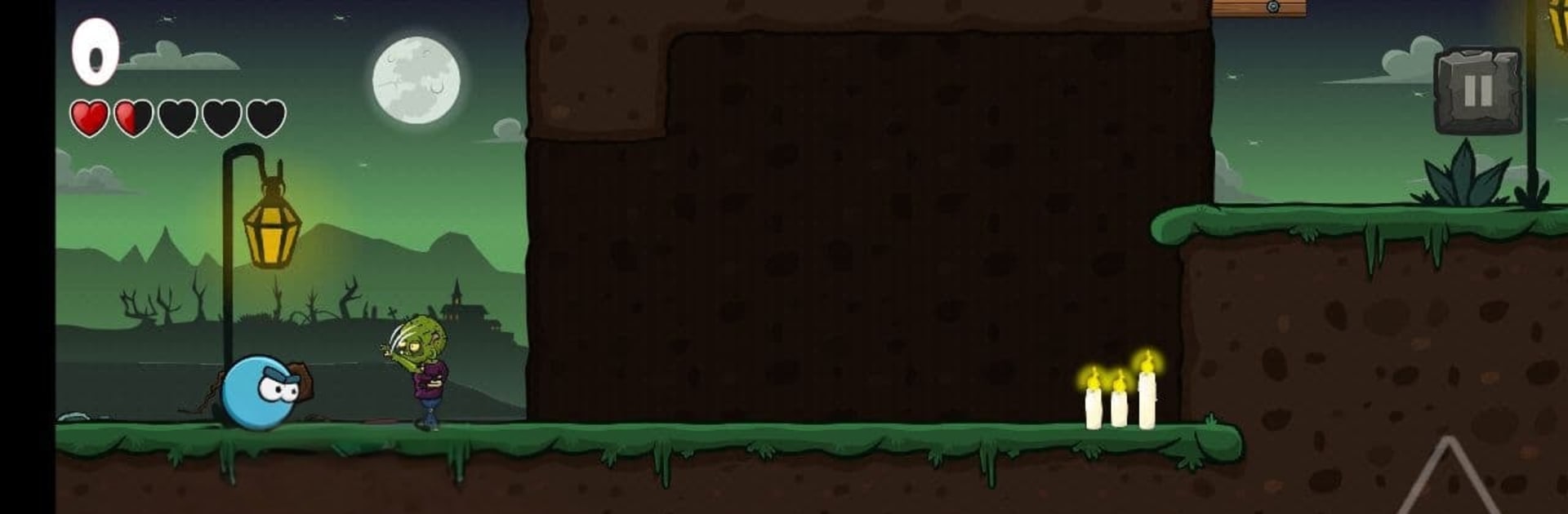
Spike ball: stop the zombie and evil spirits

Spike ball: stop the zombie and evil spirits

Arcade

| Strict games

Play on PC with BlueStacks or from our cloud

  • Overview
  • Game Features
  • How to Play

Page Modified On: April 24, 2026

Play Spike ball: stop the zombie and evil spirits on PC or Mac

Bring your A-game to Spike ball: stop the zombie and evil spirits, the Arcade game sensation from Strict games. Give your gameplay the much-needed boost with precise game controls, high FPS graphics, and top-tier features on your PC or Mac with BlueStacks.

About the Game

Spike ball: stop the zombie and evil spirits is a punchy Arcade platformer from Strict games where a tough little spiked ball takes on the supernatural. Roll, hop, and bounce through crafty stages while smashing ghosts, witches, skeletons, and—yes—the ever-stubborn zombies. It’s simple to pick up, but you’ll need smart timing and a bit of nerve to clear those traps and outplay enemies that don’t go down easily.

Game Features

  • Bounce-and-bash action: Move fast, jump clean, and use your spikes to take out creepy foes as you navigate each stage.
  • Smarter zombie fights: Zombies won’t fall to a straight-on hit—stomp from above or slip behind them to finish the job.
  • Traps with teeth: Expect moving hazards, narrow ledges, and timing challenges that keep every level feeling fresh.
  • Varied monsters: Ghosts, witches, skeletons, and zombies each push you to change tactics instead of just rolling forward.
  • Clean, pick-up-and-play controls: Easy to learn, responsive to the touch, and precise enough for quick course-corrections. Prefer a keyboard? It runs smoothly on PC with BlueStacks.
  • Level-by-level progression: Tackle handcrafted stages that ramp up the challenge without piling on confusion.
  • Friendly for all ages: Bright, readable visuals and approachable gameplay make it suitable for players 3+ while still offering a real challenge.

Make your gaming sessions memorable with precise controls that give you an edge in close combats and visuals that pop up, bringing every character to life.


Game Features

Enhancements

  • Macros
  • Multi Instance
  • Multi Instance Sync
  • Script
  • Enhancements
Macros

Macros

Automate the predictable in Spike ball: stop the zombie and evil spirits and transform your gameplay with Macros. Get access to inventive Macros in the BlueStacks Macro Community
Multi Instance

Multi Instance

Play Spike ball: stop the zombie and evil spirits on one window. And chat with your friend on the other. Press CTRL + Shift + 8 to open the Multi-Instance Manager. And start creating fresh instances or clone an existing one.
Multi Instance Sync

Multi Instance Sync

Play Spike ball: stop the zombie and evil spirits with the power of Multi-Instance Sync. Replicate what you are doing on the main instance on all other instances. Level up faster, play more.
Script

Script

Script your way to gaming glory in Spike ball: stop the zombie and evil spirits with BlueStacks Script. Write and run a set of commands to automate repeated tasks. Trigger the command by assigning it to any key.
Read More

How to Download and Play Spike ball: stop the zombie and evil spirits on PC or Mac

  • Download and install BlueStacks on your PC or Mac

  • Complete Google sign-in to access the Play Store, or do it later

  • Look for Spike ball: stop the zombie and evil spirits in the search bar at the top right corner

  • Click to install Spike ball: stop the zombie and evil spirits from the search results

  • Complete Google sign-in (if you skipped step 2) to install Spike ball: stop the zombie and evil spirits

  • Click the Spike ball: stop the zombie and evil spirits icon on the home screen to start playing

video
Watch Video

Minimum System Requirements

With BlueStacks 5, you can get started on a PC that fulfills the following requirements.

  • Operating System

    Microsoft Windows 7 or above, macOS 11 (Big Sur) or above

  • Processor

    Intel, AMD or Apple Silicon Processor

  • RAM

    at least 4GB

  • HDD

    10GB Free Disk Space

Note:

* You must be an Administrator on your PC. Up to date graphics drivers from Microsoft or the chipset vendor.

Spike ball: stop the zombie and evil spirits - FAQs

  • How to play Spike ball: stop the zombie and evil spirits on Windows PC & Mac?

    Play Spike ball: stop the zombie and evil spirits on your PC or Mac by following these simple steps.

    • Click on 'Play Spike ball: stop the zombie and evil spirits on PC’ to download BlueStacks
    • Install it and log-in to Google Play Store
    • Launch and play the game.
  • Why is BlueStacks the fastest and safest platform to play games on PC?

    BlueStacks respects your privacy and is always safe and secure to use. It does not carry any malware, spyware, or any sort of additional software that could harm your PC.

    It is engineered to optimize speed and performance for a seamless gaming experience.

  • What are Spike ball: stop the zombie and evil spirits PC requirements?

    Minimum requirement to run Spike ball: stop the zombie and evil spirits on your PC

    • OS: Microsoft Windows 7 or above MacOS 11 (Big Sur) or above
    • Processor: Intel, AMD or Apple Silicon Processor
    • RAM: Your PC must have at least 4GB of RAM. (Note that having 4GB or more disk space is not a substitute for RAM)
    • HDD: 10GB Free Disk Space.
    • You must be an Administrator on your PC.